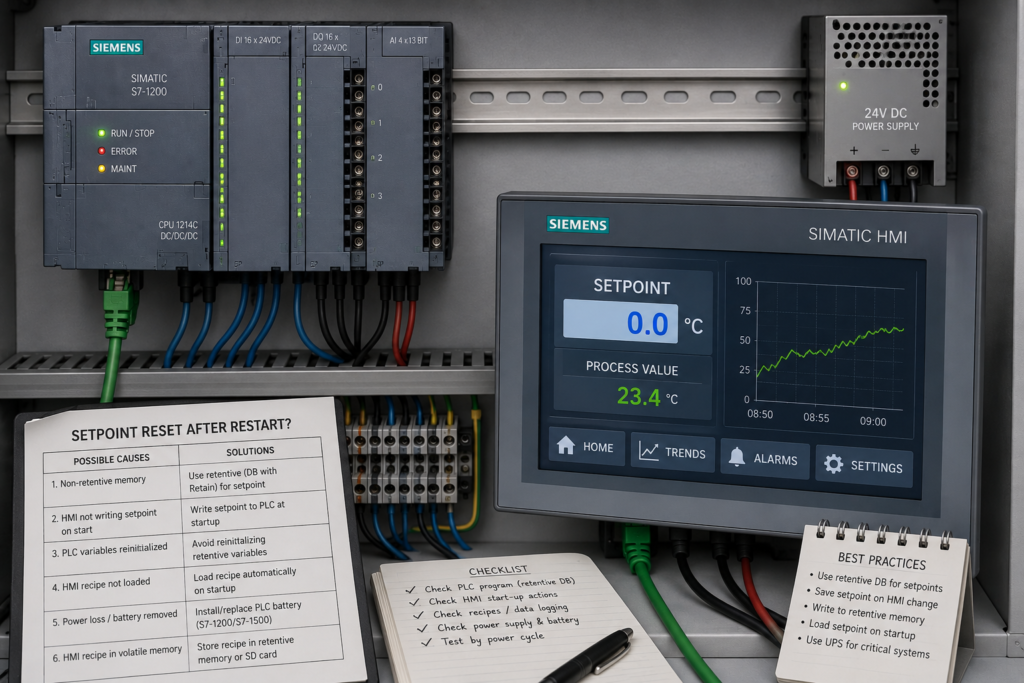
You enter a speed, pressure or temperature setpoint on the HMI. The machine runs correctly, so the value appears to have been saved.
After a power cut or restart, the setpoint is suddenly back at zero.
This is usually not an HMI hardware failure. More often, the value was stored in non-retentive PLC memory, replaced by startup logic or held only inside the HMI without persistent storage.
The first question is simple:
Where is the setpoint actually stored?
It may be an external HMI tag connected to the PLC, an internal HMI tag, a recipe value or a temporary program variable. Each one behaves differently during a restart.
Identify Which Device Was Restarted
“Restart” can mean several things:
- Only the HMI restarted
- The PLC changed from STOP to RUN
- The complete control panel lost power
- A new PLC program was downloaded
- The HMI project was transferred again
- The PLC memory was reset
Do not treat these events as identical.
If restarting only the HMI causes the value to disappear, investigate HMI tags, scripts and persistent storage.
If the value disappears only when the PLC restarts, investigate PLC retentivity, data-block start values and startup logic.
Step 1: Check the Value Directly in the PLC
Before restarting anything, open a watch table in TIA Portal and monitor:
- The PLC tag connected to the HMI field
- The HMI tag
- Any internal copy of the setpoint
- The final setpoint used by the control logic
Restart the equipment and watch which tag becomes zero first.
PLC Tag Becomes Zero
The problem is probably caused by:
- Non-retentive memory
- A data-block start value
- Startup logic
- Cyclic program logic
- Recipe loading
- Data-block reinitialisation
PLC Tag Keeps Its Value but the HMI Shows Zero
Investigate:
- Wrong HMI tag connection
- Internal HMI tag instead of an external PLC tag
- HMI start value
- Communication delay
- Display formatting
- HMI scripts
- Tag acquisition settings
This one comparison can save a great deal of unnecessary troubleshooting.
Step 2: Make the PLC Setpoint Retentive
A normal non-retentive PLC tag may return to its configured start value after the CPU restarts.
On an S7-1200 warm restart, non-retentive bit memory is cleared and non-retentive data-block contents return to their initial values. Retentive data-block values are preserved.
If the setpoint is stored in a data block, open that block and inspect the Retain property.
For example:
| Tag | Start value | Retain |
|---|---|---|
Speed_Setpoint | 0.0 | Selected |
Temperature_Setpoint | 0.0 | Selected |
Operator_Mode | 0 | Not selected |
Siemens defines retentive tags as values that remain available after the power supply is switched off.
Do not make every variable retentive without thought. Outputs, temporary commands and sequence states may need to return to a safe default after startup.
Setpoints, calibration values and operator-adjustable parameters are more common candidates for retention.
Step 3: Check the Data-Block Start Value
A start value is not necessarily the same as the current online value.
Suppose the data block contains:
- Start value:
0.0 - Current online value:
45.0
The HMI displays 45.0 while the PLC is running. If that tag is non-retentive, the CPU can restore 0.0 during startup because zero is still the configured start value. Siemens describes a start value as the value a tag assumes after CPU startup when retention does not preserve the current value.
If zero is not a safe or useful default, enter a sensible initial value.
For example:
- Temperature setpoint: 60°C
- Conveyor speed: 30%
- Pressure setpoint: 4 bar
Retention and start values solve different problems:
- Retain preserves the most recent operator value.
- Start value defines what should be used when no retained value is available.
Step 4: Search the Startup OB
The PLC program may deliberately write zero during startup.
On S7-1200 CPUs, startup OBs execute once during the transition from STOP to RUN, before the cyclic program begins. They can be used to initialise values for normal operation.
Open OB100 or any other startup OB and search for:
- Direct assignments to the setpoint
MOVEinstructions- Data-block reset instructions
- Recipe initialisation
- Array clearing
- Calls to parameter-initialisation blocks
- A general “reset all commands” routine
Example:
"Process_DB".Temperature_Setpoint := 0.0;That line will overwrite a correctly retained value every time the CPU starts.
Startup logic should usually initialise temporary commands and unsafe states—not blindly clear operator settings.
Step 5: Cross-Reference Every Write to the Setpoint
The setpoint may be restored correctly and then overwritten during the first normal PLC scan.
Use the TIA Portal cross-reference function and find every location that writes to the tag.
Look for logic such as:
IF NOT "RecipeLoaded" THEN
    "Process_DB".Speed_Setpoint := 0.0;
END_IF;
Other common causes include:
- Manual mode writing a default value
- Automatic mode copying an empty parameter
- A disabled machine section clearing its setpoints
- A reset command remaining active during startup
- A temporary tag being copied into the retained tag
- Two different HMI screens writing to the same PLC address
Monitor the tag online and use a trace if it changes too quickly to observe manually.
Step 6: Check the HMI Tag Start Value
WinCC tags can have configured start values.
When Runtime begins, a tag initially uses its start value. For an external PLC tag, that value may be displayed until communication updates it with the PLC value.
This creates an important distinction:
The HMI briefly displaying zero does not automatically mean the PLC setpoint was reset.
If the correct value appears after a few seconds, the HMI probably displayed its start value while waiting for communication.
Check:
- HMI tag start value
- PLC connection status
- Tag acquisition cycle
- Whether the I/O field is linked to the correct external tag
- Whether the screen opens before the PLC connection is established
Do not add program logic to “repair” a temporary display issue until you confirm that the PLC value actually changed.
Step 7: Check Whether It Is an Internal HMI Tag
An internal HMI tag exists only inside the HMI Runtime. It is not automatically stored in the PLC.
If a setpoint is entered into an internal tag and no persistent-storage function is configured, it may return to its start value when Runtime restarts.
For WinCC Unified, tag persistency can be enabled for internal tags so their values remain available after Runtime or the HMI device restarts.
Possible solutions include:
- Connect the I/O field directly to a retentive PLC tag
- Enable HMI tag persistency
- Store the value in a recipe or parameter set
- Copy the internal HMI value into a retentive PLC data block
For most machine setpoints, storing the authoritative value in the PLC is easier to diagnose and less dependent on HMI availability.
Step 8: Inspect HMI Startup Events and Scripts
An HMI event may be writing zero when Runtime starts or when a screen opens.
Check:
- Runtime-start events
- Screen-loaded events
- Tag-change events
- JavaScript or VBScript
SetTagfunctions- Buttons with press and release actions
- Popup opening events
- User-login events
A common mistake is using zero as a temporary initial value and then forgetting that the startup event runs after every reboot.
Also check whether an I/O field’s event writes the displayed HMI start value back to the PLC before communication has supplied the real value.
Step 9: Check Recipes and Parameter Sets
A startup routine may automatically load a recipe.
If the selected recipe record is empty, missing or filled with defaults, it can overwrite the retained PLC setpoint with zero.
Check:
- Which recipe record loads at startup
- Whether a valid record actually exists
- Whether the PLC or HMI triggers the loading
- Whether the recipe contains the affected setpoint
- Whether “load from PLC” and “load to PLC” actions were confused
- Whether a newly transferred HMI project replaced stored recipe data
Add a clear handshake such as:
Recipe_Load_RequestRecipe_Load_DoneRecipe_Load_Error
Do not allow the machine to use recipe values until loading has completed successfully.
Step 10: Consider Downloads and Memory Resets
A tag marked as retentive does not survive every engineering operation.
A PLC memory reset clears both retentive and non-retentive data.
Downloading changes to a data-block structure can also cause values to be reinitialised. Siemens notes that S7-1500 retentive values are preserved during suitable block downloads only under specific conditions, including avoiding incompatible structural changes.
Before downloading major data-block changes:
- Save important online setpoints.
- Take a snapshot or backup.
- Download the modified blocks.
- Restore and verify the operating values.
- Confirm that units and limits are still correct.
A value that survives ordinary power cycles may still be lost after a program modification.
A Reliable Setpoint Design
A practical design normally includes:
- A retentive PLC tag for the operator setpoint
- A safe non-zero start value
- Range checking
- A separate temporary entry tag where necessary
- Clear recipe-load handshakes
- Startup logic that does not erase retained settings
- An alarm when retained data has been lost
For example:
IF "HMI_DB".Entered_Setpoint >= 0.0
   AND "HMI_DB".Entered_Setpoint <= 100.0 THEN

    "Process_DB".Speed_Setpoint :=
        "HMI_DB".Entered_Setpoint;
END_IF;
The retained process setpoint should not be replaced unless the new value has passed validation.
Fast Troubleshooting Sequence
- Determine whether the HMI, PLC or complete panel restarted.
- Monitor the setpoint directly in the PLC.
- Check whether the PLC tag is retentive.
- Review its configured start value.
- Search startup OBs for zero assignments.
- Cross-reference every write to the tag.
- Check whether the HMI tag is internal or external.
- Review HMI start values and communication status.
- Inspect startup scripts and screen events.
- Check recipe or parameter-set loading.
- Consider recent PLC downloads or memory resets.
- Test another controlled restart while monitoring all related tags.
Final Thoughts
When an HMI setpoint resets to zero, the HMI is not always the device erasing it.
The PLC may restore a non-retentive data-block start value. Startup logic may overwrite it. A recipe may load zeros, or the HMI may only be displaying its temporary start value while communication reconnects.
Watch the PLC tag during the restart and find the first moment it changes.
Once you know whether zero originates in the PLC, HMI or recipe system, the fault usually becomes straightforward to correct.