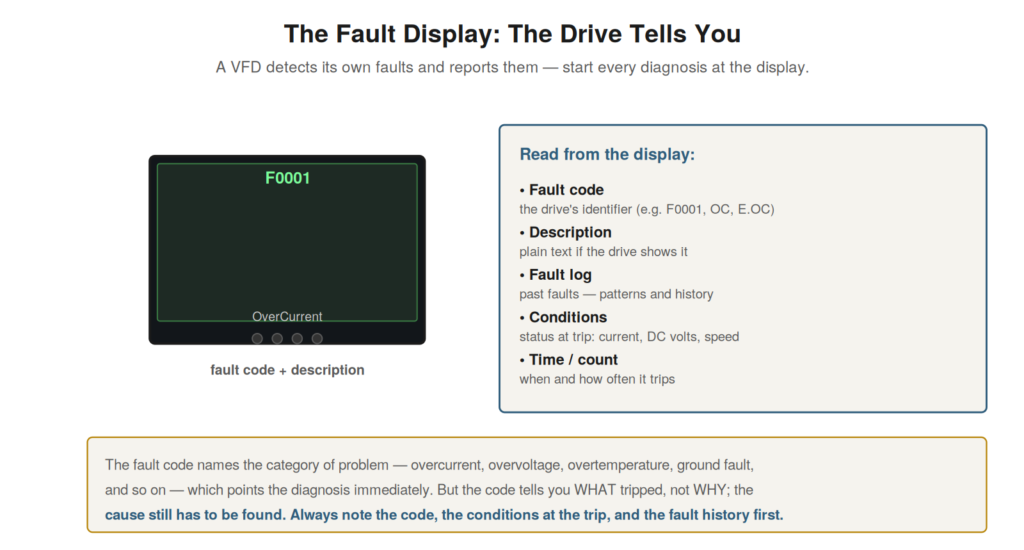
A great advantage of the VFD in troubleshooting is that it detects
and reports its own faults, and the fault display is where every
diagnosis should begin. Rather than facing a silent, mysterious failure,
the technician troubleshooting a drive usually has the drive’s own
report of what went wrong — a fault code and often a description — which
points the diagnosis immediately. Understanding how to read and use the
fault display and codes is the starting point of effective drive
troubleshooting.
and reports them. Note the fault code, description, conditions at the
trip, and the fault history. The code tells you WHAT tripped, not WHY —
the cause still has to be found.
What the display tells you
The drive’s display, and its fault log, provide several pieces of
information that are valuable to the diagnosis. The fault code is the
drive’s identifier for the fault — a code (and often a plain-text
description) naming the category of problem, such as overcurrent,
overvoltage, or overtemperature. The fault log or history shows past
faults, revealing patterns (a fault that recurs, or several faults
together) that a single current fault would not. Many drives also record
the conditions at the moment of the trip — the current, DC bus voltage,
speed, and other values when the fault occurred — which is valuable
evidence about what was happening. And the time and count of faults show
when and how often the drive trips. Understanding what the display and
log provide — the fault code, the history, the conditions at trip, and
the timing — lets you gather the drive’s own evidence at the start of
the diagnosis. This information, read first, gives a strong starting
point: the code points to the category, the history reveals patterns,
and the conditions at trip show what was happening, together focusing
the diagnosis far more than a symptom alone would. Understanding how to
read all this from the display is the basis for using the drive’s
self-diagnosis, which is one of the technician’s greatest advantages in
drive troubleshooting.
What the code does and doesn’t tell you
It is essential to understand what a fault code does and does not
tell you, because misreading it leads the diagnosis astray. The fault
code tells you what the drive detected — the category of the fault, such
as overcurrent — which points the diagnosis to that category. But the
code does not tell you why the fault occurred: an overcurrent code says
the drive saw excessive current, but not what caused the excessive
current, which could be a short, a jammed load, too-fast acceleration,
or a motor fault. So the code names the symptom the drive detected, not
the underlying cause, and the diagnosis must go from the reported fault
to the actual cause. This is the central skill of drive troubleshooting:
using the code as the starting point (it tells you the category) while
understanding that the cause still has to be found (the code does not
name it). Understanding this distinction — the code tells you what
tripped, not why — is crucial, because treating the code as the complete
diagnosis leads to wrong fixes (replacing parts the code seemed to
implicate, when the real cause lies elsewhere). It reinforces using the
code correctly: as a valuable pointer to the category of fault, from
which the diagnosis proceeds to find the actual cause, rather than as
the answer itself. The code is the drive telling you where to look, not
what to fix, and understanding this makes the fault code the powerful
starting tool it should be, launching a proper diagnosis rather than
short-circuiting it.
Clearing faults and the fault log
Understanding how faults are cleared and how to use the fault log
completes the practical use of the fault display. When a drive trips on
a fault, it stops and displays the fault, and it must be reset (the
fault cleared) before it will run again — but resetting should follow,
not replace, addressing the cause: clearing the fault and restarting
without finding the cause simply invites the fault to recur. The fault
log, recording the history of faults, is valuable beyond the current
fault: it reveals whether a fault is recurring (suggesting an unresolved
cause), whether multiple faults occur together (suggesting a common
cause), and how the drive’s fault history has developed over time.
Reading the fault log as part of the diagnosis provides this historical
context, which can be as informative as the current fault. Understanding
fault clearing (reset after addressing the cause, not instead of it) and
the value of the fault log (the history and patterns it reveals)
completes the practical use of the drive’s fault reporting. It
reinforces that faults should be cleared only after the cause is
addressed, not repeatedly reset in hope, and that the fault log is a
valuable diagnostic resource showing the history and patterns of faults.
Using the fault display fully — the current fault, the conditions, and
the history, with clearing following diagnosis — makes the most of the
drive’s self-reporting, which is a powerful aid to troubleshooting when
used properly rather than as a mere reset-and-restart.
The conditions at the trip
One of the most valuable pieces of information the fault display can
provide is the conditions at the moment of the trip, and understanding
its value makes the most of this feature. Many drives record, at the
instant a fault occurs, the values of key quantities — the output
current, the DC bus voltage, the frequency, the temperature — capturing
a snapshot of what was happening when the drive tripped. This snapshot
is valuable evidence: it shows the conditions that led to the trip,
which often points to the cause. An overcurrent trip with a recorded
high current confirms a real overcurrent; an overvoltage trip with a
recorded high DC bus voltage on deceleration confirms regeneration; a
trip with normal recorded values suggests a nuisance trip or noise. So
the recorded conditions at the trip turn the fault from a bare code into
a documented event with context. Understanding the value of these
recorded conditions — the snapshot of what was happening at the trip —
makes the most of the fault display. It reinforces reading not just the
fault code but the conditions at the trip, because this snapshot
provides crucial evidence about the cause, showing what the drive saw at
the moment it tripped. Understanding that many drives record these
conditions, and using them, greatly aids diagnosis, turning the fault
into a documented event whose recorded conditions often point directly
to the cause, which is far more informative than the fault code alone
and one of the most useful features of the drive’s self-reporting.
Scenario: the fault log revealed the pattern
A scenario shows the fault log revealing a diagnostic pattern. A
drive tripped occasionally, and the current fault gave little to go on —
a single overtemperature trip. But reading the fault log revealed a
pattern: the overtemperature trips clustered in the afternoons, the
hottest part of the day. This pattern, invisible from the single current
fault but clear in the log, pointed to a cooling problem exacerbated by
high ambient temperature: the drive was marginal on cooling, and the
afternoon heat pushed it over the overtemperature limit. Investigating
the cooling with this insight found the air filters partially clogged,
reducing cooling enough that the afternoon heat caused trips. Cleaning
the filters restored cooling margin, and the afternoon trips stopped.
This scenario shows the fault log’s value: the pattern of trips
(afternoons) revealed the cause (marginal cooling plus high ambient)
that the single fault did not. Understanding that the fault log records
the history and can reveal patterns explains this: reading the log
showed the afternoon clustering, pointing to the
ambient-temperature-related cooling problem. It reinforces reading the
fault log, not just the current fault, because the history and patterns
it reveals — here the afternoon clustering — often point to causes that
the single current fault would not, such as the condition-dependent
(ambient temperature) cooling problem this scenario uncovered. The
scenario reinforces the fault log as a valuable diagnostic resource, its
recorded patterns revealing causes — here a marginal cooling problem
triggered by afternoon heat — that reading only the current fault would
miss.
Consulting the manufacturer’s documentation
An essential practice in using fault codes is consulting the
manufacturer’s documentation, because codes and their meanings vary by
drive, and understanding this ensures correct interpretation. While
fault categories are universal (overcurrent, overvoltage, and so on),
the specific codes a drive uses, and the exact meaning and recommended
actions for each, vary by manufacturer and model. So a code seen on a
drive should be looked up in that drive’s documentation (manual, fault
code list) to get its exact meaning and the manufacturer’s guidance,
rather than assumed from a general knowledge of categories. The
documentation also often provides troubleshooting guidance for each
fault, the conditions that cause it, and the recommended checks.
Understanding the importance of consulting the documentation — to get
the exact meaning and guidance for the specific drive’s codes — ensures
correct interpretation and makes use of the manufacturer’s
troubleshooting help. It reinforces looking up fault codes in the
specific drive’s documentation, because codes and meanings vary, and the
documentation provides the exact interpretation and often useful
guidance. Understanding that fault codes must be interpreted via the
specific drive’s documentation — not assumed — and that the
documentation offers valuable guidance, reinforces consulting it as a
key step in using fault codes, ensuring the code is correctly understood
for that drive and making use of the manufacturer’s fault-specific
troubleshooting guidance, which complements the general understanding of
fault categories with the specific drive’s exact code meanings and
recommended actions.
The drive’s self-reporting as an advantage
A consolidating recognition is that the drive’s self-reporting is a
great advantage in troubleshooting, and appreciating it frames the whole
approach to drive faults. Unlike much equipment that fails silently, a
drive detects and reports its own faults, providing the fault code, the
conditions, and the history — a wealth of diagnostic information that
other equipment does not offer. This self-reporting is a major
advantage: it gives the diagnosis a strong starting point (the fault
category), evidence (the conditions), and context (the history), far
more than a silent failure would. So the drive, for all its complexity,
aids its own troubleshooting through its self-reporting, an advantage
the technician should fully exploit. Recognizing the self-reporting as
this advantage frames the approach to drive faults: start with and make
full use of what the drive reports. It reinforces that the drive’s
self-reporting — its fault codes, conditions, and history — is a great
troubleshooting advantage, to be exploited fully by starting every
diagnosis at the display and using all the information it provides.
Understanding the drive’s self-reporting as a major advantage — the
drive telling you about its own faults, unlike silently-failing
equipment — consolidates the approach to drive troubleshooting: begin
with and rely on the drive’s own report, which gives the diagnosis a
strong start and rich information, making the self-reporting one of the
technician’s greatest assets in diagnosing the complex faults of a drive
that, helpfully, reports on its own condition.