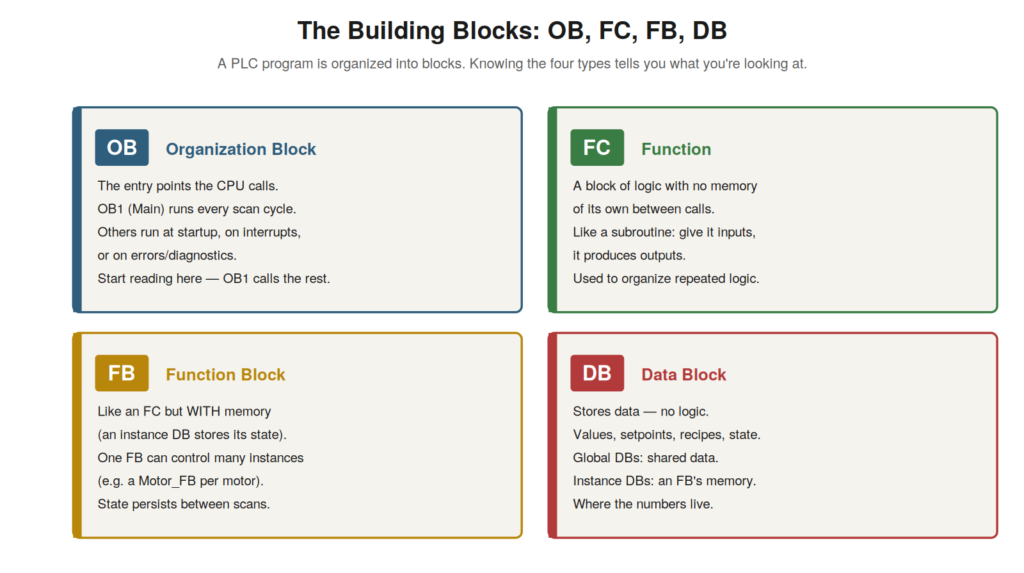
A PLC program is organized into blocks, and understanding the four
block types — OB, FC, FB, and DB — is essential to reading a program,
because it tells you what each part is and how they fit together. Rather
than one monolithic program, a Siemens PLC program is a structured set
of blocks with different roles, and knowing the roles lets you navigate
the program and understand its organization. This chapter explains the
block types a maintenance technician needs to recognize.
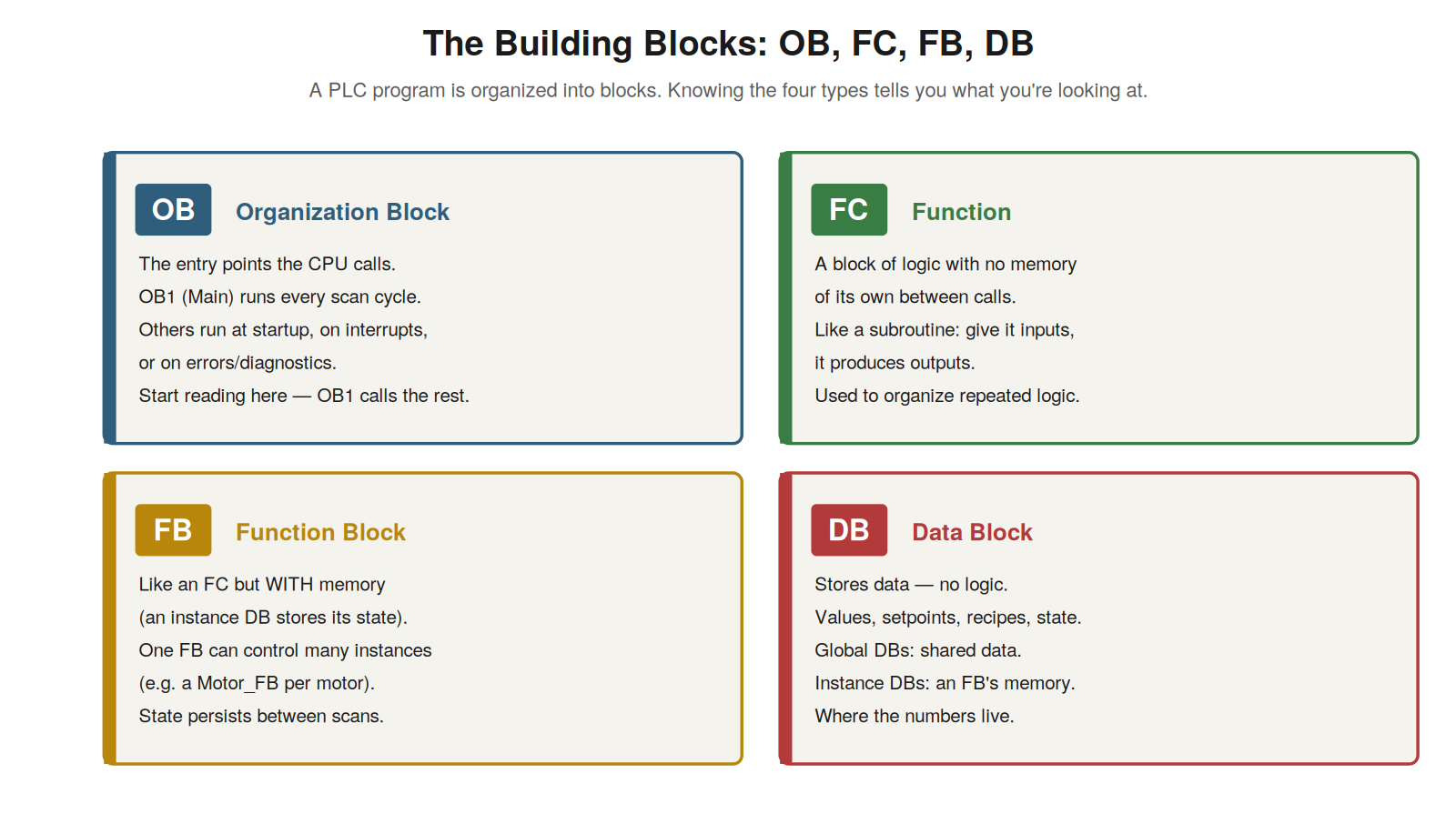
entry points the CPU calls, starting with Main/OB1 every scan), FC
(functions — logic with no memory), FB (function blocks — logic with
memory in an instance DB), and DB (data blocks — where values are
stored).
Organization blocks (OB) — the entry points
Organization blocks (OBs) are the entry points of the program — the
blocks the CPU itself calls — and understanding them tells you where the
program starts and how it is triggered. The CPU runs the program by
calling OBs, and the most important is OB1, called Main, which the CPU
calls every scan cycle — so OB1 is where the main program runs,
repeatedly, and where you start reading to understand the program’s
operation. Other OBs handle specific situations: a startup OB runs once
when the CPU starts, interrupt OBs run on specific events, and error or
diagnostic OBs run when faults occur. So OBs are the CPU’s entry points
into the program, with OB1/Main being the main cyclic one. Understanding
OBs — the entry points the CPU calls, especially OB1/Main running every
scan — tells you where the program begins and how it is structured
around these entry points. It reinforces that the program runs through
OBs, with OB1 (Main) the central one called every scan, so that to
understand a program’s operation you start at OB1 and follow how it
calls the other blocks. Understanding organization blocks — the CPU’s
entry points, with OB1/Main the main cyclic block — orients you to where
the program starts and how it is triggered, which is where you begin
reading a program: at OB1, the main block the CPU runs every scan, from
which the rest of the program’s logic is called and organized.
Functions (FC) and function blocks (FB)
Functions (FCs) and function blocks (FBs) are the blocks that contain
the program’s logic, called from the OBs, and the difference between
them — memory — is worth understanding. A function (FC) is a block of
logic with no memory of its own between calls: you give it inputs, it
produces outputs based on them, like a subroutine, but it does not
remember anything from one call to the next. A function block (FB) is
similar but has memory: it has an associated instance data block that
stores its state between calls, so an FB remembers values from scan to
scan. This memory makes FBs suitable for logic that needs to retain
state — like controlling a motor with its running status and timers —
and one FB can control many instances (a Motor_FB used for each of
several motors, each with its own instance data). So FCs are memoryless
logic, FBs are logic with retained state. Understanding FCs and FBs —
both containing logic called from OBs, FCs without memory and FBs with
instance memory — helps you read the program’s logic blocks. It
reinforces that the program’s logic lives in FCs (memoryless) and FBs
(with instance memory for retained state), called from the OBs.
Understanding functions and function blocks — the logic-containing
blocks, distinguished by whether they retain state — helps you
understand the program’s structure, recognizing that the logic is
organized into these callable blocks, with FBs used where state must be
remembered (like device control) and FCs for stateless logic, which is a
common organization you will read in Siemens programs.
Data blocks (DB) — where values live
Data blocks (DBs) store the program’s data — they contain no logic,
just values — and understanding them tells you where the program’s
numbers and states are kept. A DB holds data: setpoints, measured
values, recipes, states, counters, and any other values the program
uses. There are two kinds: global DBs store data accessible throughout
the program (shared values), and instance DBs are the memory of a
specific FB (storing that FB’s state). So when you need to find a value
— a setpoint, a status, a stored measurement — it lives in a DB.
Understanding DBs — the data-storing blocks, global for shared data and
instance for FB memory — tells you where the program’s values are. It
reinforces that DBs hold the program’s data (no logic), with global DBs
for shared values and instance DBs for FB state, so that to find or
monitor a value you look in the relevant DB. Understanding data blocks —
where the program’s values live, in global and instance DBs — completes
the picture of the four block types, telling you where to find the data
(as opposed to the logic in FCs/FBs and the entry points in OBs).
Understanding all four block types — OB entry points, FC and FB logic,
DB data — lets you read a program’s structure, knowing what each block
is and where to find the entry points, the logic, and the data, which is
the foundation for navigating and understanding any Siemens PLC program
you encounter in maintenance.
How blocks call each other
Understanding how blocks call each other clarifies how a program is
structured and how to navigate it, which is essential to reading a real
program. The program executes through calls: OB1 (Main) runs each scan
and calls other blocks (FCs and FBs) to do the work, and those blocks
may call still others. So the program has a call structure — a hierarchy
of blocks calling blocks — starting from OB1. To understand the program,
you follow this structure: start at OB1, see which blocks it calls, and
follow those calls into the called blocks to see what they do. In the
logic, a call appears as a block being invoked (with its inputs and
outputs), and you can navigate into a called block to read it. So
reading a program means following the calls from OB1 down through the
called blocks, understanding the structure. Understanding how blocks
call each other — the call hierarchy from OB1 down — clarifies how to
navigate and read a program. It reinforces that the program is
structured as blocks calling blocks from OB1, and that reading it means
following these calls to understand the structure and logic.
Understanding how blocks call each other — the call hierarchy that
organizes the program from OB1 downward — is essential to reading a real
program, because it tells you how the program is structured and how to
navigate it: start at OB1, follow the calls into the called blocks, and
build up an understanding of the program’s organization and logic by
following the call structure that connects the blocks into a working
whole.
Scenario: reading an unfamiliar program
A scenario shows block knowledge structuring the reading of an
unfamiliar program. A technician needed to understand an unfamiliar
machine’s program to diagnose a fault. Faced with many blocks, they used
their understanding of block types to structure their reading: they
started at OB1 (Main), knowing it runs every scan and calls the rest,
and followed its calls to see the program’s structure. They found it
called several FBs — one per major machine section — each controlling
its area, with data in associated DBs. Understanding the block types let
them make sense of the organization: OB1 as the entry point calling
section FBs, with DBs holding the data. This structure oriented them,
letting them navigate to the relevant section’s FB for their fault.
Block knowledge had turned an intimidating mass of blocks into an
understandable structure. This scenario shows understanding block types
structuring the reading of an unfamiliar program. Understanding OBs,
FBs, and DBs let the technician start at OB1 and follow its calls to
grasp the program’s organization, orienting them in an unfamiliar
program. It reinforces that block-type knowledge lets you make sense of
a program’s structure, starting at OB1 and following the calls, which
orients you in an unfamiliar program. The scenario reinforces the value
of understanding the building blocks: the technician navigated an
unfamiliar program by using block-type knowledge to grasp its structure
— OB1 calling section FBs with data in DBs — illustrating how
understanding the block types turns an intimidating program into an
understandable structure you can navigate to find the logic relevant to
a fault.
Instance data and multiple instances
A nuance of function blocks worth understanding is how their instance
data works with multiple instances, because it explains a common program
pattern. An FB has memory stored in an instance data block, and
importantly, one FB can be used for multiple instances, each with its
own instance DB. So a Motor_FB written once can control several motors,
with each motor having its own instance DB storing that motor’s state
(its running status, timers, faults). This is efficient: the logic is
written once (in the FB), but each instance keeps its own separate state
(in its instance DB). When reading such a program, you see the FB called
multiple times, each call with a different instance DB — one per motor.
Understanding this lets you make sense of the pattern: the same FB
logic, multiple instances, each with separate data. Understanding
instance data and multiple instances — one FB controlling several
instances, each with its own instance DB — explains this common,
efficient program pattern. Understanding instance data and multiple
instances — how one FB serves multiple instances each with its own
instance DB storing its separate state — explains a common program
pattern you will encounter, where a single FB (like Motor_FB) is called
multiple times for multiple devices, each call using a different
instance DB to keep that device’s state separate, so that you can read
and make sense of programs using this efficient pattern of shared FB
logic with per-instance data, which is very common in real Siemens
programs controlling multiple similar devices.
Block structure as the program’s map
Consolidating the building-blocks material, the block structure is
the program’s map — understanding it lets you navigate any program — and
appreciating this emphasizes the value of block-type knowledge. A
program’s organization into OBs, FCs, FBs, and DBs, with OB1 calling the
others, is its structure — the map of how it is put together.
Understanding this map lets you navigate any program: you know where it
starts (OB1), how the logic is organized (FCs and FBs), and where the
data is (DBs), so you can find your way to any part. Without this
understanding, a program is an undifferentiated mass; with it, the
program is a navigable structure. So block-type knowledge is what makes
programs navigable, turning them from intimidating to understandable.
This is why it is foundational to reading programs. Understanding block
structure as the program’s map — the organization that makes any program
navigable — emphasizes the value of block-type knowledge. Understanding
the block structure as the program’s map — the organization into OBs,
FCs, FBs, and DBs that makes any program navigable — emphasizes the
value of block-type knowledge, so that you can find your way through any
program by understanding its structure (where it starts, how the logic
is organized, where the data lives), turning an undifferentiated mass of
code into a navigable structure, which is why understanding the building
blocks is foundational to reading programs and why it repays the effort
to understand the block types that organize every Siemens program you
will encounter.