When maintenance does require changing the program — downloading a
modification to the PLC — it must be done safely, because a download
changes the running machine. This is the most consequential action a
maintenance technician takes in TIA Portal, and understanding how to do
it safely protects the machine, the process, and people. This chapter
covers downloading changes with the care it demands, following the
golden rule that changes affect real machines.
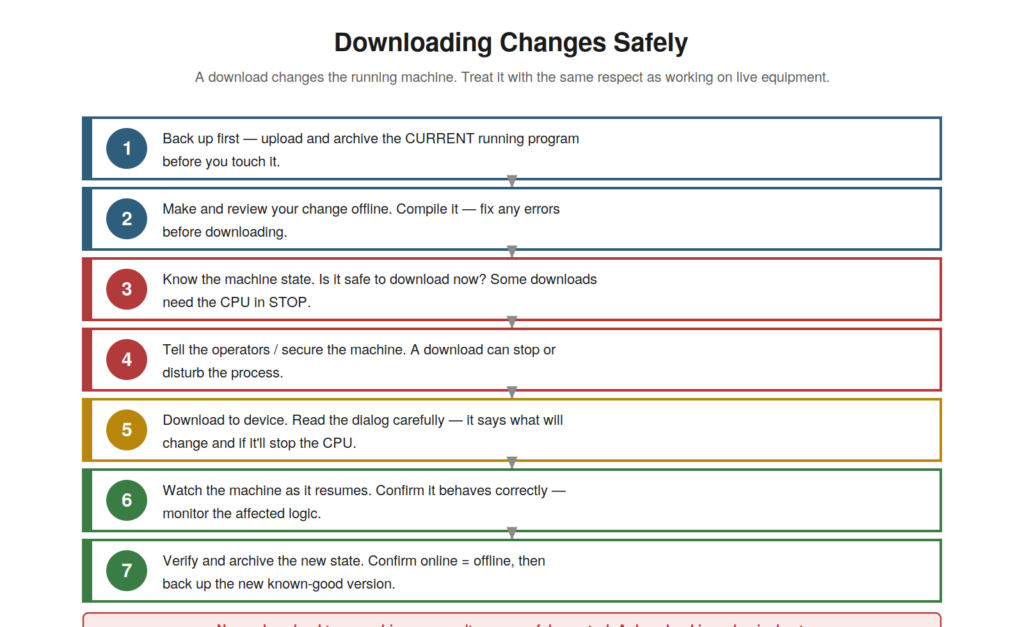
review the change offline, know the machine state, secure the machine
and warn operators, download carefully (reading the dialog), watch the
machine resume, then verify and archive the new state. A download is a
physical act.
Before you download
The preparation before a download is as important as the download
itself, and understanding it protects against the harm a careless
download can cause. Before downloading: back up first — upload and
archive the current running program, so you can roll back if the change
is wrong (this is essential). Make and review your change offline, and
compile it — fixing any errors before downloading, so you download
known-good, compilable logic. Know the machine state — is it safe to
download now? Some downloads require the CPU in STOP, which stops the
machine, so you must know whether the download will stop the CPU and
whether that is safe. And prepare the machine and people — secure the
machine and tell the operators, because a download can stop or disturb
the process. So the preparation — back up, review offline, know the
state, secure the machine and warn people — sets up a safe download.
Understanding this preparation — the essential steps before downloading
— protects against a harmful download. It reinforces preparing before a
download: back up (to roll back), review and compile offline (to
download good logic), know the machine state (will it stop?), and secure
the machine and warn operators (as it affects the process).
Understanding the preparation before a download — backup, offline
review, machine state, securing and warning — is essential to a safe
download, ensuring you can recover (backup), download good logic
(review), and do not harm the process or people (state, securing,
warning), which prepares for the download to be done safely rather than
causing the disruption or damage a careless, unprepared download could
inflict on the running machine.
Doing the download
The download itself must be done carefully, reading what TIA Portal
tells you, because the download dialog explains what will happen — and
understanding this ensures no surprises. When you download, TIA Portal
presents a dialog describing what will be downloaded and its effects —
importantly, whether the CPU will be stopped (which stops the machine)
and what will change. Reading this dialog carefully, rather than
clicking through it, tells you the consequences before they happen, so
you can confirm they are acceptable (or stop if not). During the
download, the machine may stop and restart (if the CPU is stopped), or
the change may take effect while running, depending on the download. So
doing the download carefully — reading the dialog, understanding whether
the CPU stops, confirming the effects — ensures no surprises.
Understanding how to do the download carefully — reading the dialog that
explains the effects — ensures you know what will happen. It reinforces
reading the download dialog carefully, as it explains the effects
(including whether the CPU stops), so you confirm the consequences
before they occur. Understanding how to do the download carefully —
reading and understanding TIA Portal’s dialog about the effects —
ensures the download holds no surprises, so that you know whether the
CPU will stop and what will change before it happens, confirming the
effects are acceptable, which prevents the unexpected machine stop or
behavior that clicking blindly through the download dialog could cause
on the running machine.
After the download
The download is not finished when the transfer completes — you must
verify the result and secure the new state — and understanding these
final steps completes a safe download. After downloading, watch the
machine as it resumes: confirm it behaves correctly, monitoring the
affected logic to verify the change works as intended and the machine
runs properly. Then verify the new state — confirm the online and
offline copies now match (the change is in place) — and archive the new
known-good version, so your backup reflects the current state. These
final steps — watch the machine resume, verify the change, archive the
new state — complete the download properly, confirming success and
updating your safety net. Skipping them risks leaving an unverified
change or an outdated backup. Understanding these after-download steps —
verify the machine and the change, archive the new state — completes the
safe download. It reinforces that after downloading you must watch the
machine resume correctly, verify the change worked and the copies match,
and archive the new known-good state. Understanding the after-download
steps — watching the machine, verifying the change, and archiving the
new state — completes a safe download, ensuring the change actually
worked and the machine runs correctly, and updating your backup to the
new state, so that the download is properly finished: verified as
successful, with the machine confirmed running correctly and a fresh
backup capturing the new known-good configuration, which completes the
careful, safe download process that the consequential act of changing a
running machine demands.
Download in RUN versus STOP
An important technical distinction in downloading is whether the
download can happen with the CPU in RUN or requires STOP, and
understanding it clarifies the machine impact of a download. Some
changes can be downloaded while the CPU stays in RUN (the machine keeps
running, and the change takes effect without stopping) — a download in
run mode, less disruptive. Other changes require the CPU to go to STOP
to download (stopping the machine), because they cannot be applied while
running. TIA Portal’s download dialog indicates which applies — whether
the CPU will stop — which is exactly why reading that dialog matters. A
download that stops the CPU stops the machine, a significant event to
prepare for; a download in RUN is less disruptive but still a change to
the running machine. Understanding this distinction — download in RUN
(machine keeps running) versus requiring STOP (machine stops) —
clarifies a download’s machine impact. It reinforces that some downloads
keep the CPU in RUN while others require STOP (stopping the machine), as
the download dialog indicates, which is why reading it matters.
Understanding download in RUN versus STOP — whether the download stops
the machine or not — clarifies the impact of a download and the
importance of the dialog that tells you which will happen, so that you
know whether a given download will stop the machine (requiring more
preparation) or take effect while running, which is a key part of
understanding and preparing for the machine impact of a download,
determined by whether the change can be applied in RUN or requires the
CPU to STOP.
Scenario: the careful download
A scenario shows a download done safely. A genuine program change was
needed on a machine — a corrected parameter in the logic. The technician
did it carefully. First, they backed up the current running program
(uploading and archiving it), so they could roll back. They made and
reviewed the change offline, and compiled it to confirm no errors. They
checked the machine state and the download dialog, which indicated the
download could occur with the CPU in RUN (no machine stop). They secured
the area and informed the operator. They downloaded, reading the dialog
to confirm the effects. They then watched the machine continue running
correctly with the change in effect, verified the change worked,
confirmed online matched offline, and archived the new state. The
careful process meant the change went smoothly, with a rollback ready
had it not. This scenario shows a download done with proper care from
backup through verification. Understanding the safe download process let
the technician make the change smoothly and safely, with preparation,
care during, and verification after. It reinforces that a download done
carefully — backup, offline review, checking the state and dialog,
securing, verifying — goes smoothly and safely, respecting that it
changes the machine. The scenario reinforces the safe download process:
the technician made a needed change smoothly by backing up first,
reviewing offline, downloading carefully with the dialog understood, and
verifying after, illustrating how the careful, respectful approach to
downloading — treating it as the machine change it is — makes a download
safe and successful, with a rollback ready and the result verified.
Downloading only what changed
A nuance of downloading is that you often download only the changed
blocks rather than the whole program, and understanding this helps you
download efficiently and with less disruption. TIA Portal can download
just the blocks that have changed (a partial download of the
modifications) rather than re-downloading the entire program. This is
less disruptive — only the changed logic is updated — and faster. When
you download after a change, TIA Portal typically handles this,
downloading what is needed to bring the PLC up to date with your
changes. Understanding that a download can be just the changes helps you
appreciate what is happening — you are updating the changed blocks, not
necessarily replacing everything — and why a download of a small change
need not be a whole-program replacement. Still, the download dialog
tells you what is being downloaded and its effects, which you read as
always. Understanding downloading only what changed — that downloads can
update just the modified blocks — helps you download efficiently with
less disruption. Understanding that you often download only what changed
— updating just the modified blocks rather than replacing the whole
program — helps you download efficiently and with less disruption, so
that you understand a download of a small change as an update to the
changed blocks (which the download dialog details), appreciating that
TIA Portal brings the PLC up to date with your changes efficiently,
while you still read the dialog to understand exactly what is being
downloaded and its effects on the running machine, which remains
important regardless of whether the download is partial or complete.
Respect as the guiding principle
Consolidating the downloading material, respect for the fact that a
download changes a real machine is the guiding principle — everything
else follows from it — and understanding this centers your approach to
downloads. All the specific practices — backing up first, reviewing
offline, knowing the machine state, securing and warning, reading the
dialog, verifying after — flow from one principle: respecting that a
download is a physical change to a running machine, not a mere software
operation. If you hold that respect, the careful practices follow
naturally, because you treat the download with the seriousness a machine
change deserves. If you lack it, you may skip the care and cause harm.
So respect is the guiding principle, from which safe downloading flows.
Centering your approach on this respect — treating every download as the
machine change it is — ensures the care that safe downloading requires.
Understanding respect as the guiding principle — from which the safe
download practices flow — centers your approach on treating downloads
with appropriate seriousness. Understanding respect for the fact that a
download changes a real machine as the guiding principle — from which
all the specific safe-download practices flow — centers your approach,
so that you treat every download as the physical change to a running
machine that it is, from which the care (backing up, reviewing, knowing
the state, securing, reading the dialog, verifying) follows naturally,
because holding that respect makes the careful practices automatic,
whereas lacking it invites the harm that careless downloading causes,
making respect for the download’s real consequences the essential
guiding principle of safe downloading.