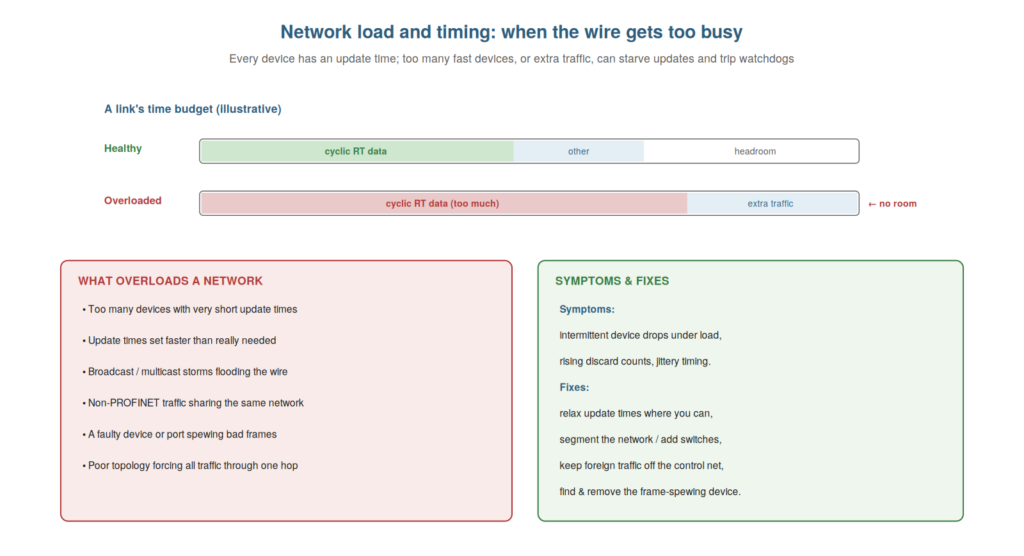
Some PROFINET faults arise not from a broken component but from the
network being overloaded or mistimed — too much traffic, or update times
too demanding — so that updates are delayed or lost and watchdogs trip.
Understanding network load and timing lets you diagnose these subtler
faults, which can otherwise be baffling because nothing is obviously
broken. This chapter covers load and timing from the maintenance
perspective.
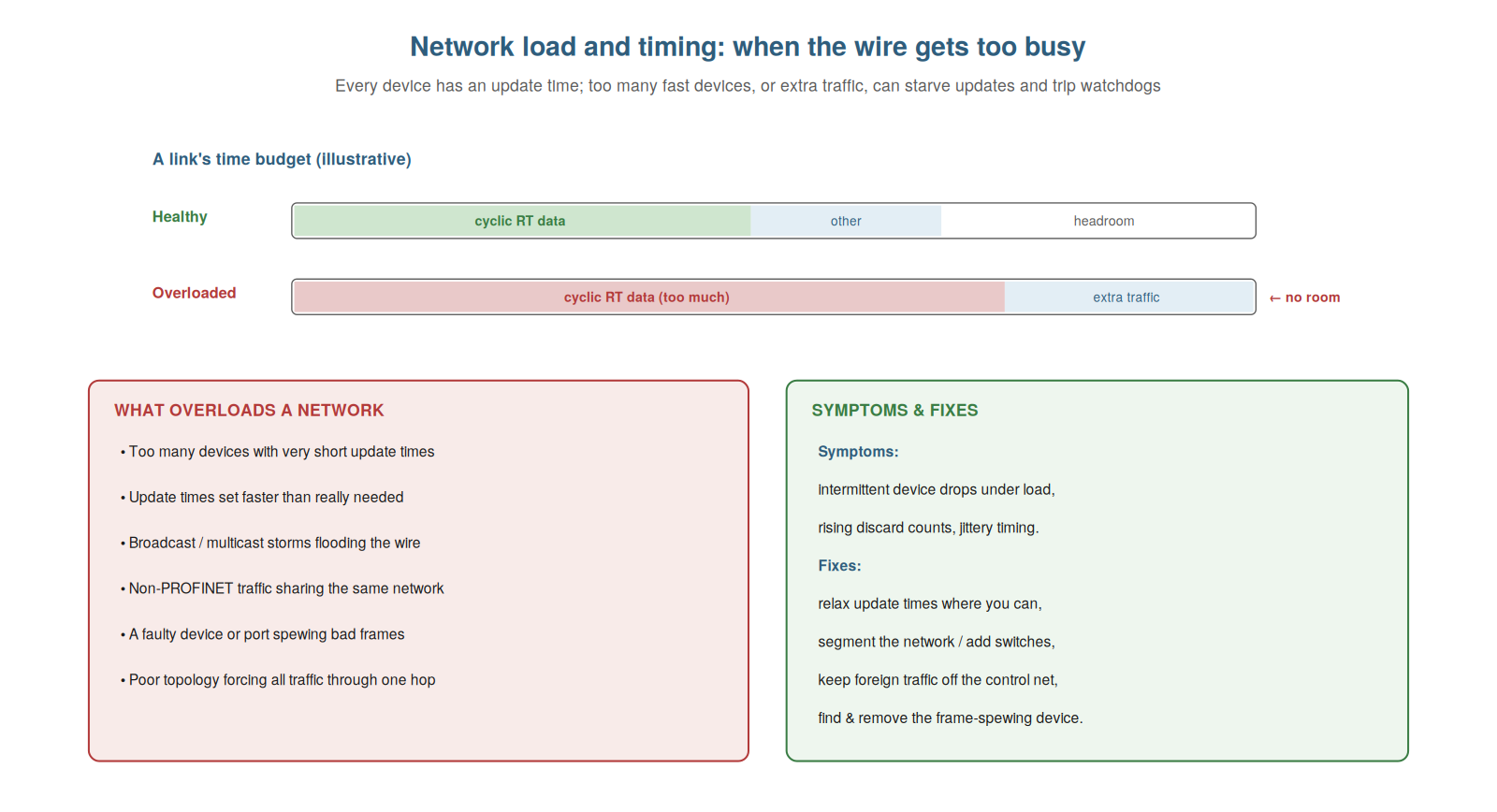
and too much cyclic data (or extra traffic) leaves no room, delaying
updates and tripping watchdogs. Causes include too-fast update times,
foreign traffic, and frame-spewing devices; fixes include relaxing
update times and segmenting the network.
How overload causes faults
Understanding how network overload causes faults explains a class of
problems where devices fail without anything being physically broken.
The network has a finite capacity — a time budget on each link for the
cyclic data and other traffic. If this budget is exceeded — too much
cyclic data from too many fast devices, plus extra traffic — there is no
room, and updates get delayed or lost. When a device’s updates are
delayed or lost enough to exceed its watchdog, it is declared failed —
even though nothing is broken; the network simply could not deliver its
data in time. So overload causes failures by starving devices of timely
updates, tripping their watchdogs. This is a subtle fault: the
components are all fine, but the network as a whole is over capacity.
Understanding this mechanism — overload delaying updates and tripping
watchdogs — explains failures that have no broken component.
Understanding how overload causes faults — by exceeding the network’s
time budget so updates are delayed or lost and watchdogs trip — explains
a class of failures with nothing physically broken. It reinforces that
network overload starves devices of timely updates, tripping watchdogs
and causing failures despite healthy components. Understanding how
overload causes faults — the network’s finite time budget being exceeded
so that updates are delayed or lost and devices’ watchdogs trip —
explains the baffling class of failures where nothing is physically
broken yet devices fail, so that when you find healthy components but
failing devices, especially under load, you recognize overload as a
possible cause and investigate the network’s traffic and timing rather
than hunting fruitlessly for a broken part.
What overloads a network
To diagnose and fix overload, you need to understand what causes it,
and knowing the common causes lets you find and address the source.
Several things overload a network: too many devices with very short
update times (each demanding frequent data), update times set faster
than actually needed (wasting budget), broadcast or multicast storms
(floods of traffic), non-PROFINET traffic sharing the control network
(foreign traffic competing for budget), a faulty device or port spewing
bad frames (flooding the network with errors), or a poor topology
forcing all traffic through one overloaded hop. So overload comes from
excessive cyclic demand, extra or foreign traffic, faulty flooding, or
bottleneck topology. Knowing these causes directs your investigation:
check the update times, look for foreign or storming traffic, find any
frame-spewing device, and consider the topology. Understanding what
overloads a network — excessive cyclic demand, extra traffic, faulty
flooding, bottlenecks — lets you find the source. It reinforces that
overload comes from too-fast update times, foreign or storming traffic,
a frame-spewing device, or a bottleneck topology, which directs the
investigation. Understanding what overloads a network — too many or
too-fast update times, broadcast storms, foreign traffic on the control
network, a faulty frame-spewing device, or a bottleneck topology — lets
you find the source of an overload fault, so that when overload is
suspected, you investigate these common causes: examining the update
times for excessive demand, looking for foreign or storming traffic that
should not be there, finding any device flooding the network with bad
frames, and considering whether the topology forces too much through one
hop, which directs you to the specific cause you can then address.
Relieving overload
Having found an overload’s cause, understanding how to relieve it
completes the diagnosis, and the fixes follow naturally from the causes.
If update times are faster than needed, relaxing them (setting each
device’s update time to what the application actually requires, not
faster) frees budget. If foreign traffic is on the control network,
removing it (keeping non-PROFINET traffic off the control network) frees
budget. If a device is spewing bad frames, finding and fixing or
replacing it stops the flood. If the topology bottlenecks traffic,
segmenting the network (adding switches, dividing the traffic) relieves
the hop. So relieving overload means addressing its cause: relax update
times, remove foreign traffic, fix the flooding device, or improve the
topology. These fixes restore the network’s capacity to deliver updates
on time, resolving the overload failures. Understanding how to relieve
overload — relaxing update times, removing foreign traffic, fixing
flooding, segmenting — completes the diagnosis. It reinforces that
overload is relieved by addressing its cause: relaxing update times,
removing foreign traffic, fixing the flooding device, or segmenting the
network. Understanding how to relieve overload — by relaxing
over-demanding update times, removing foreign traffic from the control
network, fixing or replacing a frame-spewing device, or segmenting a
bottlenecked topology — completes the diagnosis of overload faults, so
that once you have found the cause, you know the corresponding fix that
restores the network’s ability to deliver updates on time, resolving the
failures that overload caused, which turns the subtle, baffling overload
fault into a diagnosable and fixable problem once you understand its
mechanism, causes, and remedies.
When to suspect load
A practical question is when to suspect network load as opposed to a
physical fault, and understanding the signs of a load problem helps you
recognize this less-obvious cause. Load problems have distinguishing
signs: the faults tend to correlate with heavy network activity or the
addition of traffic or devices (appearing or worsening when the network
is busiest); they may affect timing-sensitive devices first (those with
the shortest update times); the physical layer checks out (cables and
connectors are fine, no physical faults found); and the faults may be
widespread or shifting rather than tied to one physical location. So you
suspect load when faults correlate with network activity, affect the
fastest devices, resist physical diagnosis, and are not tied to a
specific physical fault. By contrast, a fault firmly tied to one cable
or connector, or one physical location, points to physical rather than
load. Understanding when to suspect load — the signs that distinguish it
from a physical fault — helps you recognize this less-obvious cause.
Understanding when to suspect network load — recognizing the signs of a
load problem: faults correlating with heavy network activity, affecting
the timing-sensitive devices first, resisting physical diagnosis, and
not tied to one physical location — helps you recognize this
less-obvious cause, so that when the physical layer checks out but
devices still fail, especially under network activity and among the
fastest devices, you turn your attention to load and timing rather than
continuing to hunt for a physical fault that is not there, which is the
key to catching the overload faults that physical-first troubleshooting
can otherwise miss.
Scenario: the foreign laptop
A scenario shows a load problem from foreign traffic. A network began
experiencing intermittent device drops that had never happened before,
with no physical fault found — cables and connectors all checked out.
The technician, suspecting load because the physical layer was clean and
the faults correlated with network activity, investigated the traffic
and found the cause: someone had connected a laptop to the control
network and it was generating traffic (updates, network chatter) that
competed with the PROFINET data, occasionally delaying updates enough to
trip watchdogs. Removing the laptop from the control network stopped the
drops. Understanding that foreign traffic overloads the network and that
a clean physical layer with load-correlated faults points to load led
him to the foreign laptop. This scenario shows a load problem from
foreign traffic, diagnosed by suspecting load when the physical layer
was clean. Understanding that foreign traffic overloads the network, and
recognizing the signs of load, let the technician find the foreign
laptop behind the drops. It reinforces that a clean physical layer with
load-correlated faults points to load, here foreign traffic from a
laptop on the control network. The scenario reinforces recognizing load
problems: the technician diagnosed intermittent drops as a load problem
from a foreign laptop on the control network, illustrating how
suspecting load when the physical layer is clean and faults correlate
with activity leads to causes like foreign traffic, which is why
guarding the control network from foreign traffic matters and why load
is the cause to consider when physical diagnosis comes up empty.
Setting update times sensibly
A practical aspect of avoiding load problems is setting update times
sensibly, and understanding the principle — as fast as needed, not
faster — helps prevent overload and diagnose it. Each device’s update
time can be set, and there is a temptation to set it very fast (for the
best responsiveness), but faster update times consume more network
capacity, and setting many devices faster than they need wastes budget
and risks overload. The sensible principle is to set each device’s
update time to what its application actually requires — a fast-moving
axis may need a short update time, but a slow temperature reading does
not — rather than uniformly fast. This matches the network load to the
real need, avoiding the self-inflicted overload of unnecessarily fast
update times. So understanding to set update times sensibly — as fast as
needed, not faster — helps prevent and cure overload. When diagnosing an
overload, relaxing over-fast update times to sensible values is a key
remedy. Understanding how to set update times sensibly — each device as
fast as its application needs, not uniformly fast — helps prevent and
cure overload, so that you avoid the self-inflicted overload of
unnecessarily fast update times by matching each device’s update time to
its real requirement (a fast axis short, a slow reading longer), which
keeps the network load matched to the actual need, and when diagnosing
an existing overload, relaxing the over-fast update times to sensible
values is a key remedy that frees the network capacity the excessive
speed was consuming.
Remembering load when the physical is clean
To close, it is worth crystallizing the key practical takeaway:
remember to consider load when the physical layer comes up clean,
because this is when load problems are most often missed. The
physical-first approach is right — most faults are physical — but its
risk is that when the physical layer checks out and the fault persists,
a technician may keep hunting for a physical cause that is not there.
The takeaway is to remember load and timing as the next suspect when the
physical is clean: if you have checked the cables, connectors, and
signal quality and found them good, yet devices still fail (especially
under activity, among the fastest devices), turn to load. So the
practical rule is: physical first, but load next when the physical is
clean. Remembering this catches the load problems that a purely physical
focus would miss. Understanding to remember load when the physical is
clean — turning to load as the next suspect — catches the load problems
a physical-only focus misses. Understanding to remember load when the
physical layer comes up clean — turning to load and timing as the next
suspect when the cables, connectors, and signal quality all check out
yet devices still fail — catches the load problems that are most often
missed, so that while you rightly suspect the physical layer first, you
remember not to keep hunting a physical cause that is not there but to
consider load and timing next, especially when faults correlate with
network activity and affect the fastest devices, which is the practical
rule that catches the overload faults a purely physical focus would
overlook.