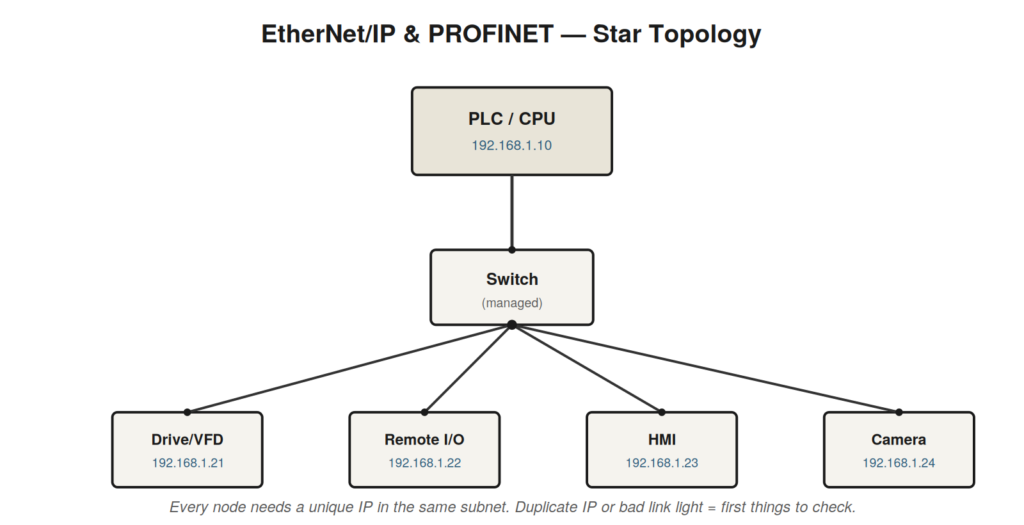
Because EtherNet/IP and PROFINET dominate new installations, Ethernet
troubleshooting is now a core maintenance skill. Most Ethernet
communication faults come down to a handful of causes, and you can check
them in order from the physical layer up.
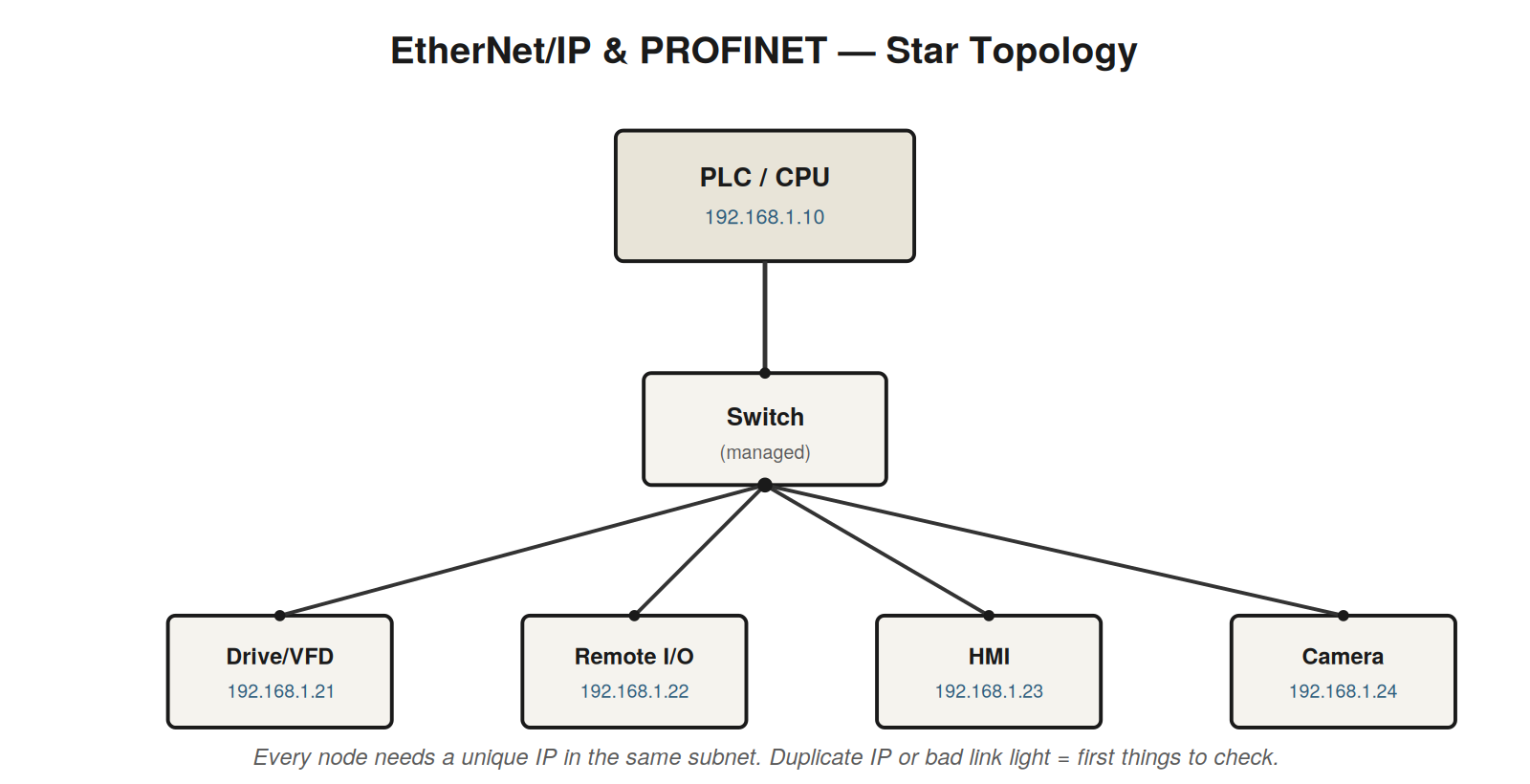
switch and needs a unique IP address in the same subnet. Duplicate
addresses and dead link lights are the two most common faults.
Work up from the physical layer
Link lights first. Every Ethernet port has a link/activity LED at
both ends. No link light means a physical problem: cable, connector,
port, or a powered-down device.Cable and connectors. Industrial environments destroy cables —
check for crushing, chafing, and pulled-out connectors. Swap a suspect
cable with a known-good one.IP addressing. Every device needs a unique IP in the same subnet
as the controller. A duplicate IP is a classic fault after a device
swap: the replacement arrives with a default or cloned address.Duplicate address detection. Both platforms and many devices
detect and report a duplicate IP; read the device display or the
controller’s diagnostics.The switch. A failed switch port, an unmanaged switch dropping
traffic under load, or a misconfigured managed switch (VLANs, IGMP) can
break communication for one node or many.
What the controller tells you
On an Allen-Bradley system, a lost EtherNet/IP connection to remote
I/O or a drive produces an I/O fault: a module in the tree shows a fault
indication, and the controller logs it. In Studio 5000 the I/O tree
flags the offending module, and its module properties give a connection
status and error. On Siemens, a PROFINET device that drops off appears
in the diagnostic buffer with a timestamp and the device name, and the
online view shows the device as faulted. In both cases the controller
names the device that went silent, which turns a vague ‘comms fault’
into a specific place to look.
AFTER A DEVICE SWAPThe most common post-replacement fault is addressing. AB devices |
The link light tells you more than you think
The humble link light at each end of an Ethernet connection is a rich
diagnostic. A steady link light means the physical connection is
electrically sound and the two ends have negotiated a link — cable,
connectors, and ports are healthy at that basic level. No link light at
either end means a physical break: a damaged cable, a bad connector, a
dead port, or an unpowered device at the far end. A link light at one
end but not the other narrows it further. Activity blinking shows
traffic is actually flowing. Before touching any addressing or
configuration, confirm you have link lights, because a network problem
with no link light is always physical, and confirming that redirects you
immediately away from software and toward cable and hardware.
A case file: the cloned address
A remote I/O block is replaced after a failure, and afterward that
block — and intermittently a second, unrelated block — will not
communicate reliably. The controller logs connection faults. The link
lights are healthy, which rules out the physical layer and points at
addressing or configuration. Checking addresses reveals the problem: the
replacement block came from stores preconfigured with an IP address
already in use by another device on the network. Two devices sharing one
address produce exactly this signature — intermittent, affecting both
devices, with healthy physical links. Assigning the replacement its
correct unique address restores both. The lesson recurs constantly:
after any device swap, the first suspect is identity. A replacement
arrives with a default or cloned address and must be given the one the
system expects.
Managed switches: help and hazard
Industrial networks increasingly use managed switches, which add
capability and new failure modes. A managed switch can prioritize
traffic, segment the network into VLANs, and manage the multicast
traffic that some industrial protocols use heavily — but a
misconfiguration in any of these can break communication in ways that
look like a device fault. If several devices behind one switch lose
communication together while devices elsewhere are fine, suspect the
switch or its configuration rather than each device. Unmanaged switches
are simpler but can still fail or become overwhelmed. Either way, when a
fault affects a cluster of devices that share a switch, the switch is a
prime suspect precisely because it is the common element.
Vendor specifics worth knowing
On the Allen-Bradley side, EtherNet/IP ties devices into the
controller’s I/O tree, and a communication loss shows as an I/O fault
against the specific module, whose properties reveal a connection status
and error detail. Addressing a new device may involve BOOTP/DHCP, rotary
switches on the device, or software configuration depending on the
product. On the Siemens side, PROFINET identifies devices primarily by a
device name rather than relying on the IP alone, which has an important
consequence for replacement: a swapped device must be assigned the
correct device name to assume the identity of the one it replaces, or
the controller will not recognize it. This single fact resolves a large
share of ‘replaced it and it still will not talk’ situations on Siemens
networks.
IP addressing without mystery
IP addressing trips up technicians who do not work with it daily, but
the practical rules are few. Every device on the same network segment
needs an address that is unique and that sits in the same subnet as the
others, the subnet being determined by the subnet mask. Two devices with
the same address conflict, producing intermittent faults on both. A
device with an address in the wrong subnet cannot communicate at all, as
if it were speaking a different dialect. After a replacement, the new
device often arrives with a default address or one cloned from stores,
which is either a duplicate or in the wrong subnet — the single most
common post-swap fault. You do not need deep networking theory to handle
this: confirm each device’s address is unique and in the correct subnet
for the machine, and the large majority of addressing faults resolve.
Where the address is set — rotary switches, software, DHCP/BOOTP —
depends on the device, which is exactly the kind of detail worth noting
in a personal reference for the equipment your plant runs.
A case file: the intermittent whole-machine
dropout
An entire machine’s networked devices drop communication briefly and
simultaneously, several times a shift, then recover — production
stutters but never fully stops. Simultaneous dropout of many devices
points at something they all share rather than at any one device, which
directs attention to the common path: the switch and the trunk cable
feeding it. The link lights are mostly healthy, so a hard break is
unlikely. Investigating the switch, the technician finds it mounted
where it overheats during busy periods, and an overheating switch can
briefly drop traffic before recovering as load eases — matching the
intermittent, load-related pattern precisely. Improving the switch’s
cooling ends the dropouts. The diagnostic key was scope: when many
devices fail together and recover together, the fault is in what they
share, and the investigation belongs at the switch, the trunk, or the
power feeding them, not at the individual devices.
Cables in the industrial environment
Ethernet cabling in a plant endures abuse that office cabling never
sees, and this makes the physical cable a leading suspect in industrial
Ethernet faults in a way it rarely is elsewhere. Cables get crushed by
traffic and equipment, chafed against sharp edges as machines move,
pulled at their connectors by cable-management that has failed, soaked
by coolant and washdown, and flexed continuously where they cross moving
joints. Each of these degrades the cable, sometimes to outright failure
and sometimes to a marginal condition that causes intermittent faults —
a partially damaged cable that works until vibration or temperature
nudges it. This is why swapping a suspect cable for a known-good one is
such a productive test in industrial Ethernet troubleshooting: the cable
is genuinely likely to be the fault, far more so than in a benign
environment, and substitution definitively settles whether it is. When
an Ethernet fault resists explanation, and especially when it is
intermittent and a cable in the path is exposed to crushing, chafing,
flexing, or fluid, testing that cable by substitution early is time well
spent, because the industrial environment makes cable damage a common
rather than an exotic cause.
A case file: the fault at the flex point
A machine with a moving section that flexes its cabling develops
intermittent communication faults to a device on that moving section,
occurring more as the machine cycles. The correlation with machine
motion is the decisive clue: a communication fault that worsens with
mechanical movement points at the cabling flexing with that movement
rather than at the device or its configuration. The Ethernet cable
feeding the moving section runs through the flex point and, on
inspection, shows the internal damage that repeated flexing causes over
time — conductors fatiguing where standard cable was used in an
application that demanded flex-rated cable. The cable works when still
and faults as it flexes, exactly matching the symptom. Replacing it with
cable rated for continuous flex, properly routed through the moving
joint, ends the faults. The case teaches two things: intermittent
network faults that correlate with machine motion implicate the cabling
at the moving points, and applications with continuous flexing require
cable built for it, since ordinary cable fatigues and fails at flex
points, producing precisely these motion-correlated intermittent
faults.
A structured summary of Ethernet faults
Industrial Ethernet faults organize cleanly into layers worked from
the bottom up, since the lower layers fail far more often. The physical
layer comes first: link lights, cables, connectors, and ports, where the
harsh industrial environment makes cable damage — crushing, chafing,
flexing, fluid ingress — a leading and often intermittent cause, best
settled by substituting a known-good cable. Addressing comes next: every
device needs a unique address in the correct subnet, and the most common
post-swap fault is a replacement arriving with a duplicate or wrong
address, producing intermittent faults on both conflicting devices.
Configuration follows: the controller must expect the device with
matching parameters, and on Siemens PROFINET a replacement must be
assigned the correct device name to assume the identity it replaces.
Shared infrastructure sits across these: when many devices fail
together, the fault lies in what they share — a switch, a segment, a
trunk cable, or their power — rather than in each device, and managed
switches add their own configuration-related failure modes. The
controller’s own diagnostics anchor the whole approach by naming which
devices are present and which are missing, and the pattern of what is
missing versus present, read against the topology, points at the layer
and location of the fault before any cable is touched. Working up from
the physical layer, using the controller’s device view to read the
pattern, resolves the large majority of industrial Ethernet faults
without ever reaching the rare genuine protocol problem.
A case file: the device that came back wrong
A faulty networked device is replaced with an identical spare, but
afterward the controller still reports it as faulted even though the new
hardware is healthy. On a Siemens PROFINET network this is a familiar
and specific situation, because PROFINET identifies devices by an
assigned device name rather than by hardware alone, and a replacement
device does not automatically assume the name of the one it replaced.
The new device is physically fine and correctly connected, but it does
not yet carry the device name the controller expects, so the controller
does not recognize it as the device it is configured to talk to and
reports the expected device as still missing. Assigning the correct
device name to the replacement — the name the controller expects for
that position — lets the new device assume the identity of the old one,
and communication is restored immediately. The case illustrates why the
identity of a replacement device matters as much as its health on
networks that use logical identifiers: a healthy, correctly wired
PROFINET replacement that the controller still will not recognize almost
always needs its device name assigned, and until it does, no amount of
checking the hardware or cabling will help because the fault is not
physical but a matter of the device not yet carrying the identity the
controller is looking for. Knowing this about PROFINET turns a baffling
‘replaced it and it still won’t talk’ into a one-step fix of assigning
the device name, and it is exactly the kind of vendor-specific
procedural detail worth keeping in a personal reference for the
equipment a plant runs.
Building good network habits
Beyond diagnosing specific faults, a set of habits makes networked
machines easier to keep running and their faults easier to solve when
they come. Keeping a record of each network’s addressing — which device
has which address, and why — turns the common post-swap address conflict
from a puzzle into a lookup. Labeling cables and documenting the
topology means that when a fault implicates a physical path, that path
can be found rather than traced. Using cable rated for its application —
flex-rated where cables move, shielded and properly routed away from
power and drives where noise threatens — prevents a whole class of
physical-layer faults before they occur. Confirming that a replacement
device is given the correct identity, whether an IP address or a device
name, as a standard step in any swap prevents the recurring ‘replaced it
and it won’t talk’ fault. These habits do not diagnose faults; they
prevent them and make the ones that occur faster to solve, and they
reflect the same shift from reactive to preventive thinking that marks a
maturing maintenance practice. A plant whose networks are documented,
whose cables are labeled and rated for their duty, and whose
device-replacement procedures include assigning identity will suffer
fewer network faults and resolve those it does suffer more quickly,
because the groundwork that makes diagnosis fast was laid before the
fault ever appeared. Investing in these habits during calm times is
among the highest-return uses of a technician’s attention, since network
faults are increasingly common as machines grow more distributed, and
the difference between a documented, well-built network and an
undocumented, haphazard one is measured in hours of downtime at every
future fault.