Here’s something that trips up almost everyone the first time they meet a PLC.
You write your program. A rung of ladder logic, maybe: if this sensor is on, turn that valve open. It reads top to bottom, left to right, like a page. So your instinct says the PLC runs it once, does the thing, and moves on. Job done.
That’s not what happens. Not even close.
The PLC runs your entire program, start to finish, then immediately runs it again. And again. And again — thousands of times per second, forever, as long as it’s powered and in run mode. Your one little rung about the valve? It’s being evaluated maybe five thousand times every second, whether or not anything changed.
Sounds wasteful. It absolutely isn’t. That relentless repetition is the whole design, and once it clicks, a huge amount of PLC behavior suddenly makes sense — including some bugs that’ll otherwise haunt you.
The loop has a name: the scan cycle
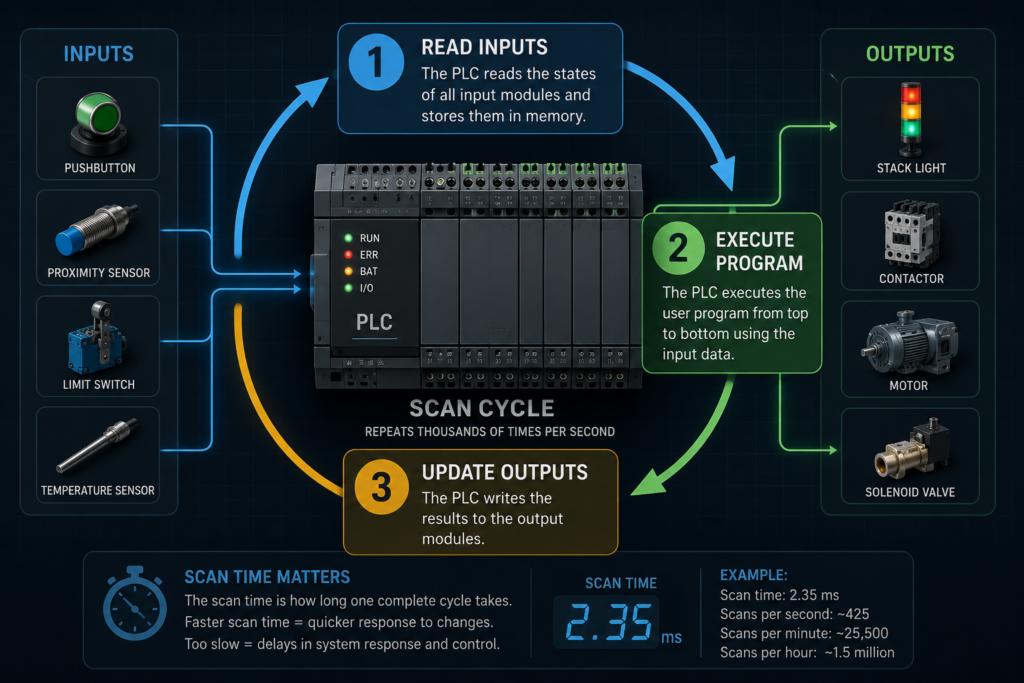
Everything a PLC does happens inside a repeating loop called the scan cycle (or scan, or program scan — same thing). One trip around that loop is one scan. And each scan has three main stages that always happen in the same order.
Read the inputs. Run the program. Update the outputs. Repeat.
Let’s take those one at a time, because the order is where all the interesting consequences live.
Stage 1: Read all the inputs — at once, up front
Before your program runs a single instruction, the PLC pauses and takes a snapshot.
It looks at every physical input terminal — every sensor, every button, every limit switch wired into the input modules — and records the current state of each one. On or off. High or low. It dumps all of that into a chunk of memory usually called the input image table (some vendors say process image, same idea). Think of it as a photograph of the entire input side of the machine, frozen at this instant.
And here’s the critical part: your program does not read the physical inputs directly. It reads the photograph. For the rest of this scan, when your ladder logic checks “is the start button pressed?”, it’s not looking at the actual button on the panel — it’s looking at what the button was the moment the snapshot got taken at the top of this scan.
Why do it this way? Consistency. If a sensor flickered halfway through your program execution, you wouldn’t want rung 3 to see it “on” and rung 40 to see it “off.” That kind of split-brain behavior would make logic almost impossible to reason about. By freezing all inputs at the start, the PLC guarantees that every rung in a given scan sees the exact same, unchanging picture of the world. Clean. Predictable.
Stage 2: Execute the program — top to bottom
Now the PLC runs your logic. Every rung, in order, from the first to the last.
As it works through the program, it reads from that input image table, does whatever your logic says — timers, counters, comparisons, math, latches — and writes its conclusions into another chunk of memory: the output image table. This is a photograph too, but of what the outputs should become. Nothing physical moves yet. The PLC is just doing the thinking, scribbling its answers into memory.
So when your rung decides “open the valve,” it doesn’t fling open the valve right then. It writes a 1 into the output image table at the valve’s address and keeps marching down the rungs.
There’s a subtle behavior baked in here that beginners bump into constantly. Because the program runs strictly top to bottom, if two different rungs write to the same output, the last one wins. Rung 10 turns a light on, rung 50 turns it off — that light is going off this scan, every time, no matter what rung 10 wanted. Order isn’t cosmetic in ladder logic. It’s causal.
Stage 3: Update the outputs — all at once
Program’s done. The PLC has a completed output image table sitting in memory — a full picture of what every output should be.
Now, and only now, it pushes that picture out to the physical world. Every output terminal gets updated to match the table in one coordinated move. Valves actuate, motors energize, indicator lamps light up. The machine physically changes state to match what the logic decided.
Then the scan ends… and instantly begins again. Snapshot the inputs, run the logic, update the outputs. Over and over.
So why the obsessive repetition?
Because the real world never holds still.
A sensor that was off a millisecond ago might be on now. A part just landed on the conveyor. An operator just slapped the e-stop. The PLC has no idea any of that happened unless it looks — and the only way to keep up with a constantly changing machine is to keep re-checking, constantly. The repetition isn’t the PLC being dumb and redundant. It’s the PLC staying perpetually current with reality.
Each scan is a fresh read of the world and a fresh decision based on it. Ten thousand times a second, the controller is asking: what’s true right now, and what should I do about it? That’s what makes a PLC responsive. Stop scanning and it’s frozen — blind to every change, outputs stuck wherever they were.
Scan time: the number that quietly matters
One full trip around the loop — read, execute, update — takes a certain amount of time. That’s your scan time, and it’s usually measured in milliseconds. A small program might scan in under a millisecond; a big, complex one might take ten or twenty.
For most machines, single-digit milliseconds is plenty fast and nobody thinks about it. But scan time is not something you can ignore forever, because it sets a hard limit on how fast your PLC can react to anything. And that leads to a genuinely important gotcha.
Your PLC cannot detect an event shorter than its scan time. Reliably, anyway.
Remember, inputs only get read once per scan, at the very top. If a signal turns on and then off again entirely between two snapshots, the PLC never sees it. It’s a tree falling in a forest with nobody scanning. Say your scan time is 8 milliseconds and a fast sensor produces a 3-millisecond pulse — there’s a real chance that pulse lands in the gap between reads and vanishes without a trace.
This is exactly the kind of bug that drives people up the wall. The machine works ninety-nine times, then drops a count on the hundredth, and you swear the sensor is fine because your meter says it’s firing. It is firing. The PLC just isn’t looking at the right instant. The signal is faster than the scan.
The fix, when you hit this, is usually one of a few things: a faster scan, a latching input, a hardware pulse-stretcher, or a high-speed counter — a dedicated input that catches fast pulses in hardware, independent of the scan cycle, precisely so encoder and flow-meter signals don’t slip through the cracks. Which is a strong hint about how common this problem is: they built special hardware just to route around it.
A few things that follow from all this
Once the scan cycle lives in your head, a bunch of PLC quirks stop being mysterious:
Output timing feels “delayed” because a change to an input can’t affect an output until the next full scan works its way through. Input, then a full lap of logic, then output. There’s always at least a scan’s worth of latency baked in.
Rung order matters because the program runs sequentially and the last write to an output wins. Move a rung and you can genuinely change behavior.
And troubleshooting with the programming software’s live view can lie to you a little — what you’re watching is the image tables updating scan by scan, not the raw electrical reality on the terminals. Usually that’s fine. Occasionally, when you’re chasing a fast signal, that distinction is the whole ballgame.
The takeaway
A PLC repeats the same scan thousands of times because a machine is a moving target, and the only way to control a moving target is to keep looking at it. Read the world, decide, act, repeat — fast enough that it feels continuous even though it absolutely isn’t.
It’s not brute-force redundancy. It’s disciplined, rhythmic re-checking, and that rhythm is what makes the whole thing dependable. Understand the three stages and the scan time between them, and you understand the heartbeat every PLC program runs on.
Everything else is just logic riding on top of that beat.