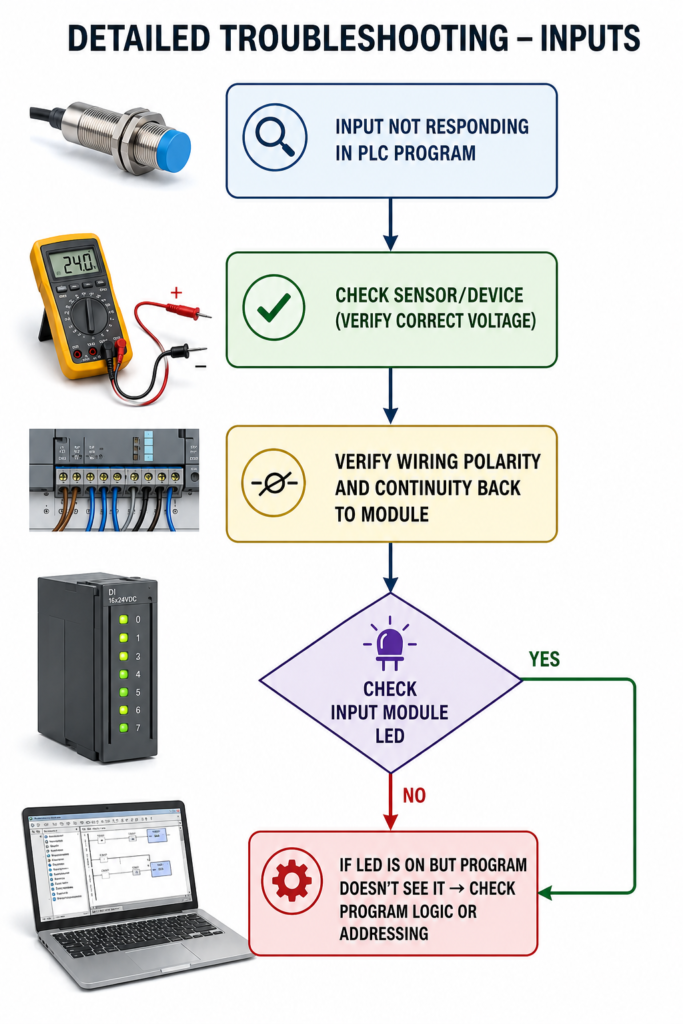
A sensor is clearly active, the indicator light is glowing, yet the PLC program stubbornly shows the input as OFF.
Annoying, yes. Unusual? Not really.
When a PLC input does not respond, the fault can usually be found somewhere between the field device and the program address. The sensor may have no power, the wiring could be damaged, the input common may be missing, or the program may simply be monitoring the wrong channel.
The quickest way to find the problem is to follow the signal from the sensor all the way to the PLC logic.
Step 1: Check the Sensor or Field Device
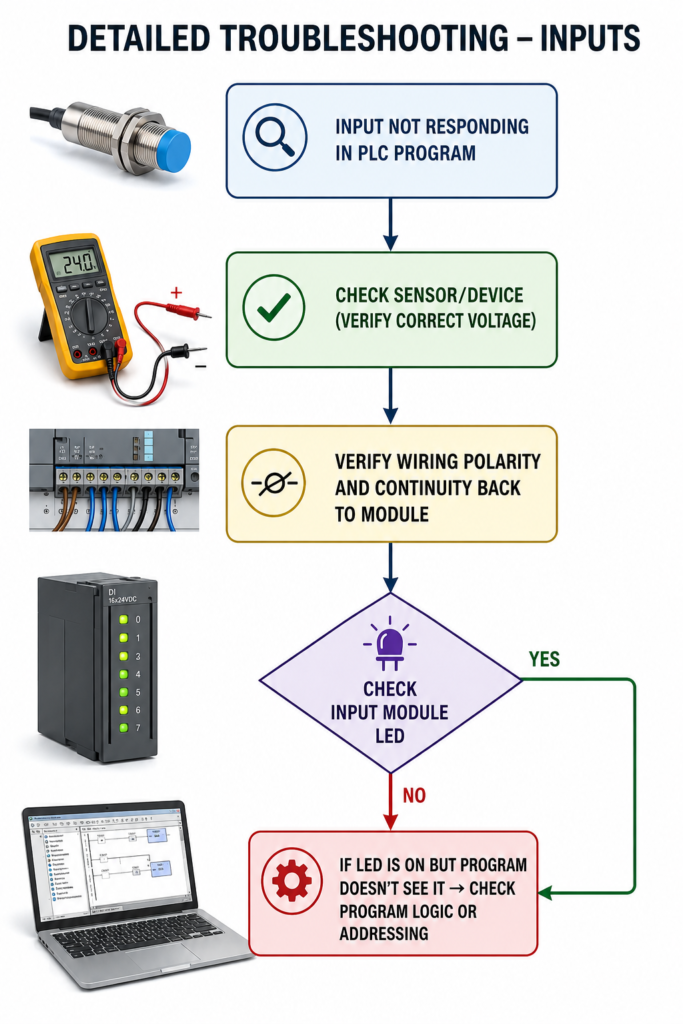
Begin at the source.
Confirm that the sensor, push button, limit switch or other field device is receiving the correct supply voltage. Many industrial sensors operate from 24 V DC, but never assume. Check the device label or wiring diagram.
Use a multimeter to measure the voltage directly at the sensor terminals.
Also inspect the sensor indicator LED. If the LED does not change when the target is detected, the problem may involve:
- Missing power
- Incorrect sensor alignment
- Wrong sensing distance
- Failed sensor
- Mechanical position problem
A sensor can be perfectly healthy but positioned a few millimetres too far away from its target.
Step 2: Test the Sensor Output
A glowing sensor LED does not always mean the output signal is working.
Measure the sensor output while activating and deactivating it. The output voltage should change according to the sensor type.
Pay attention to whether the sensor is:
- PNP or NPN
- Normally open or normally closed
- Two-wire, three-wire or four-wire
Incorrect PNP/NPN selection is a common reason why a newly installed sensor does not operate a PLC input.
A jumper can sometimes be used to test the input circuit, but only when the correct voltage and wiring arrangement are fully understood. Applying voltage to the wrong terminal can damage the input module.
Step 3: Verify Wiring and Polarity
If the sensor output is correct, trace the signal back toward the PLC.
Check:
- Terminal blocks
- Junction boxes
- Cable connectors
- Loose screws
- Broken conductors
- Damaged cable sections
- Input common connection
- Wiring polarity
Measure the signal at several points along the circuit. If voltage is present at the sensor but missing at the PLC terminal, the fault lies somewhere in the wiring path.
Moving cables deserve extra attention. Conductors inside cable chains can break internally and still work intermittently.
Step 4: Check the Input Module LED
Most digital input modules have an LED for each channel.
Activate the sensor and watch the corresponding input LED.
If the LED remains off even though the correct voltage is present at the terminal, investigate:
- Missing module common
- Wrong polarity
- Incorrect input voltage
- Faulty input channel
- Module configuration problem
A useful test is moving the signal to a known working spare channel, provided the wiring and PLC program are updated carefully.
Step 5: Check the PLC Address and Program Logic
If the module LED turns on but the program still shows no input, the physical circuit is probably working.
Now focus on the software.
Confirm that the PLC tag points to the correct:
- Rack
- Slot
- Module
- Channel
- Remote I/O station
Use the cross-reference function to see where the input tag is used. The program may be reading a different address, using an inverted instruction or copying the input through another internal tag.
Also check whether the input is being forced. A forced OFF value may override the real field signal even while the module LED is on.
Final Thoughts
PLC input troubleshooting becomes much easier when you stop guessing and follow the signal in order:
Field device → sensor output → wiring → input terminal → module LED → PLC address → program logic
The exact point where the signal disappears usually reveals the fault.
Do not replace the PLC input card simply because the program shows an OFF condition. More often, the real cause is a missing supply, loose terminal, incorrect polarity or damaged cable.
Start with the simple checks. They solve an impressive number of supposedly complicated PLC problems.