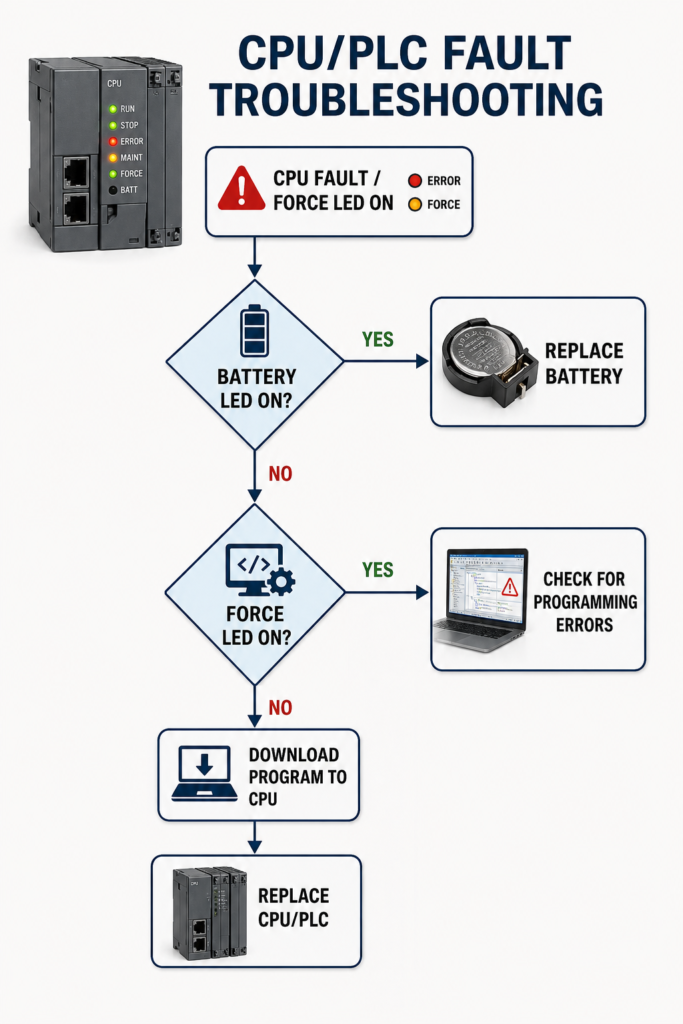
A PLC fault light does not automatically mean the CPU is damaged. Start with the simple checks before replacing expensive hardware.
First, verify the controller’s power supply directly at its terminals. Look for low voltage, loose connections, blown fuses or brief voltage drops.
Next, record all CPU LEDs and read the exact fault code using the programming software. Review the diagnostic history before clearing anything. Common causes include programming errors, watchdog timeouts, missing I/O modules, firmware mismatches and memory problems.
If the FORCE LED is on, inspect the force table. Disable and remove forces only after confirming what they control.
Also verify that the correct program is loaded and matches the CPU model, firmware and installed hardware. Do not download an old backup without comparing it first.
Reset the fault only after fixing the underlying cause. Replace the CPU last, once power, programming, memory, communication and connected modules have been ruled out.