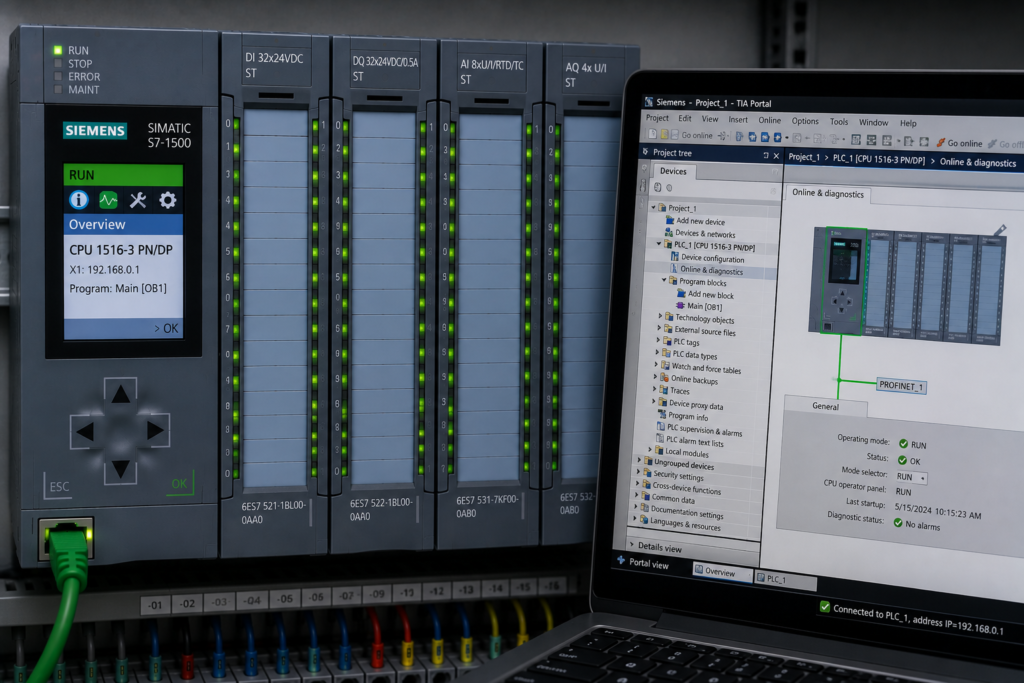
Online editing is one of the most useful capabilities available to a PLC engineer.
A programmer can change logic, correct a timer, add diagnostics or repair a sequence without shutting down the controller. During commissioning, that can save significant time and avoid repeatedly downloading the entire project.
It is also one of the easiest ways to make a live machine less predictable.
An online edit does not change an isolated piece of software sitting on a laptop. It changes the behaviour of equipment that may already contain:
- Active outputs
- Running motors
- Pressurized actuators
- Retained commands
- Partially completed sequences
- Live communication links
- Products moving through the process
A small modification can interact with all of those conditions immediately.
The greatest danger is not necessarily one bad edit. It is a series of uncontrolled edits applied while the machine state continues changing.
Why Online Edits Are Different From Offline Programming
During offline development, an engineer can:
- Review the complete program
- Compile the project
- Simulate expected behaviour
- Compare program versions
- Plan startup from a known state
- Test the change before deployment
During a live online edit, the PLC may already be halfway through a sequence.
For example:
Current state: STARTING
Motor request: TRUE
Valve feedback: FALSE
Startup timer: 4.8 seconds
Fault threshold: 5 seconds
Changing the timer, permissive or transition logic at that moment can immediately alter what happens next.
The machine does not automatically return to a clean startup condition because the program changed. Existing states, timers and retained bits may continue from their current values.
This creates a critical distinction:
New logic may begin executing with old machine state.
A Typical Unsafe Online-Edit Sequence
A common failure pattern looks like this:
Startup fault appears
↓
Timer increased online
↓
Machine advances farther
↓
Different interlock fails
↓
Second condition bypassed
↓
Sequence state manually changed
↓
Machine behaviour becomes unclear
Eventually, the machine may start.
But the recovery team may no longer know:
- Which change solved the original problem
- Which bypasses remain active
- Whether the old timer was genuinely incorrect
- Whether the sequence skipped a required condition
- Whether the offline project matches the PLC
- What will happen after the next power cycle
Production may be restored temporarily while the control architecture becomes less trustworthy.
An Edit Can Change More Than One Rung
A small visible change may have wider effects.
Depending on the PLC platform and type of modification, an online edit may affect:
- Logic execution order
- Program scan time
- Timer or counter behaviour
- State transitions
- Function-block instances
- Data initialization
- Memory layout
- Calls shared by several machines
- Communication data structures
- HMI tag compatibility
Not every online edit changes all these things. The exact behaviour depends on the controller, development environment and modification being made.
That uncertainty is precisely why edits must be controlled.
Existing Memory Does Not Automatically Match New Logic
Consider a latched run request:
Run_Request_Latched = TRUEAn engineer changes the reset conditions online.
The new logic begins executing, but the latch may remain true because it was set under the old rules.
Similarly, an active timer may retain:
- Its accumulated value
- Its done state
- Its enable state
A sequence state may also contain a numerical value that the modified program no longer expects.
For example:
Current machine state = 40Before the edit, State 40 meant:
OPENING_DISCHARGE_VALVEAfter restructuring, State 40 may be unused or may represent another operation.
Unless the transition is handled deliberately, the machine can continue from an invalid or misunderstood condition.
Stale Logic States
A stale logic state is an internal condition left over from the previous program behaviour.
Examples include:
- A latch that should no longer be active
- A timer already completed
- A one-shot memory bit in an unexpected state
- A pending start request
- A sequence step retained through the edit
- A bypass left true
- A fault acknowledgement already stored
The code may be correct for a clean startup but behave differently when introduced into a running controller containing old values.
Before activating edited logic, determine whether affected state variables must be:
- Preserved
- Cleared
- Reinitialized
- Revalidated
- Moved through a controlled recovery state
Never assume that downloading new logic automatically creates a valid machine condition.
Transition Logic Is Especially Sensitive
Sequence transitions are among the riskiest areas to change online.
Suppose the existing transition is:
State = OPENING_VALVE
AND Valve_Open_Feedback
→ State = STARTING_PUMP
During troubleshooting, an engineer changes it to:
State = OPENING_VALVE
AND
(
    Valve_Open_Feedback
    OR Valve_Bypass
)
→ State = STARTING_PUMP
If Valve_Bypass is already true, the transition may occur as soon as the edit becomes active.
The pump can start before the engineer has finished observing the logic.
A live transition edit should therefore be treated as a potential movement command.
Before applying it, verify:
- Current machine state
- Current values of every new condition
- Outputs commanded by the destination state
- Physical readiness of the equipment
- Fault and stop priorities
- How the state will be recovered if the transition is wrong
Output Ownership Changes
Editing final output logic is particularly dangerous.
A programmer may add another coil or assignment without noticing that the same output is already written elsewhere.
For example:
Automatic routine:
Motor_Output := Automatic_Run_Request;
A new maintenance edit adds:
Maintenance routine:
Motor_Output := Maintenance_Jog_Request;
The final result may depend on execution order or task structure.
A later write may override an earlier one. Set and reset instructions may compete. Separate tasks may update the same command at different times.
Before modifying an output, use cross-reference tools to identify:
- Every normal write
- Every set or reset instruction
- HMI writes
- Communication writes
- Force status
- All tasks containing the tag
Physical outputs should have one authoritative owner.
Shared Function Blocks Multiply Risk
A change to a reusable function block may affect many devices simultaneously.
An engineer troubleshooting Motor 3 may edit a shared motor-control block. The change could then affect:
- Motor 1
- Motor 2
- Motor 3
- Motors on another production area
- Instances currently running in automatic mode
Before editing a shared block, determine:
- Every active instance
- Which machines are operating
- Whether instance data remains compatible
- Whether the change affects timing or fault behaviour
- Whether all associated equipment can be monitored
A local symptom does not always justify a global online modification.
Online Edits Can Alter Scan Behaviour
Adding logic usually adds some execution work.
One small contact or comparison may have negligible impact. Larger changes involving loops, communications, string handling, data logging or complex calculations can increase task execution time.
This matters when the program depends on:
- One-scan pulses
- Short HMI commands
- High-speed transitions
- Tight watchdogs
- Time-sensitive communication
- Interrupt-task scheduling
The controller may remain within its cycle-time limit while still changing when asynchronous signals are observed.
After significant edits, monitor:
- Current scan time
- Maximum scan time
- Task utilization
- Watchdog margins
- Communication loading
- Missed or delayed transitions
Do not judge performance only by whether the CPU remains in RUN.
Temporary Logic Frequently Becomes Permanent
Commissioning edits are often introduced with comments such as:
TEMPORARY TEST
REMOVE AFTER STARTUP
The machine begins working, production resumes and attention moves elsewhere.
The temporary logic remains.
Over time:
- Operators depend on it.
- Future programmers assume it is required.
- The original fault becomes forgotten.
- The official backup may not include it.
- Removing it becomes risky.
Temporary logic should include a formal removal condition.
Record:
Purpose
Date added
Engineer
Affected machine
Test performed
Required removal time
Rollback method
Before handover, search the entire project for:
- TEMP
- TEST
- BYPASS
- FORCE
- IGNORE
- SIMULATION
- DISABLE
- COMMISSIONING
Comments alone are not enough. Temporary changes need ownership.
One Controlled Change at a Time
When several edits are applied together, cause and effect disappear.
Unsafe approach:
Increase timer
Add bypass
Change reset logic
Move sequence step
Restart machine
If the machine starts, nobody knows which edit mattered.
A disciplined approach is:
Capture current behaviour
↓
Form one hypothesis
↓
Define expected result
↓
Apply one controlled edit
↓
Repeat the same test
↓
Record the result
↓
Keep or roll back
When a change does not produce the expected behaviour, restore the baseline before testing a new theory.
Do not build a second speculative edit on top of a failed first edit.
Define Rollback Before Applying the Edit
A rollback plan is not something to invent after the machine becomes unstable.
Before modifying the live controller, know:
- What the original logic was
- Where the verified backup is stored
- Whether retained data must be preserved
- Whether the rollback requires CPU stop
- What machine state is required
- Which outputs may change
- How the restored logic will be tested
- Who authorizes the rollback
A screenshot of one rung is not a complete rollback plan.
The saved baseline should reflect the actual running system, including relevant hardware configuration, data blocks and device parameters.
Establish the Correct Project Baseline
Industrial sites often contain several versions of the same PLC project:
- Official server backup
- Engineer’s laptop copy
- Uploaded project from the controller
- Commissioning version
- Production version
- Vendor copy
- Maintenance copy
Before applying online edits, establish which version matches the live controller.
Otherwise, an engineer may modify an outdated project and accidentally overwrite newer logic during download.
Use project comparison tools where available and record:
- PLC program version
- Project timestamp
- Online/offline differences
- Firmware versions
- Hardware configuration
- HMI and drive versions
Version confusion can turn a minor logic correction into a major plant outage.
Record Every Modification
An online-edit log should include:
| Item | Information |
|---|---|
| Time | When the edit was applied |
| Engineer | Who made it |
| Block | Program block or routine changed |
| Original logic | Previous condition or value |
| New logic | Exact modification |
| Reason | Fault or hypothesis being tested |
| Expected result | Predicted machine behaviour |
| Actual result | What happened |
| Rollback | How the original state is restored |
| Status | Temporary, approved or removed |
This record is especially important during shift handover.
The incoming team should never have to guess which live changes remain in the PLC.
Verify the Current Machine State First
Before applying an edit, record:
- Current state
- Previous state
- Active mode
- Pending requests
- Active commands
- Output feedback
- Fault status
- Active timers
- Retained latches
- Forces and bypasses
A safe edit in the READY state may be unsafe in RUNNING or RECOVERY.
For example, modifying the logic for opening a valve may have no immediate effect while the machine is stopped. The same edit can energize the valve instantly if the current state already requests it.
Validate New Conditions Before Activation
When adding a contact or condition, check its current value.
Suppose the edit changes:
Start_Permissive :=
    Drive_Ready
    AND Pressure_Healthy;
to:
Start_Permissive :=
    Drive_Ready
    AND Pressure_Healthy
    AND Downstream_Ready;
If Downstream_Ready is currently false, the active command may drop immediately.
Likewise, removing a false condition may energize an output immediately.
Before activating the edit, evaluate both outcomes:
- What happens if the new condition is true?
- What happens if it is false?
Never Edit Around an Unverified Field Fault
An online change should not be used to compensate for a condition that has not been physically verified.
Before rewriting a permissive, confirm:
- The field device state
- Input-module status
- Wiring condition
- Communication health
- Data validity
- Mechanical position
- Actual process condition
A valve-open input that remains false may indicate:
- Misaligned switch
- Broken wire
- Low air pressure
- Stuck valve
- Delayed remote I/O
- Incorrect PLC address
Removing the interlock may allow operation without repairing any of these causes.
Test From a Controlled State
After applying an edit, avoid immediately resuming full production.
Where practical, return the machine to a known state such as:
STOPPED
READY
RECOVERY_REQUIRED
Then:
- Validate safety status.
- Confirm forces and bypasses.
- Check startup permissives.
- Verify field positions.
- Issue one deliberate start request.
- Monitor every affected transition.
- Confirm output feedback.
- Test normal stopping.
The change should be evaluated through the complete sequence it affects.
Monitor Transitions After the Edit
Do not focus only on whether the machine reaches RUNNING.
Monitor:
- Current and next state
- Transition reason
- Time in state
- Permissives
- Timeout conditions
- Output commands
- Field feedback
- First-out faults
- Scan time
A machine that eventually starts may still:
- Skip a state
- Momentarily energize the wrong output
- Depend on an old latch
- Fail during the next restart
- Use an active bypass
Successful production output does not prove correct sequence behaviour.
Test Abnormal Conditions
An edit is incomplete until relevant abnormal behaviour is checked.
Depending on the change, test:
- START before readiness
- STOP during transition
- Communication loss
- Feedback arriving late
- Timeout
- Fault and reset together
- Power recovery
- Mode change
- HMI reconnection
- Missing field feedback
The edit may solve the normal cycle while making fault recovery less predictable.
Remove Temporary Logic Immediately
Once a controlled test is complete:
- Remove the temporary condition.
- Remove all test forces.
- Confirm bypasses are inactive.
- Restore temporary timer changes.
- Repeat the normal sequence.
- Compare online and offline projects.
- Save the approved final version.
Do not wait until the end of a long commissioning shift. Temporary logic becomes easier to forget with every additional change.
Use Peer Review for High-Risk Changes
A second engineer should review online changes that affect:
- Physical outputs
- Safety-system interfaces
- Restart behaviour
- Sequence states
- Shared function blocks
- Communication structures
- Retentive memory
- Fault recovery
The reviewer should check:
- Current machine state
- Logic difference
- Potential immediate outputs
- Rollback plan
- Test procedure
- Active forces and bypasses
A brief independent review can catch mistakes created by fatigue or tunnel vision.
Safety Functions Require Separate Discipline
Online editing of standard PLC logic must not be used to defeat or imitate required safety functions.
Changes affecting emergency stops, guard monitoring, safe motion or prevention of unexpected startup may require:
- Authorized safety personnel
- Validated safety software procedures
- Formal change control
- Safety-function testing
- Updated documentation
- Risk assessment review
A normal PLC permissive is not equivalent to a safety-rated function.
Production pressure does not reduce the required validation.
A Practical Online-Edit Procedure
Before the edit
- Confirm personnel and machine safety.
- Freeze unrelated changes.
- Capture the current state and alarms.
- Review forces and bypasses.
- Save the current running baseline.
- Define one hypothesis.
- Document the proposed edit.
- Prepare rollback.
- Identify potentially affected outputs and instances.
During the edit
- Keep the machine in the safest practical state.
- Apply one controlled modification.
- Confirm the intended edit became active.
- Watch scan time and controller diagnostics.
- Monitor affected states, commands and feedback.
- Stop immediately if behaviour differs from prediction.
After the edit
- Repeat the test from a known state.
- Test relevant abnormal conditions.
- Remove temporary logic.
- Confirm no forces remain.
- Compare online and offline projects.
- Save and version the approved program.
- Record the final result.
- Communicate the change during handover.
Warning Signs That Online Work Is Becoming Uncontrolled
Pause the recovery when:
- Several edits are pending simultaneously.
- Nobody can list all active forces.
- The offline project no longer matches the PLC.
- Temporary logic has no owner.
- Engineers are modifying the same system from different laptops.
- The current machine state is unclear.
- The rollback version is uncertain.
- An edit produced unexpected movement.
- Another edit is proposed before the first was evaluated.
- Operators are repeatedly trying to start the machine between changes.
These conditions indicate that the troubleshooting baseline has been lost.
Final Thoughts
Online PLC edits are not inherently unsafe.
Uncontrolled online experimentation is.
A disciplined edit can correct a well-understood problem while preserving production availability. A rushed series of changes can hide the original fault, create stale state, alter sequence behaviour and leave the machine dependent on temporary logic.
Before every live modification, define:
- The evidence
- The hypothesis
- The expected result
- The machine state
- The affected outputs
- The rollback method
- The validation test
Make one change at a time.
Monitor the complete transition—not just the final result.
Remove temporary logic as soon as the test is finished.
The purpose of an online edit is not merely to make the machine move again. It is to restore behaviour that remains predictable after the engineer disconnects, the PLC restarts and the plant returns to normal operation.