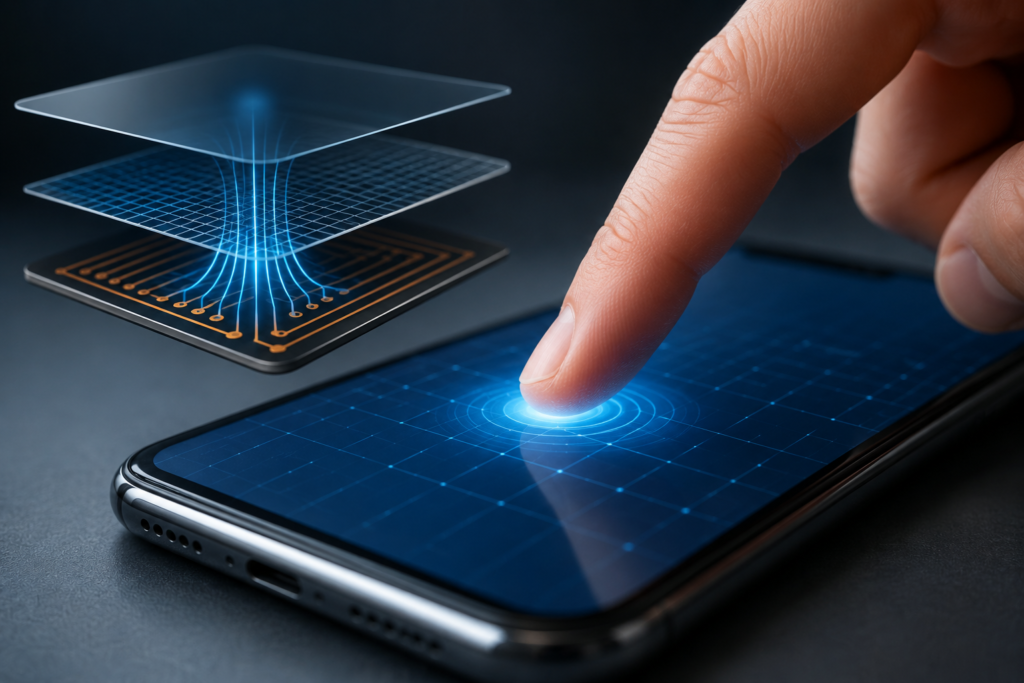
You’ve done it thousands of times today already. Tapped, swiped, pinched, scrolled. Your finger lands on a slab of glass and something underneath just knows — to within a fraction of a millimeter — exactly where you touched. No buttons. No moving parts. Just glass.
It feels like magic. It isn’t. It’s physics, and honestly, it’s the kind of physics that’s a lot simpler than the result makes it look.
The short version: your finger is slightly conductive, the screen is constantly measuring tiny amounts of stored electrical charge across a grid, and the spot where those measurements dip is the spot you’re touching. That’s the whole trick. Everything below is just filling in the details.
First, forget the old kind of touchscreen
Before we talk about the screen in your pocket, it helps to know what it isn’t.
Older touchscreens — think ATMs from fifteen years ago, supermarket self-checkout machines, the GPS unit that came bolted into a 2009 car — mostly used resistive sensing. Two flexible layers with a thin gap between them. Press down, the layers touch, a circuit completes at that point, and the controller figures out the location from the resistance. Simple, cheap, works with a gloved hand or a stylus or a pencil eraser.
But resistive screens have a tell: you have to actually push. There’s a bit of give, a soft squish. And they can’t do the multi-finger stuff — try pinch-to-zoom on an old GPS and nothing happens.
The screens we’re actually here to talk about work differently. They don’t care about pressure at all. You could rest your finger on the glass featherlight and it still registers. These are capacitive touchscreens, and to understand them you need one idea from physics class that you may or may not have slept through.
The one concept that makes it all click: capacitance
Here’s the idea, stripped down.
A capacitor is just two conductors sitting near each other with an insulator in between. That’s it. Two bits of metal, some empty space or non-conductive material separating them. When you apply voltage, one side collects positive charge, the other collects negative charge, and the arrangement can store a little bit of that charge. How much it can store is called its capacitance.
Think of it like a tiny reservoir for electricity. Not a big one — we’re talking incredibly small amounts — but measurable. Very, very measurable if you build the right circuit.
Now here’s the part that matters for touchscreens: capacitance changes when something conductive comes near. You don’t even have to make contact. Bring a conductor close to a capacitor and you change how much charge that little reservoir holds. The field between the two conductors gets disturbed, and the stored charge shifts.
Guess what’s conductive and tends to hover near your phone all day?
You are basically a bag of salt water
Your body is mostly water, and not pure water either — it’s loaded with dissolved salts. Sodium, potassium, chloride, all of it dissolved into ions that carry electrical charge around. That makes you a decent conductor. Not as good as a copper wire, but far better than glass or plastic or air.
So when your fingertip approaches the screen, from the capacitor’s point of view, a conductor just walked into the room. The electric field notices. The stored charge changes. And a chip somewhere in your phone, sampling that charge hundreds of times per second, sees the change and goes: something’s touching here.
This is also why — and you’ve definitely run into this — your touchscreen ignores you when you’re wearing regular gloves. Wool and leather don’t conduct. Your finger’s still there, but electrically speaking the screen can’t feel it, because the conductive part of you is now wrapped in an insulator. Those “touchscreen gloves” that actually work? They’ve got conductive thread woven into the fingertips to bridge the gap. Little strands that let your body’s charge reach the glass.
Same reason a plastic pen won’t work but your knuckle will. The screen isn’t detecting touch in the way we normally mean it. It’s detecting conductivity. Anything conductive enough and close enough will do — which is a fun thing to test. Try tapping your screen with a metal spoon sometime. It works. Weird, right?
Okay, but where is the finger? The grid.
Detecting that a touch happened is one thing. Pinpointing where is the actual engineering.
Picture a grid. Underneath the glass, there’s a layer of transparent conductive material — usually indium tin oxide, ITO, which is special because it conducts electricity while staying see-through — laid out in two sets of lines. One set runs horizontally (rows), the other runs vertically (columns). They don’t touch each other; there’s a thin insulating layer keeping them apart. Where a row crosses a column, you’ve got a tiny capacitor. Thousands of them, all across the screen.
The controller chip does something clever here. It doesn’t just wait passively. It actively drives a small voltage down each column, one at a time, and measures what shows up on every row. At each intersection — each little crossing point — there’s a known, baseline amount of capacitance. The chip has memorized what “no touch” looks like for every single node.
Then your finger arrives.
At the intersections nearest your fingertip, some of that charge gets pulled away toward you instead of staying in the grid. The measured capacitance at those specific crossing points drops. The chip scans the whole grid — every row against every column — sees which intersections dropped and by how much, and reconstructs the location. Row 14, column 22 dipped hardest? That’s your finger.
This scanning happens absurdly fast. The whole grid gets read out something like 60 to 120 times every second, which is why dragging feels instant and smooth. There’s no lag between your finger moving and the cursor following because the screen is essentially re-measuring the entire surface faster than your eye can perceive.
The math trick that makes it feel precise
Here’s a detail I love, because it shows how software rescues hardware.
The grid isn’t actually that fine. The intersections might be spaced a few millimeters apart — much coarser than the pixel-perfect precision you feel when you’re typing. So how does a chunky grid give you fine control?
Interpolation. Your finger is bigger than a single grid node, so it disturbs several neighboring intersections at once — strongly at the center, weaker at the edges. The controller looks at the pattern of those changes and calculates a weighted center point, a kind of electrical center of gravity. If node A dropped a lot and node B next to it dropped a little, your actual finger position is mathematically closer to A. The chip does this in real time and lands on a precise coordinate that sits between the physical grid lines.
So the perceived resolution is way higher than the physical resolution. Clever software squeezing accuracy out of modest hardware — which, if you’ve done any kind of embedded or automation work, is a pattern you’ll recognize everywhere.
Two flavors: self and mutual capacitance
Quick note, because you’ll bump into these terms if you ever dig deeper.
Self-capacitance measures the capacitance of each row and each column relative to ground. It’s sensitive and simple, but it has a famous weakness — put two fingers down and it can get confused about which row-and-column combos are real. It sees “rows 3 and 8 active, columns 2 and 9 active” and can’t always tell whether you touched at (3,2) and (8,9) or at (3,9) and (8,2). Ghost points.
Mutual capacitance measures each individual intersection, row-against-column, one node at a time. It’s slower to scan but it knows exactly which crossing points changed. This is what unlocks reliable multi-touch — the pinch, the two-finger rotate, the ten-finger piano app. Modern phones lean on mutual capacitance for precisely this reason.
Why this matters beyond your phone
I’ll wrap it here, but I want to zoom out for a second, because this isn’t just consumer-gadget trivia.
Capacitive sensing shows up all over industrial and automation work. Capacitive proximity sensors detect whether a product is present on a conveyor without ever touching it — and they’ll sense liquids and powders through the walls of a tank or pipe, which mechanical switches simply can’t do. The exact same principle — a conductor changing a stored charge — gets used to sense liquid level, to detect a part in a fixture, to build buttons with no moving parts that survive being hosed down in a filthy factory. HMI touch panels on the plant floor are running the same grid-scanning logic as the phone in your pocket, just built tougher.
Same physics. Wildly different jobs.
So the next time you unlock your phone without a second thought, spare a moment for what’s happening under the glass. A grid of thousands of invisible capacitors, sampled a hundred times a second, watching for the exact moment a bag of salt water drifts close enough to steal a little charge. Then some quiet math turns that theft into a coordinate.
Not magic. Just physics that happens to be very, very good at its job.