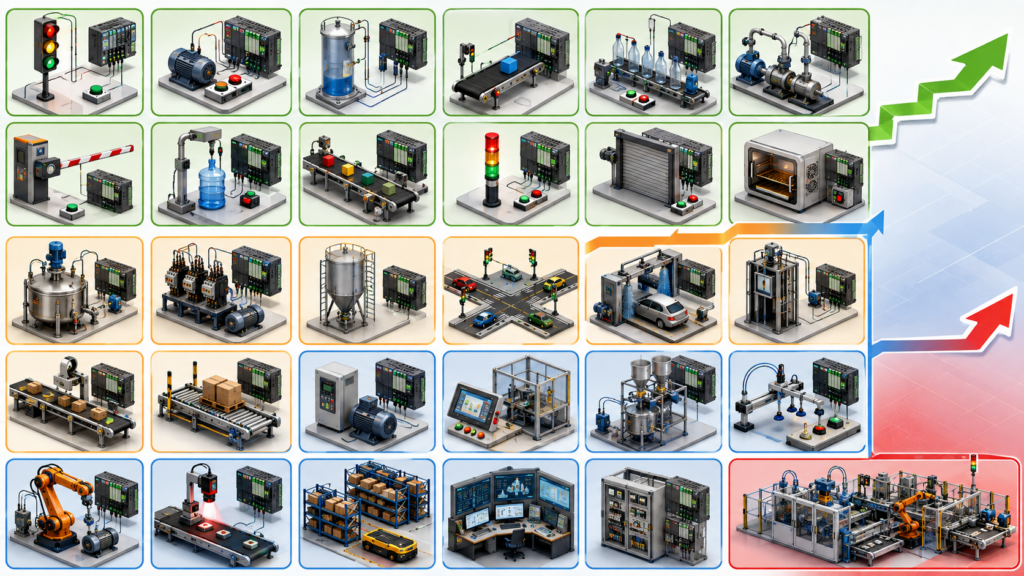
PLC projects are one of the best ways to learn industrial automation. Reading about ladder logic, timers, counters, sensors, and motor control is useful, but real understanding comes from building a sequence, testing it, finding faults, and improving the program.
A student project does not need an expensive industrial machine. Many ideas can be completed using PLC simulation software, pushbuttons, indicator lamps, small 24 V DC sensors, relays, or a basic training panel.
The projects below are arranged by difficulty. Beginner projects focus on basic logic. Intermediate projects introduce sequencing, analog signals, alarms, and operator controls. Advanced projects combine multiple systems, communication, data handling, and fault recovery.
Always use safe low-voltage equipment when possible. Motor circuits, heaters, pneumatic cylinders, and mains voltage should only be used under qualified supervision.
Beginner PLC Projects
1. Start-Stop Motor Control
Create a basic motor-control program with start and stop pushbuttons. Use a holding contact so the motor remains on after the start button is released.
This teaches sealing logic, normally open and normally closed contacts, and basic output control.
2. Traffic Light Controller
Program a set of red, yellow, and green traffic lights using timers. The lights should follow a repeating sequence.
A second version can include pedestrian lights and a crossing request button.
3. Automatic Room Lighting
Use a simulated motion sensor and light sensor to control a lamp. The lamp should switch on only when motion is detected and the room is dark.
Add a timer so the lamp remains on briefly after motion stops.
4. Water Tank Level Control
Simulate a tank with low-level and high-level sensors. Start a pump when the water reaches the low level and stop it at the high level.
Add protection to prevent the pump from running if the source tank is empty.
5. Conveyor Start and Stop
Create a simple conveyor system with start, stop, and emergency-stop inputs. Add a lamp showing whether the conveyor is running.
This project introduces basic machine-control structure and status indication.
6. Product Counter
Use a photoelectric sensor input to count products passing along a conveyor. Display or store the total count.
Add a reset button and a preset target that stops the conveyor when the required quantity is reached.
7. Parking Garage Counter
Use one sensor for vehicles entering and another for vehicles leaving. Calculate how many parking spaces are occupied.
Turn on a “full” indicator when the maximum capacity is reached.
8. Two-Hand Control Simulation
Require two pushbuttons to be pressed within a short time before activating an output.
This project demonstrates timing comparisons and simultaneous input conditions. It should remain a training exercise and must not be used as a real machine safety function.
9. Automatic Door Controller
Use open and close sensors to simulate an automatic sliding door. The door should open when a person is detected, remain open for several seconds, and then close.
Add logic to reopen the door if an obstruction is detected.
10. Simple Alarm System
Monitor several simulated fault inputs, such as high temperature, low pressure, and open guard.
Activate a buzzer and warning light when a fault occurs. Add an acknowledge button to silence the buzzer without removing the fault indication.
Intermediate PLC Projects
11. Conveyor Sorting System
Use sensors to identify products and direct them into different lanes using pneumatic pushers or simulated outputs.
The program should track each product from detection to the correct sorting position.
12. Automatic Bottle-Filling System
Create a sequence that detects a bottle, stops the conveyor, opens a filling valve, waits for the required filling time, closes the valve, and restarts the conveyor.
Add a timeout alarm if no bottle arrives.
13. Washing Machine Sequence
Program filling, washing, draining, rinsing, and spinning stages.
Use timers, level sensors, a door interlock, and selectable washing programs.
14. Elevator Controller
Build a two- or three-floor elevator simulation. Include floor buttons, position sensors, door controls, and travel direction.
The elevator should respond to requests and prevent movement when the door is open.
15. Star-Delta Motor Starter
Program the sequence for a star-delta starter. The motor should start in star, wait for a set time, switch off briefly, and then run in delta.
Include electrical interlocking logic to prevent star and delta contactors from turning on together.
16. Lead-Lag Pump Control
Control two pumps that alternate as the primary pump after each cycle.
Start the second pump if demand is too high or if the primary pump fails. Track operating hours for both pumps.
17. Temperature Control System
Read a simulated analog temperature value and control a heater or fan.
Start with simple on-off control using high and low limits. Later, replace it with PID control.
18. Recipe-Based Mixing Tank
Create several recipes with different filling, mixing, and draining times.
Allow the operator to choose a recipe from an HMI or selector switch before starting the batch.
19. Production Target and Shift Counter
Count completed products and compare the actual output with a production target.
Calculate remaining quantity and display whether production is ahead of or behind target.
20. Fault History and Alarm Reset
Create an alarm system that records which fault happened first.
Use separate conditions for active, acknowledged, and reset alarms. This project introduces structured fault management rather than simple warning lamps.
Advanced PLC Projects
21. Multi-Conveyor Tracking System
Track products as they move across several conveyors.
The PLC should know which conveyor section contains each product, even when sensors are spaced far apart. Add jam detection and controlled restart logic.
22. Automated Warehouse Simulation
Create a storage system that places and retrieves products from numbered locations.
The program should remember occupied spaces, reject invalid requests, and prevent two movements from using the same equipment simultaneously.
23. Batch Process Control
Simulate a complete batch process with ingredient filling, weighing, mixing, heating, cooling, and discharge.
Include recipe selection, operator permissions, alarms, pause-and-resume functions, and batch completion records.
24. PLC and HMI Machine Simulator
Develop a complete machine interface with operating modes, manual controls, alarm pages, settings, maintenance counters, and production statistics.
The PLC program should support manual, automatic, setup, and fault states.
25. PID Flow or Pressure Control
Use a simulated analog process value to control a valve, pump speed, or fan speed.
Add adjustable PID parameters, high and low alarms, manual output control, and bumpless switching between manual and automatic operation.
26. Predictive Maintenance Counter
Monitor motor starts, operating hours, temperatures, vibration values, or overload events.
Generate maintenance warnings based on accumulated use rather than waiting for a failure.
27. Energy Monitoring System
Collect simulated voltage, current, power, and energy values from several machines.
Calculate daily energy use, identify the largest loads, and generate an alarm when consumption exceeds a chosen limit.
28. PLC Communication Project
Connect two PLCs or simulated controllers using PROFINET, EtherNet/IP, Modbus TCP, or another industrial protocol.
Exchange start commands, production values, status bits, and fault information. Add communication-loss detection and safe fallback behaviour.
29. Remote SCADA Monitoring System
Build a small SCADA application that monitors several simulated machines.
Display operating status, alarms, trends, production data, and energy use. Add user accounts with different access levels.
30. Complete Automated Production Line
Combine multiple stations into one project, such as feeding, processing, inspection, sorting, and packaging.
Each station should have its own control sequence while communicating with the rest of the line. Include automatic operation, manual mode, alarm handling, product tracking, emergency-stop status, maintenance counters, and controlled restart after a fault.
This project can serve as a final college assignment or portfolio demonstration because it combines most major PLC programming skills.
How to Choose the Right PLC Project
Choose a project that is slightly above your current ability.
A beginner should focus on reliable start-stop logic, timers, counters, interlocks, and simple sequences. An intermediate student should work with analog values, operating modes, alarms, and HMI screens. An advanced student should practise communication, data handling, modular programming, fault recovery, and system architecture.
Do not make the project unnecessarily large. A small machine that works correctly is more impressive than a huge simulation filled with unfinished features.
Your project should include more than code. Create an I/O list, sequence description, electrical diagram, alarm list, operating instructions, and test checklist. Save several software revisions and document what changed.
These supporting documents make the project look much closer to real industrial work.
What Makes a PLC Project Valuable to Employers
Employers are rarely impressed by a program that only turns a lamp on and off. They want to see how you approach real machine problems.
A strong student project should demonstrate:
- Clear and organised logic
- Safe output conditions
- Manual and automatic modes
- Alarm handling
- Sensor timeout detection
- Interlocks
- Operator controls
- Useful comments and tag names
- Fault recovery
- Proper documentation
During an interview, be prepared to explain why you designed the program in a particular way. Mention problems you encountered, tests you performed, and improvements you would make in a real machine.
The project does not need to use the same PLC brand as the employer. Siemens, Allen-Bradley, Beckhoff, Schneider, Mitsubishi, Omron, and CODESYS systems have different software environments, but the core principles of sequencing, interlocking, troubleshooting, and safe control remain transferable.
The best PLC project is not necessarily the most complicated one. It is the project you can fully explain, demonstrate, troubleshoot, and improve.