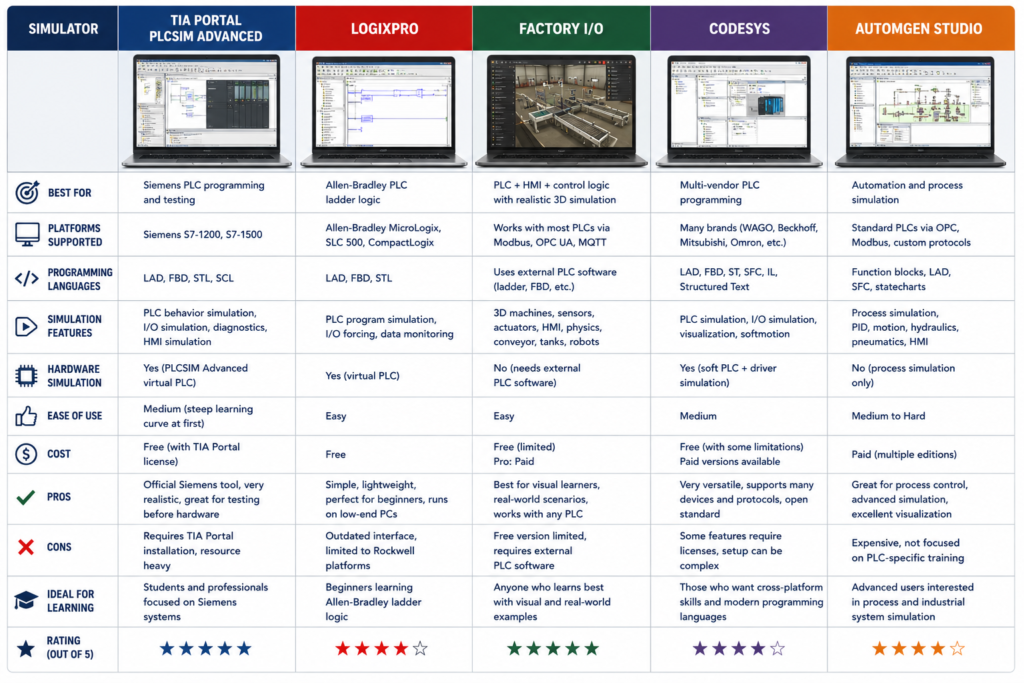
You do not need physical PLC hardware to begin learning PLC programming.
A simulator can teach you:
- Ladder logic and Structured Text
- Timers, counters and comparisons
- Program structure
- Sequences and state machines
- Alarm handling
- Analogue scaling
- HMI interaction
- Online monitoring and debugging
What it cannot fully teach is field wiring, electrical noise, damaged sensors, network cabling or the mild panic caused by downloading software to a machine that costs more than your house.
The best simulator depends on the PLC platform used by employers in your area.
Quick Simulator Comparison
| Simulator | Best for | Cost or access | Main limitation |
|---|---|---|---|
| Siemens TIA Portal with S7-PLCSIM | Siemens-focused careers | Time-limited trial or paid licence | Large installation and limited trial period |
| Rockwell CCW with Micro800 Simulator | Free Rockwell-style practice | Free Standard edition | Not the same as ControlLogix and Studio 5000 |
| Studio 5000 with Logix Echo | Professional ControlLogix practice | Commercial, with trial options | Expensive and less accessible to beginners |
| CODESYS | Best free general-purpose option | Free IDE with demo SoftPLC | Not identical to one specific PLC manufacturer |
| Beckhoff TwinCAT 3 | Structured Text and PC-based control | Free engineering download with renewable trials | Steeper setup and engineering environment |
| OpenPLC | Open-source and cross-platform learning | Free and open source | Less representative of major proprietary platforms |
| Factory I/O | Visual machine simulation | Paid, with 30-day trial | Usually needs a PLC simulator alongside it |
Siemens TIA Portal and S7-PLCSIM
For someone targeting automation jobs in continental Europe, Siemens is usually the most practical first platform.
TIA Portal is used to configure and program Siemens controllers, while S7-PLCSIM runs a simulated controller on the computer. This allows you to download a project, switch the virtual CPU into RUN and monitor the program without owning an S7-1200 or S7-1500.
Siemens provides time-limited trial packages containing STEP 7, WinCC and S7-PLCSIM. The latest TIA Portal V21 trial package was released with corresponding simulation tools, while S7-PLCSIM Advanced V8 is available for more advanced virtual-controller and external-simulation work.
Best for
- Siemens S7-1200 and S7-1500 learning
- TIA Portal job preparation
- Ladder, FBD and SCL practice
- HMI projects using WinCC
- Learning Siemens project structure and diagnostics
Limitations
The software requires a reasonably capable Windows computer and a substantial installation. The trial period also means you should prepare a learning plan before activating it rather than spending the first week deciding what to program.
S7-PLCSIM is the strongest option when Siemens appears repeatedly in local vacancies.
Connected Components Workbench and Micro800 Simulator
Rockwell Automation offers a more accessible beginner option through Connected Components Workbench, normally shortened to CCW.
The Standard edition is available as a free download and includes a demo version of the Micro800 Simulator. It supports controller programming, simulation, configuration and basic HMI development. The free simulator can remain in RUN mode for ten minutes at a time, while the paid Developer edition extends simulation sessions.
Best for
- Basic Rockwell-style programming
- Ladder Diagram, Structured Text and Function Block Diagram
- Micro800 controller concepts
- Tags, user-defined function blocks and online monitoring
- Beginners who cannot access Studio 5000
Important limitation
Micro800 and CCW are not the same as ControlLogix and Studio 5000.
The general programming concepts transfer, but the software organisation, controller architecture and professional workflow differ. CCW is a useful starting point—not a complete substitute for ControlLogix experience.
Studio 5000 and FactoryTalk Logix Echo
For realistic Allen-Bradley ControlLogix practice, the professional combination is Studio 5000 Logix Designer with FactoryTalk Logix Echo.
Logix Echo emulates supported Logix controllers so application code can be tested without physical hardware. Rockwell also continues to offer Studio 5000 Logix Emulate, although Logix Echo is the newer virtualisation platform aimed at controller emulation and digital-twin integration.
Best for
- ControlLogix and CompactLogix career preparation
- Existing Rockwell users
- Professional code testing
- Integration with machine or digital-twin simulations
- Practising genuine Studio 5000 workflows
Limitations
This route is difficult to recommend as the first home option because licences are commercial and access can be expensive. It makes more sense when your employer, school or training provider supplies the software.
For a zero-budget learner, start with CCW and move to Studio 5000 when access becomes available.
CODESYS
CODESYS is arguably the best all-round option for someone who wants to practise serious PLC programming without committing to one expensive manufacturer.
The CODESYS Development System can be downloaded free of charge. Its installation includes a demo version of CODESYS Control Win SL, which turns a Windows computer into a SoftPLC. Without a purchased runtime licence, the controller operates with full functionality for two hours before stopping; it can be restarted for another session.
Best for
- Ladder Diagram
- Structured Text
- Function Block Diagram
- Sequential Function Chart
- Reusable function blocks
- Visualisation
- OPC UA and communication experiments
- General IEC-style programming skills
CODESYS is used as the basis for controllers from numerous manufacturers, so the experience is more industrially relevant than a simplified educational ladder simulator.
Its main weakness is that it will not teach the exact workflow of Siemens TIA Portal or Rockwell Studio 5000.
Beckhoff TwinCAT 3
TwinCAT turns a Windows computer into a software-based control system and is particularly strong for Structured Text, motion concepts and PC-based automation.
TwinCAT engineering and runtime components can be downloaded free of charge. Beckhoff allows renewable seven-day trial licences to be generated for runtime functions, making repeated home practice possible without permanent hardware.
Best for
- Beckhoff-focused job markets
- Structured Text
- Object-oriented PLC programming
- EtherCAT concepts
- Motion-control architecture
- PC-based automation
Limitations
TwinCAT can feel more like a full engineering environment than a beginner simulator. Installation, runtime configuration and the relationship between the engineering computer and target system take time to understand.
It is excellent once basic PLC logic is already familiar.
OpenPLC
OpenPLC provides a free, open-source route into IEC-style PLC programming. The current OpenPLC platform offers an editor and Runtime v4 for Windows, macOS and Linux. The older Runtime v3 repository reached end of life in April 2026, so new learners should avoid tutorials built around that obsolete version.
Best for
- Linux or macOS users
- Open-source projects
- Basic Ladder and Structured Text
- Raspberry Pi or microcontroller experiments later
- Learners interested in how a PLC runtime works
Limitations
OpenPLC teaches useful principles, but employers asking for Siemens, Rockwell or Beckhoff experience will still expect knowledge of their specific engineering environments.
Use it to learn logic—not to claim professional experience with another manufacturer.
Factory I/O
Factory I/O is different from the other options.
It simulates the physical machine rather than only the PLC. You can watch conveyors move, sensors detect boxes, cylinders extend and products travel through a process.
It can connect to PLC simulators and common industrial communication systems. A 30-day full-feature trial is available, and the current product supports integrations including Siemens simulation, CODESYS, Modbus and OPC. The Starter edition also includes a basic internal PLC simulator.
Factory I/O is valuable because it exposes weak sequence logic.
A motor output turning on in a tag table looks successful. A virtual conveyor repeatedly crushing boxes makes the programming error harder to ignore.
Which One Should You Choose?
Use this decision:
- Targeting Siemens jobs: TIA Portal and S7-PLCSIM
- Targeting Allen-Bradley jobs with no budget: CCW and Micro800 Simulator
- Already have Rockwell software access: Studio 5000 and Logix Echo
- Want the strongest free general option: CODESYS
- Targeting Beckhoff or advanced Structured Text: TwinCAT 3
- Need free cross-platform software: OpenPLC
- Want realistic visual machinery: Add Factory I/O
Do not install six platforms and complete one start/stop circuit in each.
Choose one environment and build increasingly complete projects.
What to Practise
Start with a motor-control project, then add:
- Start, stop and seal-in logic
- Manual and automatic modes
- Motor-running feedback
- Failed-start timeout
- Overload alarm
- Sensor sequence
- Jam detection
- Alarm acknowledgement
- Runtime accumulation
- Power-recovery behaviour
After that, build:
- A conveyor system
- Duty and standby pumps
- A tank-filling process
- Traffic barriers
- A packaging sequence
- A simple batch process
Test faults deliberately. A program that works only when every sensor behaves perfectly is not finished.
What Simulation Will Not Teach You
Software practice does not replace working with real equipment.
A simulator cannot fully reproduce:
- Incorrect PNP and NPN wiring
- Loose terminals
- Voltage drop
- Electrical interference
- Damaged Ethernet cables
- Mechanical binding
- Real emergency-stop behaviour
- Incorrect motor rotation
- Firmware and compatibility problems
- The consequences of unsafe online changes
Simulation should therefore be treated as the first stage:
Program in simulation → test abnormal conditions → use real hardware when available → work under supervision on production equipment
You can become good at PLC logic without owning a PLC.
Becoming a complete automation technician still requires contact with real machines.