A distinctive and troubleshooting-critical aspect of PROFINET is how
it identifies and addresses devices — chiefly through device names, with
IP addresses assigned based on them, and with GSD files describing each
device to the engineering tool. A great many PROFINET problems,
especially ‘won’t connect’ faults and device-replacement issues, come
down to these identities being wrong, so understanding them is
essential. This chapter explains device names, IP addresses, and GSD
files in practical terms.
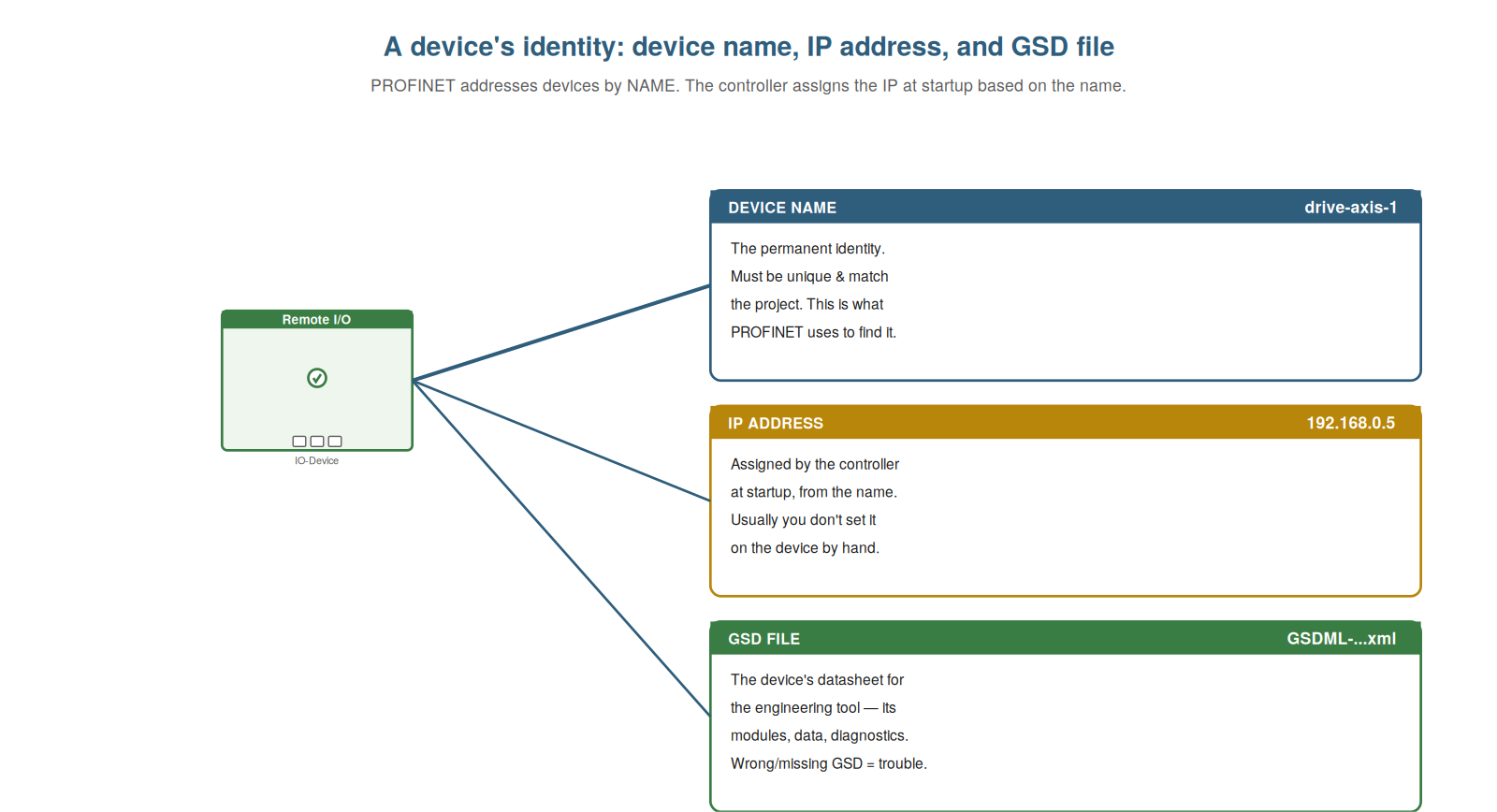
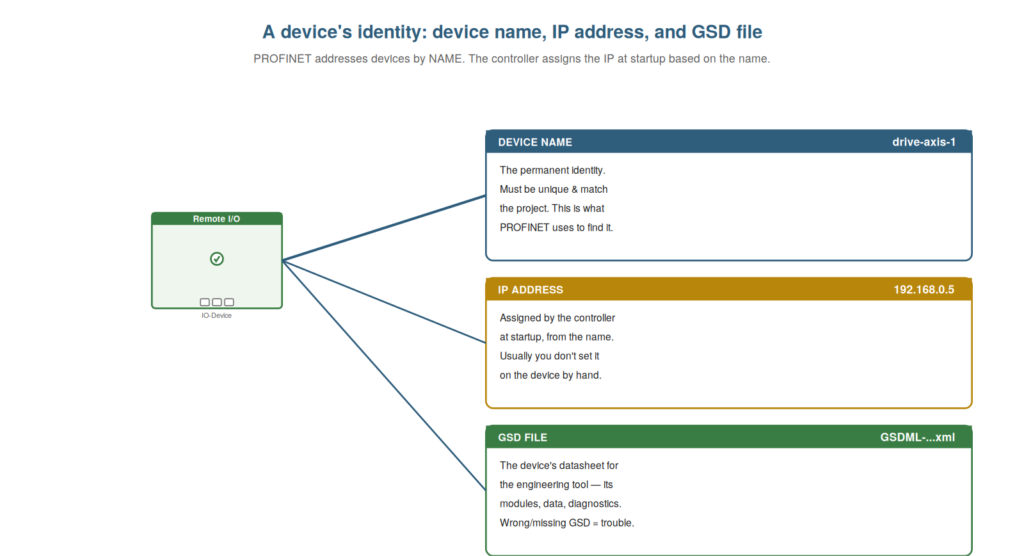
permanent identity PROFINET uses to find it), its IP address (assigned
by the controller at startup, based on the name), and its GSD file (the
device’s datasheet for the engineering tool). Wrong or missing identity
is behind many faults.
The device name: PROFINET’s key identifier
The most important identity concept in PROFINET — and the one behind
many faults — is the device name, and understanding its central role is
essential to troubleshooting. Unlike a purely IP-based system, PROFINET
identifies devices primarily by name: each device has a device name
(like ‘drive-axis-1’), which is its permanent identity on the network.
The controller uses this name to find and address the device: at
startup, the controller looks for the device by its configured name, and
having found it, proceeds to communicate. This means the device name
must be correct and unique: it must match what the project expects (so
the controller finds it), and no two devices may share a name (or the
controller cannot tell them apart). So the device name is PROFINET’s key
identifier, central to how devices are found and addressed. A wrong name
(not matching the project), a missing name (a blank device), or a
duplicate name (two devices the same) are among the most common causes
of a device failing to connect. Understanding the device name’s central
role — the permanent identifier by which the controller finds each
device — is essential to diagnosing connection faults. It reinforces
that PROFINET identifies devices by name, which must be correct and
unique, so that name problems (wrong, missing, duplicate) are common
connection faults. Understanding the device name as PROFINET’s key
identifier — the permanent, unique name by which the controller finds
and addresses each device — is essential to troubleshooting, because so
many connection and replacement faults come down to a name that is
wrong, missing, or duplicated, so that when a device will not connect,
the name is one of the very first things to check, reflecting the
central role names play in how PROFINET finds and communicates with its
devices.
IP addresses: assigned from the name
PROFINET devices do have IP addresses, but understanding how they are
assigned — by the controller, based on the name — clarifies why you
usually do not set them manually and what IP problems look like.
Although PROFINET uses IP addresses (it is Ethernet-based), the
addresses are typically assigned by the controller at startup: having
found a device by its name, the controller gives it its configured IP
address. So you generally do not set a device’s IP by hand; the
controller assigns it based on the name and the project configuration.
This is why the name is primary — the IP follows from it. IP-related
problems do occur: an IP conflict (two devices ending up with the same
address, often due to a name or configuration problem), or a subnet
mismatch (a device or your tool on the wrong subnet, unable to
communicate). But because the controller assigns IPs from names, most
addressing problems trace back to names or configuration rather than
manually-set IPs. So understanding that IPs are assigned from names
clarifies the addressing and where its problems come from. Understanding
IP assignment — by the controller, from the name, at startup — clarifies
why names are primary and what IP problems look like. It reinforces that
PROFINET IPs are typically assigned by the controller based on the
device name, so you rarely set them manually and IP problems often trace
back to names or configuration. Understanding that IP addresses are
assigned from the name — by the controller at startup, based on the
configuration — clarifies the PROFINET addressing model, so that you
understand why the device name is primary and the IP follows, why you
usually do not set device IPs by hand, and why addressing problems like
conflicts and mismatches usually trace back to name or configuration
issues, which keeps your attention on the names and configuration that
drive the addressing.
The GSD file: the device’s datasheet
The third piece of a device’s identity, important for configuration
and some faults, is its GSD file, and understanding what it is — the
device’s description for the engineering tool — clarifies its role and
the problems a wrong one causes. A GSD file (in PROFINET, a GSDML file)
is an electronic datasheet describing a device to the engineering tool:
what modules it has, what data it exchanges, what diagnostics it
provides, its properties. The engineering tool uses the GSD to know how
to configure and communicate with the device — it is how the tool
‘knows’ the device. So each device type has a GSD file, installed in the
tool, that describes it. GSD-related problems arise when the GSD is
wrong or missing: a device configured with the wrong GSD (or GSD
version) may not match the actual device, causing configuration
mismatches or communication problems; a missing GSD means the tool
cannot properly configure the device. So the GSD, though a background
file, matters: the right GSD for the actual device is needed for correct
configuration. Understanding the GSD — the device’s datasheet for the
tool — clarifies its role and the faults a wrong or missing one causes.
It reinforces that the GSD (GSDML) file describes a device to the
engineering tool, needed for correct configuration, so that a wrong or
missing GSD causes configuration and communication problems.
Understanding the GSD file as the device’s datasheet — the description
the engineering tool uses to configure and communicate with a device —
clarifies its role and why a wrong or missing GSD (or version mismatch)
causes configuration mismatches and communication faults, so that when a
device’s configuration does not match reality, the GSD is one thing to
check, completing your understanding of the three-part identity — name,
IP, and GSD — that underlies so much of PROFINET configuration and
troubleshooting.
THE IDENTITY TRIO BEHIND MANY FAULTSWhen a PROFINET device misbehaves at connection, suspect its identity |
How the controller finds a device (DCP)
A useful detail behind device naming is the mechanism the controller
uses to find and name devices — called DCP — because understanding it
clarifies how names and IPs are actually assigned and where that process
can fail. DCP (Discovery and Configuration Protocol) is how the
controller and tools discover devices on the network and read or set
their names and IP addresses. At startup, the controller uses DCP to
find the device with the configured name and assign its IP; your
engineering tool uses DCP for the ‘accessible devices’ scan that finds
connected devices and their names; and you use DCP (through the tool) to
assign a device its name. So DCP is the underlying mechanism for the
name-and-IP process. Understanding it clarifies that finding a device by
name, scanning for accessible devices, and assigning names all work
through this discovery protocol, and that a device must be reachable at
this level for these to work. Understanding how the controller finds a
device via DCP — the discovery protocol used to find devices, read and
assign their names, and set their IPs — clarifies the mechanism behind
PROFINET’s name-based addressing, so that you understand how the
controller finds a device by its name at startup, how the
accessible-devices scan discovers connected devices, and how you assign
a name, all working through DCP, which deepens your grasp of the naming
and addressing that underlies so many PROFINET faults and explains how
the tool’s device-discovery functions actually operate.
Scenario: the duplicate name
A scenario shows a name problem causing a baffling fault. Two devices
on a network intermittently misbehaved — sometimes one worked, sometimes
the other, unpredictably. The cause baffled the technician until he
checked the device names and found the problem: two devices had been
given the same device name. Since PROFINET identifies devices by name,
the controller could not reliably tell them apart — the duplicate name
caused a conflict, with the network confused about which device was
which. Assigning each device its correct, unique name resolved the fault
immediately: with distinct names, the controller addressed each
correctly. The duplicate name had caused a baffling, intermittent
conflict until found. This scenario shows a duplicate device name
causing a conflict, resolved by ensuring unique names. Understanding
that PROFINET identifies devices by name, which must be unique, let the
technician find the duplicate-name conflict behind the baffling fault.
It reinforces that duplicate names cause conflicts because the
controller cannot tell the devices apart, resolved by ensuring unique
names. The scenario reinforces the importance of device names: a
duplicate name caused a baffling intermittent conflict that was resolved
once the technician understood names must be unique and assigned
distinct ones, illustrating how name problems — here a duplicate — cause
faults that make no sense until you check the names, which is why the
device name is one of the first things to verify in a puzzling
connection fault.
Name conventions that help
A practical nuance of device names is that good naming conventions
make troubleshooting easier, and understanding this encourages naming
devices meaningfully. Since PROFINET finds devices by name and you read
names in diagnostics, meaningful, consistent names help enormously: a
name like ‘conveyor-3-drive’ tells you what and where the device is at a
glance, whereas a generic or cryptic name tells you nothing. Good
conventions — names that indicate the device’s function and location,
consistently applied — mean that when the diagnostics name a failed
device, you immediately know what and where it is. There are rules for
valid PROFINET names (certain characters and formats), but within those,
choosing meaningful names is a free improvement to troubleshooting. So
understanding that naming conventions help encourages meaningful,
consistent names that make diagnostics readable. Understanding name
conventions that help — meaningful, consistent names that indicate
function and location — makes troubleshooting easier by making
diagnostics readable. Understanding that good name conventions help —
meaningful, consistent device names indicating function and location,
within the rules for valid PROFINET names — makes troubleshooting
easier, so that when the diagnostics name a failed device, a meaningful
name immediately tells you what and where it is, whereas a cryptic name
tells you nothing, which makes choosing good names a free and worthwhile
improvement to the readability of diagnostics and thus to the speed of
troubleshooting, encouraging meaningful naming as a small investment
that pays off every time you read a diagnosis.
Identity first: a troubleshooting habit
To close, it is worth crystallizing the habit this chapter
encourages: checking identity first when a device misbehaves at
connection, because this habit resolves a large share of faults quickly.
The device’s identity — its name, its IP (assigned from the name), and
its GSD — is behind so many connection and replacement faults that
making ‘check the identity’ an early habit pays off repeatedly. When a
device will not connect or has just been replaced, the habit is to
verify: is the name correct and unique? Is the IP in range and
conflict-free? Does the configured device and GSD match the actual
hardware? This quick identity check catches the common name and
configuration faults before you invest in deeper diagnosis. So making
identity-first a habit resolves many faults fast, which is why this
chapter emphasizes identity so strongly. Understanding identity-first as
a troubleshooting habit — checking name, IP, and GSD early — resolves
many connection and replacement faults quickly. Understanding
identity-first as a troubleshooting habit — verifying the device name,
the IP, and the GSD match early when a device misbehaves at connection
or has been replaced — resolves a large share of faults quickly, so that
you make checking the identity an early, routine step that catches the
common name and configuration faults before deeper diagnosis, which is
the practical habit this chapter builds and a reason the identity
concepts are so central: a quick identity check resolves many of the
connection and replacement faults that maintenance technicians most
often meet.