Distinct from a device that never connects is a device that was
running and then failed — a lost device — and diagnosing these,
especially by reading the pattern of what was lost against the topology,
is a core PROFINET skill. Understanding how lost devices present, and
how the topology shapes that presentation, lets you reason from the
symptom to the fault’s location. This chapter covers lost and failing
devices and the powerful technique of reading the loss pattern.
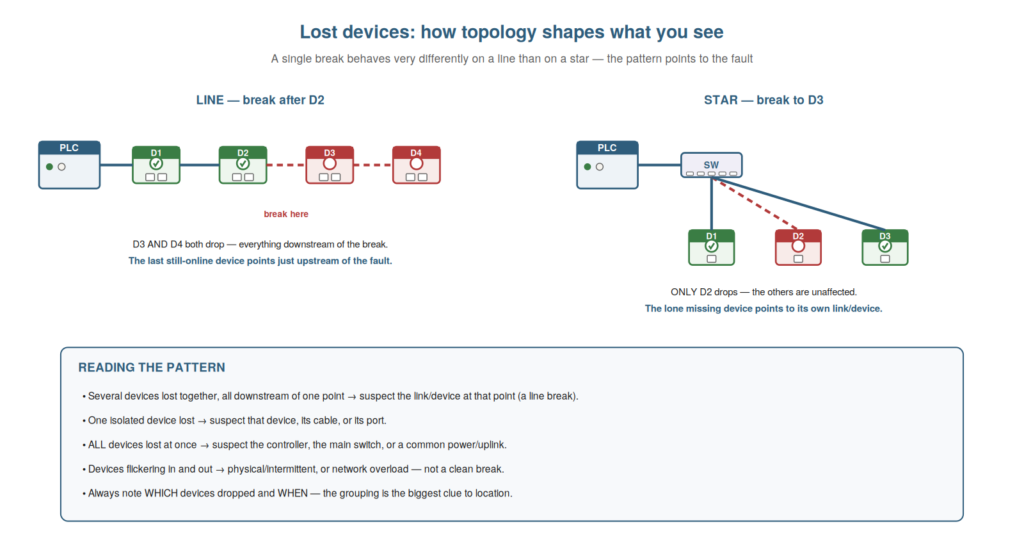
topology: on a line, a break drops everything downstream (the last
online device points to the fault); on a star, a lost device is isolated
to its own link; all devices lost points to the controller or main
switch. The grouping is the biggest clue to location.
Reading the loss pattern
The most powerful technique for diagnosing lost devices is reading
the pattern of which devices were lost, interpreted against the
topology, and understanding it lets you localize the fault from the
symptom alone. When devices are lost, the pattern is highly informative.
If several devices are lost together, all downstream of one point on a
line, the fault is at that point — a break or failure in the link or
device there — and the last still-connected device points to just
upstream of the fault. If a single isolated device is lost (others
fine), the fault is that device, its cable, or its port. If all devices
are lost at once, the fault is common to all — the controller, the main
switch, or a shared power or uplink. So the grouping of lost devices,
read against the topology, localizes the fault: downstream group to a
line break at the group’s start, isolated device to that device’s link,
all devices to a common cause. Understanding how to read the loss
pattern — interpreting the grouping against the topology — lets you
localize the fault from the symptom. It reinforces that the pattern of
lost devices (a downstream group, an isolated device, or all devices),
read against the topology, points to the fault’s location. Understanding
how to read the loss pattern — interpreting which devices were lost, and
their grouping, against the network topology — lets you localize a fault
from the symptom alone, so that a downstream group of lost devices
points to a line break at the group’s start, an isolated lost device
points to its own link or hardware, and all devices lost points to a
common cause like the controller or main switch, which makes reading the
loss pattern one of the most powerful and efficient techniques in
PROFINET troubleshooting, turning the symptom into a location.
When and what changed
Alongside the pattern of what was lost, the timing of the loss and
any associated change are valuable clues, and understanding how to use
them complements the pattern with the story of the fault. Noting when
the devices were lost, and what was happening at that moment, often
points to the cause: if the loss coincided with a machine action (a
movement, a drive starting), it suggests a physical or noise problem
triggered by that action; if it coincided with a change (someone working
on the machine or network), that change is the suspect; if it happened
at a particular time or condition, that may reveal a pattern. So the
timing and associated events tell the story around the loss,
complementing the spatial pattern of which devices were lost. Combining
the two — which devices were lost (spatial) and when and with what
(temporal) — gives a fuller picture: where the fault is and what
triggered it. Understanding how to use when and what changed — the
timing and associated events of the loss — complements the loss pattern
with the fault’s story. It reinforces that noting when devices were lost
and what coincided (a machine action, a change, a condition) points to
the cause, complementing the spatial pattern. Understanding when and
what changed — using the timing of the loss and any coinciding machine
action or change — complements the spatial loss pattern with the
temporal story of the fault, so that you learn not just where the fault
is (from which devices were lost) but what triggered it (from when they
were lost and what was happening), which together give a fuller
diagnosis: a group of devices lost the moment a large drive started, for
instance, points both to a location and to a noise-related cause,
combining the spatial and temporal clues into a clear direction for the
diagnosis.
Failing versus cleanly lost
An important distinction among lost devices is between a device that
fails cleanly (drops and stays down) and one that is failing
intermittently (dropping in and out), because they point to different
causes and call for different approaches. A device that fails cleanly —
drops and stays offline — suggests a definite fault: a cable
disconnected or broken, a device powered off or failed, a clean break.
This is comparatively straightforward: something is definitely wrong,
and you find it. A device that drops in and out — failing intermittently
— suggests a marginal condition: a loose or degrading connector, a cable
flexing, noise, or a load problem, present sometimes and not others.
This is harder, because the fault may not be there when you look. So
distinguishing clean failure from intermittent failure directs your
approach: a clean failure to finding the definite fault, an intermittent
one to the more patient techniques for intermittent faults (using
history, looking for patterns, suspecting marginal physical conditions).
Understanding failing versus cleanly lost — the definite fault versus
the marginal, intermittent one — directs your approach appropriately. It
reinforces that a cleanly lost device points to a definite fault (found
directly), while an intermittently failing one points to a marginal
condition (needing patient, pattern-based diagnosis). Understanding the
distinction between a device that is cleanly lost and one that is
failing intermittently — the former a definite fault to find directly,
the latter a marginal condition needing the more patient, pattern-based
approach — directs your diagnosis appropriately, so that you recognize
whether you are hunting a definite break (a disconnected or failed
device) or a marginal, come-and-go problem (a degrading connector,
flexing cable, or noise), and apply the fitting method, which matters
because the intermittent failure in particular calls for a different,
more patient technique than the clean failure and is one of the more
challenging PROFINET faults to resolve.
The last-good-device technique on a line
A specific, powerful technique for lost devices on a line is the
last-good-device method, and understanding it lets you pinpoint a line
break precisely. On a daisy-chained line, when a break drops everything
downstream, the devices split into two groups: those still connected (up
to the break) and those lost (from the break onward). The last
still-connected device — the last good device before the lost ones —
sits just upstream of the fault, and the first lost device sits just
downstream. So the fault is in the link between the last good device and
the first lost device, or in one of those devices’ ports. This pinpoints
the break to a specific link: you find the boundary between connected
and lost, and the fault is right there. This is far more precise than
knowing only that ‘devices are down’ — it localizes the break to one
link. Understanding the last-good-device technique — finding the
boundary between connected and lost devices to pinpoint the break —
localizes a line fault precisely. Understanding the last-good-device
technique on a line — finding the boundary between the still-connected
devices and the lost ones, so the break lies in the link between the
last good device and the first lost device — lets you pinpoint a line
break to a specific link precisely, so that instead of vaguely knowing
devices are down, you localize the fault to the exact link at the
connected/lost boundary, which is a powerful and precise application of
reading the loss pattern on a daisy-chained network that takes you
straight to the faulty link or port.
Scenario: reading the pattern to the switch
A scenario shows the loss pattern pointing to a common cause. An
entire section of a machine’s devices went offline together, all at
once. The technician read the pattern: these devices were all connected
through one particular switch (a sub-section of the network), and they
had all failed simultaneously, while devices on other switches stayed
online. Understanding that all devices sharing a common point failing
together points to that common point, he suspected the switch. Checking
it, he found the switch had lost power (a tripped supply). Restoring
power to the switch brought all its devices back at once. The loss
pattern — a whole switch’s devices failing together — had pointed
straight to the common cause, the switch. This scenario shows the loss
pattern pointing to a common cause (a switch) behind a group failure.
Understanding that a group of devices sharing a common point failing
together points to that point let the technician diagnose the switch
power loss. It reinforces that reading the loss pattern — all devices on
one switch failing together — points to the common cause, here the
switch. The scenario reinforces the power of reading the loss pattern:
the technician diagnosed a whole section’s failure by recognizing that
the affected devices shared a switch that had lost power, illustrating
how the pattern of which devices are lost, read against the network
structure, points to the fault — here a group sharing a common switch
pointing straight to that switch as the common cause.
Ring redundancy and its quirks
A nuance of ring topologies is understanding how their redundancy
behaves — and its quirks — because a ring can hide a fault that you
should still fix. In a ring, redundancy means a single break still
leaves every device reachable (via the other direction around the ring),
so the machine keeps running despite the break — a great benefit. But
the quirk is that the fault is now hidden from normal operation: nothing
appears wrong to the process, even though one link is broken and the
redundancy is being used. If a second fault then occurs, devices will be
lost (the ring can only tolerate one break). So on a ring, you must
actively check for a broken link even when everything runs, because a
break is masked but still needs fixing before a second fault strikes.
The diagnostics will indicate the redundancy is in use / a link is
broken, which you should heed. Understanding ring redundancy and its
quirks — that it masks a single break which you should still fix —
ensures you do not overlook a hidden fault. Understanding ring
redundancy and its quirks — that a ring tolerates a single break so the
machine keeps running, but the break is then hidden from normal
operation and must still be found and fixed before a second fault causes
losses — ensures you do not overlook a masked fault, so that on a ring
network you actively check the diagnostics for an indicated broken link
even when everything appears to run normally, heeding the
redundancy-in-use indication and fixing the break, because the ring’s
benefit of masking a single fault becomes a trap if it lets a hidden
break go unfixed until a second fault strikes and devices are lost.
The pattern as your most powerful clue
To close, it is worth emphasizing that the loss pattern is often your
single most powerful clue in a lost-device fault, because recognizing
this focuses your attention on the highest-value observation. When
devices are lost, the immediate temptation might be to look at one
failed device; but the pattern — which devices were lost, grouped how,
against the topology — usually tells you far more, pointing to the
fault’s location (a line break, an isolated device, a common cause). So
the most valuable first observation in a lost-device fault is the
pattern: noting exactly which devices dropped and how they group. This
pattern, read against the topology, localizes the fault more powerfully
than examining any single device. Recognizing the pattern as your most
powerful clue focuses you on gathering and reading it first. So the
pattern is the high-value observation to prioritize in any lost-device
fault. Understanding the loss pattern as your most powerful clue — more
informative than any single device — focuses you on reading it first.
Understanding that the loss pattern is often your single most powerful
clue in a lost-device fault — the grouping of which devices were lost,
read against the topology, localizing the fault more powerfully than
examining any one device — focuses your attention on the highest-value
observation, so that when devices are lost, you prioritize noting
exactly which dropped and how they group, reading this pattern against
the topology to localize the fault, which is the most powerful clue
available and the observation to gather first in any lost-device fault,
more valuable than fixating on a single failed device.