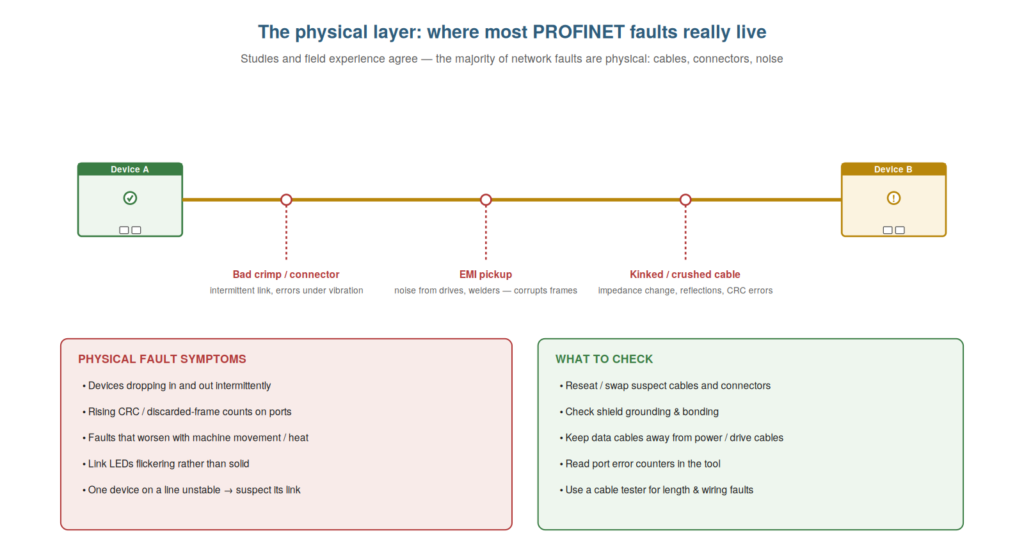
Because the physical layer is where most PROFINET faults live, it
deserves a dedicated focus on signal quality — the health of the actual
signal on the wire — and understanding it, along with the port
statistics that measure it, deepens your ability to diagnose the
physical problems that cause so much trouble. This chapter looks more
closely at physical-layer faults and how to detect the degradation that
precedes many failures.
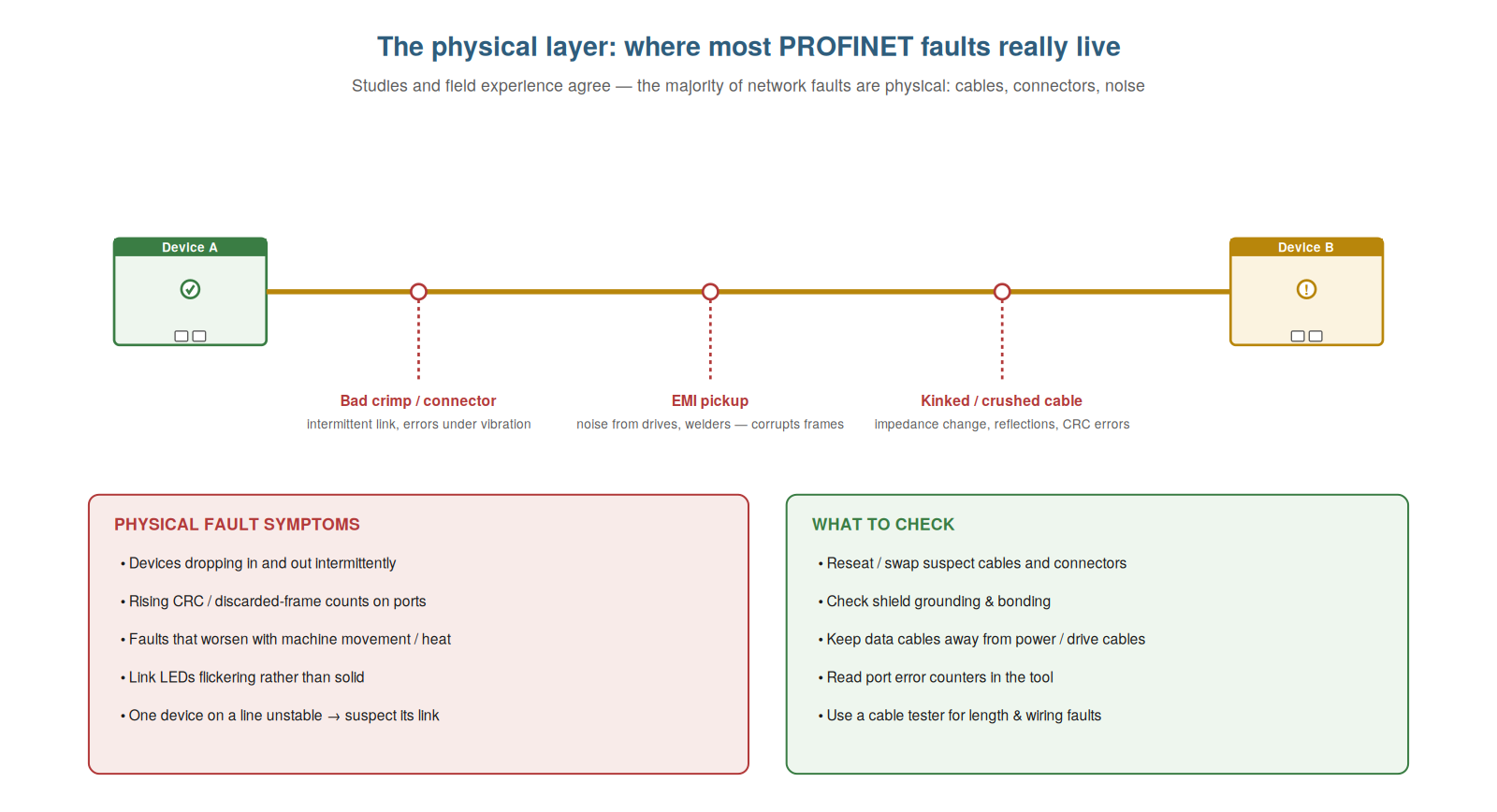
crimps and connectors, EMI pickup from drives, and kinked or crushed
cables all corrupt the signal. Symptoms include intermittent drops,
rising error counts, and faults that worsen with machine movement or
heat.
Why the physical layer dominates faults
It is worth understanding why the physical layer dominates PROFINET
faults, because appreciating this focuses your troubleshooting where it
will most often succeed. The physical components — cables and connectors
— are the parts most exposed to the harsh realities of the plant floor:
vibration that loosens connectors, movement that flexes and fatigues
cables, electrical noise that corrupts signals, moisture and
contamination, and physical damage from machine operation or
maintenance. The logical and configuration aspects of the network, once
set up correctly, tend to stay correct, but the physical components are
continually stressed by the environment. So faults accumulate at the
physical layer: it is simply where the wear, damage, and interference
occur. This is why field experience consistently finds the majority of
network faults to be physical, and why looking at the physical layer
first is the efficient strategy. Understanding why the physical layer
dominates — that it bears the environmental stress while the logical
layer stays stable — focuses your troubleshooting there. It reinforces
that the physical layer suffers the vibration, movement, noise, and
damage of the plant floor, making it where most faults occur, which is
why looking there first is efficient. Understanding why the physical
layer dominates PROFINET faults — that the cables and connectors bear
the continual environmental stress of the plant floor while the
configuration, once correct, stays correct — focuses your
troubleshooting where it will most often succeed, so that you approach
PROFINET faults with the physical layer as the prime suspect, checking
the cables, connectors, and signal quality first because that is where
the wear, damage, and interference of the industrial environment
accumulate and where the majority of faults are found.
Port statistics and error counters
A powerful tool for diagnosing physical-layer problems is the port
statistics — the error counters the network keeps — and understanding
them lets you detect and localize signal-quality problems that the LEDs
alone might not reveal. Switches and device ports maintain statistics:
counts of good frames, and importantly, counts of errors — CRC errors
(frames that arrived corrupted), discarded frames, and other error
types. These counters measure signal quality: a healthy link accumulates
few or no errors, while a link with a physical problem (a bad connector,
noise, a damaged cable) accumulates errors as its corrupted frames are
counted. So by reading the port statistics, you can detect a physical
problem — a port with rising error counts has a signal-quality issue —
and localize it to the specific port and link. This is more sensitive
than waiting for outright failure: a degrading link shows rising errors
before it fails completely. Understanding port statistics and error
counters — the measure of signal quality per port — lets you detect and
localize physical problems, including early degradation. It reinforces
that port error counters (CRC errors, discards) measure signal quality,
so a port with rising errors has a physical problem, detectable and
localizable before outright failure. Understanding port statistics and
error counters — the CRC errors, discards, and other counts that measure
each link’s signal quality — lets you detect and localize physical-layer
problems with precision, so that a port accumulating errors reveals a
signal-quality problem on that specific link (often before it fails
outright), which makes the port statistics a valuable tool for finding
degrading connections and noise problems, complementing the LEDs with a
quantitative measure of where the physical signal is suffering.
Catching degradation before failure
A valuable application of signal-quality awareness is catching
degradation before it becomes a failure, and understanding how to do
this turns troubleshooting from reactive into preventive. Many physical
faults do not appear suddenly; they develop — a connector gradually
loosens, a cable slowly fatigues, a shield connection degrades — and
during this development, the link’s signal quality declines: errors
begin to accumulate, and the network may raise ‘maintenance required’
warnings (a PROFINET feature that flags degrading conditions before they
cause failure). So by watching the port statistics and heeding
maintenance warnings, you can catch a degrading link before it fails
outright and stops the machine — fixing it at a convenient time rather
than in a breakdown. This is the preventive use of signal-quality
information: the rising errors and maintenance warnings are early
warnings, and acting on them avoids the failure. Understanding how to
catch degradation before failure — heeding rising errors and maintenance
warnings — turns troubleshooting preventive. It reinforces that physical
faults often develop with declining signal quality, so watching port
statistics and maintenance warnings catches a degrading link before it
fails, allowing a convenient fix. Understanding how to catch degradation
before failure — by heeding the rising error counts and ‘maintenance
required’ warnings that precede many physical failures — turns PROFINET
troubleshooting from purely reactive into partly preventive, so that
instead of only responding to failures, you can spot a degrading link
early through its declining signal quality and fix it before it stops
the machine, which is a valuable practice that heads off breakdowns by
acting on the early warnings that the network’s signal-quality
monitoring provides.
The four-wire and eight-wire question
A practical physical-layer detail that occasionally causes confusion
is the difference between four-wire and eight-wire Ethernet cabling, and
understanding it prevents a subtle class of fault. Standard Ethernet can
use four wires (two pairs) for the common speeds used by most PROFINET
devices, or eight wires (four pairs) for higher speeds. Much industrial
PROFINET cabling is four-wire, which is fine for the typical device
speeds. Confusion or faults arise when the wiring does not match what is
needed: using a four-wire cable or connection where eight are required
(for a higher-speed link), or a miswired connector that does not
correctly carry the needed pairs. So understanding whether a link needs
four or eight wires, and ensuring the cabling and connectors provide
them, prevents the faults that a mismatch causes. Understanding the
four-wire and eight-wire question — that most PROFINET uses four wires
but higher speeds need eight, and that the cabling must match — prevents
a subtle wiring-mismatch fault, so that when a link will not work or
negotiates a wrong speed, you can consider whether the wiring provides
the pairs the link needs, which is a subtle but real physical-layer
consideration that a properly wired and matched cable avoids, completing
your attention to the details of the physical connection that signal
quality depends on.
Scenario: the rising error count
A scenario shows port statistics catching a fault before it caused a
breakdown. During a routine check, a technician reviewed the port error
counters and noticed one port’s CRC error count was climbing — not yet
causing failures, but clearly accumulating errors, and the network had
raised a ‘maintenance required’ warning for that link. Understanding
that rising errors signal a degrading physical connection, he
investigated the link before it failed, and found a connector beginning
to corrode, degrading the signal. He cleaned and re-secured the
connection at a convenient time, and the error count stopped climbing.
By heeding the rising errors, he had prevented a future breakdown —
fixing the degrading link on his schedule rather than in an unplanned
failure. This scenario shows port statistics and maintenance warnings
catching a degrading link before failure. Understanding that rising
error counts signal degradation let the technician fix a link
preventively, before it failed. It reinforces that port statistics and
maintenance warnings catch degrading links early, allowing a convenient
fix before failure. The scenario reinforces the preventive value of
signal-quality monitoring: the technician caught a degrading connector
through its rising error count and the maintenance warning, fixing it
before it caused a breakdown, illustrating how watching the port
statistics turns troubleshooting preventive — catching the degradation
that precedes many physical failures and fixing it on schedule rather
than in an unplanned line-down.
The value of a cable tester
A practical tool for confirming physical faults is the cable tester,
and understanding its value helps you verify a suspected cable problem
definitively. When you suspect a cable fault — from symptoms, LEDs, or
error counts — a cable tester lets you confirm it directly: a tester
checks a copper cable’s wiring (are the pairs correct?), its length
(within limits?), and faults (breaks, shorts, miswires), giving a
definite answer about the cable’s physical integrity. This turns a
suspicion into a confirmation: rather than swapping the cable and
hoping, you test it and know. For a persistent or puzzling physical
fault, confirming the cable with a tester (or clearing it, pointing
elsewhere) is valuable. So understanding the cable tester’s value —
definitively checking a cable’s integrity — helps you confirm or rule
out a suspected cable fault. Understanding the value of a cable tester —
definitively checking a copper cable’s wiring, length, and faults —
helps you confirm a suspected cable problem, so that rather than
swapping a cable on suspicion, you can test it and know whether it is
the fault, which turns a suspicion into a confirmation (or clears the
cable and points you elsewhere), making the cable tester a valuable tool
for the physical-layer faults that dominate PROFINET troubleshooting by
giving a definite answer about a cable’s integrity when a link is
suspect.
From reactive to preventive at the physical
layer
To close, it helps to appreciate how attention to the physical
layer’s signal quality shifts you from reactive to preventive
maintenance, because this shift is one of the most valuable outcomes of
understanding the physical layer. Reactive maintenance waits for
failures and responds; preventive maintenance catches problems before
they fail. The physical layer’s signal quality — the port error counts
and maintenance warnings — enables the preventive shift: by watching
these, you catch degrading links before they fail, fixing them on
schedule rather than in a breakdown. So understanding signal quality is
not just for diagnosing failures reactively but for preventing them: the
rising errors and warnings are your window into developing problems.
Embracing this shifts your physical-layer work from purely reactive to
partly preventive, which is more valuable. Understanding the shift from
reactive to preventive at the physical layer — using signal-quality
information to catch problems before they fail — is a valuable outcome
of physical-layer understanding. Understanding how attention to signal
quality shifts you from reactive to preventive maintenance — using the
port error counts and maintenance warnings to catch degrading links
before they fail rather than only responding to failures — is one of the
most valuable outcomes of understanding the physical layer, so that you
use the signal-quality information as a window into developing problems,
catching and fixing them on schedule rather than in breakdowns, which
shifts your physical-layer work from purely reactive to partly
preventive and heads off much of the trouble that reactive-only
maintenance would eventually face.