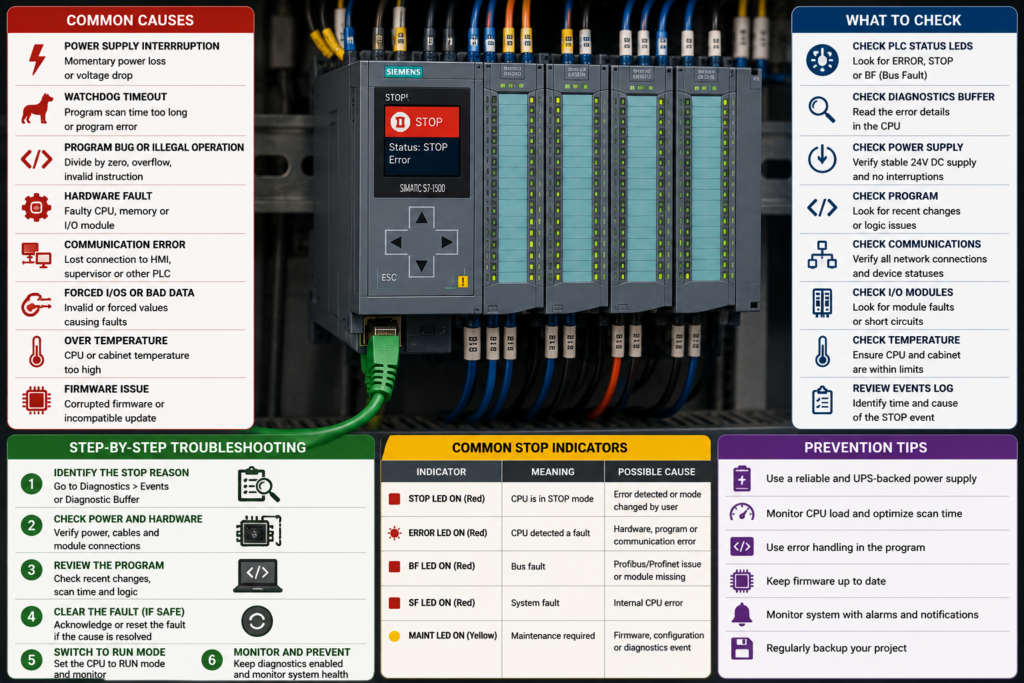
A Siemens PLC can run normally for hours, days or even months before suddenly changing from RUN to STOP.
The machine stops. Outputs switch to their configured STOP states. The RUN indicator changes, and the CPU may show a red ERROR or SF LED.
Trying to put the CPU back into RUN may work temporarily—or it may immediately return to STOP.
The most common causes include:
- program execution errors;
- cycle-time overruns;
- invalid memory access;
- missing error-handling organization blocks;
- hardware or firmware faults.
The CPU does not usually enter STOP without recording why.
Your first task is not to press RUN repeatedly. It is to find the diagnostic event that occurred immediately before the RUN-to-STOP transition.
Siemens specifically recommends examining the diagnostic-buffer entries before the STOP event to identify the original cause. The buffer records CPU operating-mode changes, user-program errors, system faults and module events in chronological order.
Quick Troubleshooting Table
| When the CPU enters STOP | Most likely causes |
|---|---|
| Immediately after a program download | Programming error, inconsistent blocks, invalid address, changed DB structure or incomplete download |
| When a particular machine sequence begins | Faulty instruction, invalid memory access, missing block or peripheral access error |
| During a calculation, loop or recipe transfer | Cycle-time overrun, array error, invalid pointer or excessive data processing |
| When remote I/O fails | Direct access to unavailable I/O or missing error-handling OB on an older CPU |
| After replacing a module | Hardware mismatch, incorrect address, missing module or incompatible firmware |
| After a firmware update | Failed update, incompatible project version, memory-card problem or internal CPU error |
| At random times | Intermittent power loss, failing hardware, loose module connection, memory fault or data-dependent program error |
| Always at the same process step | Repeatable program or I/O access error |
| Only under heavy communication load | Cycle-time overrun, interrupt accumulation or excessive communication processing |
What Happens When a Siemens CPU Enters STOP?
In RUN mode, the CPU repeatedly executes the user program and updates the process.
When it enters STOP:
- normal cyclic program execution stops;
- outputs follow their configured STOP response;
- communications and diagnostics may remain available;
- the diagnostic buffer records the operating-mode transition;
- the CPU waits for the fault to be corrected and a permitted restart.
The exact output behaviour depends on the CPU, module configuration and process-image settings. Outputs may be switched off, hold their last value or move to configured substitute values.
Never assume that STOP automatically makes the complete machine safe.
Gravity, pressure, heat, stored energy and independently powered actuators may remain hazardous.
Start With the Diagnostic Buffer
For S7-1200 and S7-1500 systems in TIA Portal, open:
Online & Diagnostics → Diagnostics → Diagnostic buffer
The newest event normally appears at the top.
Find the event showing that the CPU changed from RUN to STOP. Then inspect the entries immediately before it.
The sequence may look like this:
- Remote I/O station failure
- Peripheral access error
- Programming error
- CPU transition from RUN to STOP
In that case, the station failure may be the original fault. The access and programming errors are consequences.
Siemens describes the diagnostic buffer as a log of events from the CPU and assigned modules. Its event details can include the event ID, module, rack and slot, description, incoming or outgoing status and help for the event.
Record the evidence before resetting
Before cycling power, downloading or resetting the CPU:
- save the diagnostic buffer;
- photograph the CPU LEDs or display;
- record the date and time;
- note what the machine was doing;
- save the online block status where possible;
- compare online and offline software;
- ask whether anyone recently changed the program, hardware or firmware.
A factory reset can remove valuable evidence and create a larger recovery job.
Important Differences Between Siemens CPU Families
Not every Siemens PLC reacts to errors in the same way.
S7-300 and S7-400
Older S7-300 and S7-400 CPUs rely heavily on error-handling organization blocks.
Depending on the error, the operating system may call:
- OB80 for time errors;
- OB82 for diagnostic interrupts;
- OB83 for module insertion or removal;
- OB85 for priority-class errors;
- OB86 for rack or station failures;
- OB121 for programming errors;
- OB122 for I/O access errors.
If the required OB has not been programmed, the CPU may change from RUN to STOP.
S7-1200 and S7-1500
S7-1200 and S7-1500 CPUs have more integrated diagnostic and error-handling behaviour, but serious program and timing errors can still stop the CPU.
For example:
- a second maximum-cycle-time violation can force STOP;
- a programming error without suitable local or global handling can force STOP;
- certain instructions can produce an access error and STOP;
- fatal internal errors can place the CPU in an error or defective state.
An important difference is that an S7-1500 generally remains in RUN after an ordinary I/O access error even when OB122 is not present, while an S7-300 or S7-400 may enter STOP when OB122 is missing.
Do not copy an S7-300 troubleshooting rule directly to an S7-1500 without checking the CPU-specific documentation.
1. Program Execution Error
A program execution error occurs while the CPU is processing the user program.
The project may compile successfully and the CPU may enter RUN normally. The problem appears only when a particular instruction, machine state or data value is reached.
That is why a PLC can operate for hours before suddenly stopping.
Common Program Execution Errors
Possible causes include:
- calling a block that is not loaded;
- opening a DB that does not exist;
- accessing an invalid DB or instance DB;
- faulty indirect addressing;
- invalid pointer or VARIANT data;
- unsuitable data conversion;
- array index outside the permitted range;
- incorrect block interface after a program modification;
- arithmetic or conversion exception;
- instruction receiving invalid parameters;
- program deliberately executing a STOP instruction.
On S7-300 and S7-400 CPUs, OB121 is called for program-processing errors such as attempting to call an FC, FB or DB that is not loaded. If OB121 is missing, the CPU changes to STOP.
S7-1500 CPUs also support programming-error OB121 and local error handling. Siemens notes that local handling with instructions such as GET_ERROR or GET_ERR_ID can prevent the global programming-error OB from being called for that block.
Why It May Happen Only Occasionally
A programming error can depend on live data.
For example, an array normally receives an index between 0 and 9. Once every few days, a communication error or operator entry produces an index of 10.
The invalid access occurs only then.
Other data-dependent triggers include:
- recipe number outside the allowed range;
- empty pointer;
- corrupted device response;
- unexpected product type;
- division by an invalid value;
- sequence number that was never initialised;
- retained data left from an older program version.
The program may look healthy during online monitoring because the dangerous condition is brief.
How to Diagnose a Program Execution Error
Step 1: Read the event details
The diagnostic event may identify:
- the error type;
- the affected OB;
- the block;
- the instruction address;
- the event ID;
- additional error information.
Step 2: Identify the active machine step
Determine what happened immediately before STOP:
- recipe loaded;
- motor started;
- communication response arrived;
- alarm reset;
- array copied;
- product counter changed;
- remote device disconnected.
Step 3: Compare recent software changes
Look for:
- changed block interfaces;
- deleted blocks;
- renamed DBs;
- modified user-defined data types;
- changed array dimensions;
- copied code from another CPU;
- incomplete program download.
Step 4: Compile the complete project
Compile hardware and software consistently.
Do not compile only the block that appears faulty if its data types, hardware addresses or calling blocks have also changed.
Step 5: Search cross-references
Check every call and access involving the block, DB or tag named in the diagnostic event.
Step 6: Add range and validity checks
Validate:
- array indexes;
- pointer targets;
- recipe numbers;
- device responses;
- block availability;
- conversion results.
Step 7: Use appropriate error handling
Where the instruction supports it, process status and error outputs rather than assuming every operation succeeds.
Do not add an empty OB121 simply to keep the CPU in RUN.
The program must decide what to do safely when the requested operation cannot be completed.
2. Cycle-Time Overrun
A Siemens CPU monitors how long it takes to execute one program cycle.
If processing takes longer than the configured maximum cycle time, the operating system generates a time error.
A CPU can enter STOP when:
- no suitable time-error handling exists;
- the maximum time is exceeded again during the same cycle;
- the time-error OB itself takes too long;
- interrupt and communication processing prevent the normal cycle from completing.
For S7-1200 and S7-1500 CPUs, a second maximum-cycle-time violation, commonly described as a 2xMaxCycleTime error, causes the CPU to enter STOP.
On S7-300 and S7-400 CPUs, the operating system calls OB80 for a time error. If OB80 is missing, the CPU enters STOP. A second OB80 request during the same cycle can also force STOP.
Common Causes of Cycle-Time Overrun
Endless or very long loops
A loop condition may never become false.
WHILE #MachineReady DO
    // #MachineReady remains TRUE
END_WHILE;
The CPU remains inside the loop and never completes the scan.
A loop does not need to be truly infinite to cause trouble. Processing thousands of records in one cycle may be enough.
Excessive array or recipe processing
The program may attempt to:
- clear a large data area;
- compare thousands of values;
- move a large recipe;
- search a long array;
- sort a data set;
- serialise or deserialise a large structure.
Doing all the work in one scan can exceed the time limit.
Too many interrupt events
High-priority OBs interrupt normal cyclic execution.
Possible sources include:
- cyclic interrupts configured too frequently;
- hardware interrupts occurring rapidly;
- communication events;
- motion-control processing;
- time-of-day interrupts;
- repeated diagnostic events.
Siemens lists communication processing, accumulated interrupt events and user-program errors among possible reasons for maximum-cycle-time violations.
Slow communication instructions
A poorly designed sequence may repeatedly call communication blocks, wait incorrectly or create a flood of requests.
Recently added program code
A program may have operated close to its maximum cycle time before a new feature was added.
The additional code pushes it over the limit only under peak operating conditions.
Time-error OB is too complex
OB80 should help the application respond to the timing fault.
If it contains lengthy diagnostics, loops or communication code, it can worsen the original timing problem.
How to Fix a Cycle-Time Overrun
Step 1: Confirm the diagnostic event
Look for messages such as:
- maximum cycle time exceeded;
- time error;
2xMaxCycleTime;- OB80 requested;
- cycle monitoring triggered.
Step 2: Read the maximum and actual cycle values
Use TIA Portal diagnostics, CPU properties or trace functions to observe:
- current cycle time;
- minimum cycle time;
- maximum recorded cycle time;
- configured cycle-monitoring time.
Step 3: Find code that runs only occasionally
Look for logic triggered by:
- product change;
- recipe loading;
- shift report;
- alarm-history reset;
- communication recovery;
- midnight processing;
- large counter rollover.
Step 4: Break large tasks across multiple scans
Instead of processing 10,000 records in one cycle, process a smaller group each scan and save the current index.
Step 5: Review interrupt configuration
Check whether cyclic interrupts are configured more frequently than necessary.
Step 6: Correct endless loops
Ensure every loop has:
- a valid exit condition;
- a bounded maximum iteration count;
- protection against invalid data.
Step 7: Simplify error handling
Keep the time-error response short and deterministic.
Step 8: Increase the cycle limit only with evidence
A slightly larger monitoring time may be justified for a correctly designed program.
It should not be used to hide an endless loop or rapidly growing execution time.
A PLC that needs 149 ms against a 150 ms limit does not have much operating margin.
3. Invalid Memory Access
Invalid memory access occurs when the program tries to read or write a location that is unavailable, inappropriate or outside the expected data structure.
This is closely related to programming errors but deserves separate attention because it commonly appears after online changes, DB modifications and indirect addressing.
Typical Causes
Block or DB is missing
The program attempts to open or call a block that was not downloaded.
Array index is outside its range
An array declared from [0..9] receives an index of 10 or -1.
Pointer references the wrong area
An ANY pointer, VARIANT or indirect address may contain:
- wrong DB number;
- wrong byte offset;
- wrong data length;
- incorrect type;
- empty reference.
Data structure changed
A DB or UDT was modified, but another block still expects the old structure.
Retained data is incompatible
After a software update, old retentive values may no longer make sense for the new program.
For example, a retained product index may exceed the size of a newly reduced array.
Invalid instruction input
Certain data-handling instructions can stop the CPU under specific invalid access conditions. Siemens documents, for example, that some Deserialize error scenarios can produce an access error and STOP when suitable local error handling is not used.
Invalid Memory Access vs I/O Access Error
These are not the same fault.
Memory access error
The program accesses invalid internal program data, such as:
- DB;
- pointer;
- array;
- block;
- local memory.
I/O access error
The program accesses a process input or output address that is unavailable, for example because:
- remote I/O station has failed;
- module was removed;
- configured address does not exist;
- hardware configuration changed.
On S7-300 and S7-400 CPUs, a direct I/O access error calls OB122, and the CPU enters STOP if OB122 is missing.
On S7-1500, an ordinary I/O access error is recorded while the CPU generally remains in RUN even if OB122 is not programmed.
How to Diagnose Invalid Memory Access
- Read the diagnostic event and affected block.
- Inspect indexes, pointers and DB numbers used at that point.
- Compare online and offline block versions.
- compile all dependent blocks.
- Check whether a DB or UDT was recently changed.
- Examine retained indexes and state values.
- Check communication data before using it as an address or length.
- add range checks before indirect accesses.
- use local error handling where supported.
- test the exact sequence that produced the fault.
Example of a protected array access
Instead of assuming the index is valid:
#SelectedValue := #Recipe[#RecipeNumber];Check it first:
IF (#RecipeNumber >= 0) AND (#RecipeNumber <= 9) THEN
    #SelectedValue := #Recipe[#RecipeNumber];
ELSE
    #RecipeError := TRUE;
END_IF;
The exact syntax depends on the project, but the principle is universal:
External or calculated data should be validated before it is used as a memory address.
4. Missing Error-Handling OB
This cause is especially important in S7-300 and S7-400 systems.
When certain events occur, the CPU operating system requests the corresponding error OB.
If that OB does not exist, the CPU may enter STOP.
Common Error OBs
| OB | Typical event |
| OB80 | Time or cycle error |
| OB82 | Diagnostic interrupt |
| OB83 | Module insertion or removal |
| OB85 | Priority-class or program-sequence error |
| OB86 | Rack, station or distributed-I/O failure |
| OB121 | Programming error |
| OB122 | I/O access error |
Siemens documents STOP behaviour when several of these OBs are not present, including OB80, OB82, OB83, OB85, OB86, OB121 and OB122.
Example: Remote I/O Station Fails
Suppose an S7-300 controls an ET 200 remote station.
The network cable is damaged.
The CPU detects the station failure and attempts to call OB86.
If OB86 is absent, the CPU may enter STOP.
Even with OB86 present, a direct program access to the unavailable I/O can trigger OB122. If OB122 is absent, STOP may follow.
The fault chain becomes:
- Network failure
- OB86 event
- Direct I/O access error
- OB122 required
- CPU enters STOP
Adding OB86 alone may not be sufficient if the program continues to use unavailable I/O without handling the error.
Do Not Add Empty OBs Blindly
Creating empty error OBs may prevent the CPU from entering STOP, but it does not repair the fault.
The program should respond appropriately.
For example, after a remote-I/O failure it may need to:
- stop affected equipment;
- inhibit automatic starts;
- use substitute values;
- generate an alarm;
- mark process data invalid;
- wait for controlled station recovery.
An empty OB86 can keep the PLC green while the program continues operating with missing field data.
That is not automatically an improvement.
What About S7-1200 and S7-1500?
Newer CPUs still use error and diagnostic OB concepts, but their default reactions are not identical to S7-300/400 behaviour.
For S7-1500:
- programming errors can call OB121;
- local block-level error handling is available;
- ordinary I/O access errors generally do not force STOP merely because OB122 is absent;
- a repeated cycle-time violation can force STOP even when a time-error OB exists.
Always troubleshoot according to the actual CPU family and firmware.
5. Hardware or Firmware Fault
Not every unexpected STOP is caused by the user program.
The CPU can also enter STOP or an error state because of:
- internal CPU hardware failure;
- memory fault;
- failed firmware update;
- incompatible firmware;
- defective SIMATIC memory card;
- invalid project on the card;
- backplane or bus fault;
- failing local module;
- unstable power supply;
- severe electromagnetic disturbance.
Internal CPU Error
Possible signs include:
- CPU enters STOP without a normal program event;
- ERROR and MAINT LEDs show an unusual pattern;
- CPU display reports an internal error;
- diagnostic buffer reports CPU defective or error state;
- CPU cannot complete startup;
- fault remains with field modules isolated according to the manual.
S7-1500 status documentation includes indications for a CPU-detected error state, failed firmware update, faulty program on the memory card and CPU-defective conditions. Siemens directs users to the diagnostic buffer for more detailed information.
Failed or Incompatible Firmware Update
A firmware update can cause trouble when:
- power is interrupted;
- wrong firmware is used;
- update does not complete;
- project hardware version no longer matches;
- module requires another firmware version;
- CPU does not restart after activation.
After a firmware update, the configured module version in the project may need to be updated so that the engineering configuration matches the physical device.
Do not repeatedly reinstall random firmware versions.
Record:
- complete CPU order number;
- current firmware version;
- configured TIA Portal device version;
- memory-card contents;
- update method;
- original firmware.
SIMATIC Memory Card Problem
For CPUs that depend on a SIMATIC memory card, problems can include:
- unsupported card;
- corrupted data;
- invalid project;
- card prepared for another CPU;
- failed firmware-update files;
- damaged card contacts.
The CPU status or diagnostic buffer may indicate that the program on the card is causing an error or that a firmware update from the card failed.
Preserve the card before formatting it.
It may contain the only usable copy of the project or important diagnostic information.
Unstable 24V Supply
A brief voltage drop may:
- reset the CPU;
- stop expansion modules;
- interrupt a firmware operation;
- create station failures;
- corrupt communication;
- produce apparently random STOP events.
Measure the CPU supply:
- at the power-supply output;
- at the CPU terminals;
- during contactor operation;
- when outputs energise;
- during the event that causes STOP.
A normal reading with the machine idle does not rule out a short voltage dip.
Use a recording meter or oscilloscope where necessary.
Local Hardware or Backplane Problem
A faulty or poorly seated local module may affect CPU operation.
Inspect:
- module seating;
- backplane connectors;
- bus adapters;
- bent pins;
- loose terminal blocks;
- conductive contamination;
- excessive temperature;
- vibration;
- moisture.
Do not remove or insert modules under power unless the exact system and procedure permit it.
On older CPUs, module removal can itself request OB83 and cause STOP when the OB is not programmed.
A Step-by-Step Diagnostic Procedure
Step 1: Make the Machine Safe
Account for:
- motors;
- pneumatic cylinders;
- hydraulic pressure;
- suspended loads;
- heaters;
- independently powered equipment.
Do not put the PLC back into RUN until unexpected output operation is controlled.
Step 2: Photograph the CPU and Module LEDs
Record the exact RUN/STOP, ERROR, SF and MAINT indications.
One red LED tells you that a diagnostic exists.
The complete pattern and event text are much more useful.
Step 3: Go Online Without Downloading
Do not overwrite the CPU before reading it.
Step 4: Save the Diagnostic Buffer
Find the RUN-to-STOP event and inspect earlier entries.
Step 5: Identify the CPU Family
Determine whether the system is:
- S7-1200;
- S7-1500;
- S7-300;
- S7-400;
- fail-safe CPU;
- redundant CPU.
Error reactions differ.
Step 6: Determine Whether the Fault Is Repeatable
Does STOP occur:
- immediately after RUN;
- at one process step;
- after a fixed time;
- during remote-I/O loss;
- during communication;
- after program download;
- randomly?
Step 7: Check Recent Changes
Review:
- software download;
- DB modification;
- module replacement;
- firmware update;
- network changes;
- new HMI recipe;
- new product format;
- maintenance work.
Step 8: Compile the Entire Project
Correct errors and review relevant warnings.
Step 9: Compare Online and Offline Software
Check whether the CPU contains:
- older blocks;
- missing blocks;
- modified DBs;
- incomplete download;
- different hardware configuration.
Step 10: Check Cycle-Time Diagnostics
Look for maximum-cycle-time and 2xMaxCycleTime events.
Step 11: Inspect Indirect Accesses
Review pointers, indexes, arrays and data-handling instructions.
Step 12: Check Required Error OBs
For S7-300/400, identify which OB the event requested.
Step 13: Check Hardware and Supply Voltage
Inspect local and remote modules, the memory card and 24V supply.
Step 14: Correct the Original Cause
Do not merely clear the last consequence in the event chain.
Step 15: Return to RUN Under Controlled Conditions
Monitor the diagnostic buffer during restart.
Step 16: Test the Triggering Sequence
Run the process step that previously caused STOP and confirm that the error does not return.
Symptom-Based Troubleshooting
CPU stops immediately after a download
Check:
- full compile;
- incomplete download;
- deleted block still being called;
- changed DB layout;
- wrong hardware addresses;
- missing safety-program download;
- invalid retained data.
CPU stops during one particular machine step
Check:
- block first called in that step;
- direct I/O access;
- array or pointer values;
- communication result;
- recipe number;
- technology-object instruction.
CPU stops after several seconds of heavy processing
Check:
- scan time;
- loops;
- recipe copying;
- interrupt frequency;
- communication calls;
- OB80 or time-error diagnostics.
CPU stops when remote I/O loses power
Check:
- OB86;
- OB122;
- direct peripheral access;
- station diagnostics;
- substitute-value logic;
- PROFINET or PROFIBUS connection.
CPU stops randomly after days of operation
Check:
- data-dependent array or pointer error;
- retained values;
- power-quality events;
- intermittent module or backplane connection;
- firmware diagnostics;
- temperature;
- memory-card condition.
CPU will not return to RUN
Check:
- whether the original error remains;
- startup diagnostics;
- hardware selector;
- invalid program on memory card;
- CPU defective indication;
- repeated startup cycle-time error;
- inconsistent safety program.
What Not to Do
Avoid these common mistakes:
- Do not factory-reset the CPU first.
- Do not repeatedly switch from STOP to RUN.
- Do not download an old project blindly.
- Do not clear diagnostics before saving them.
- Do not add empty error OBs without fault-handling logic.
- Do not increase maximum cycle time without finding the slow code.
- Do not assume every I/O error stops every Siemens CPU family.
- Do not replace the CPU before checking power and modules.
- Do not format the memory card before backing it up.
- Do not leave invalid pointer or array data unvalidated.
- Do not force the machine back into service simply because the CPU remains in RUN.
Preventing STOP is not the only objective.
The program must continue safely when a fault occurs.
Why a Siemens CPU Suddenly Goes Into STOP Mode
A Siemens CPU suddenly enters STOP when the operating system detects a condition that prevents normal or safe program execution.
The most common causes are:
- a runtime programming error;
- cycle-monitoring timeout;
- invalid memory or block access;
- a required error OB that is missing;
- an internal hardware, firmware or memory-card fault.
Begin with the diagnostic buffer.
Find the RUN-to-STOP transition and read the entries immediately before it. Then identify whether the problem came from program execution, timing, memory access, missing event handling or the physical CPU system.
The yellow STOP LED is only the final result.
The actual explanation is usually one or two diagnostic entries earlier.