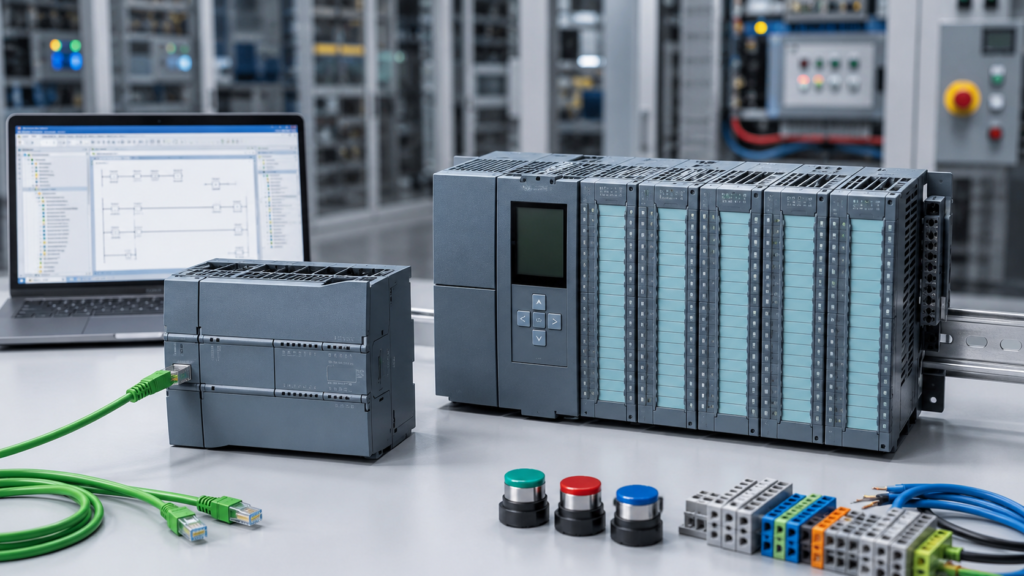
Choosing between a Siemens S7-1200 and an S7-1500 sounds simple until you start comparing actual CPUs.
The usual explanation is that the S7-1200 is for small machines while the S7-1500 is for large industrial systems. That is broadly correct, but it leaves out quite a lot.
The newer S7-1200 G2 is faster and more capable than the original S7-1200. It supports improved motion control, integrated safety options and larger PROFINET networks. Meanwhile, the S7-1500 family stretches from relatively modest CPUs to powerful technology, redundant and software-based controllers.
So, which one should you learn? More importantly, which one should you put inside a real machine?
The Basic Difference
The S7-1200 is Siemens’ compact controller family for basic and moderately demanding automation.
It is commonly used for:
- Small production machines
- Pumps and compressors
- Conveyor sections
- Packaging equipment
- Building automation
- Small process skids
- Standalone control panels
- Training systems
The S7-1500 is Siemens’ higher-performance modular controller family. It is intended for applications requiring more processing power, greater expansion, advanced motion control or more complex communication.
Typical applications include:
- Complete production lines
- Large assembly machines
- High-speed packaging systems
- Complex process plants
- Coordinated motion systems
- Safety-intensive machinery
- Redundant control systems
- Large distributed I/O networks
Siemens describes the S7-1200 G2 as a compact controller for basic automation, while the S7-1500 is positioned as a high-performance controller for complex machines and industrial processes.
S7-1200 vs S7-1500 at a Glance
| Feature | S7-1200 / S7-1200 G2 | S7-1500 |
|---|---|---|
| Main purpose | Small and medium machines | Medium to large automation systems |
| Installation | Compact and space-saving | Highly modular and expandable |
| Processing performance | Good | Higher to extremely high |
| Integrated I/O | Available on many CPUs | Available on compact models |
| Programming software | STEP 7 Basic or Professional | STEP 7 Professional |
| Motion control | Basic to coordinated motion on G2 | Advanced motion, including Technology CPUs |
| Safety versions | Available | Wide range of fail-safe CPUs |
| Redundancy | Not the main platform | S7-1500 R/H systems available |
| Purchase cost | Generally lower | Generally higher |
| Best for learning | Excellent starting point | Best after basic PLC concepts are understood |
The exact capabilities depend on the CPU, firmware and TIA Portal version. Comparing only the family names is not enough when selecting hardware for a real project.
Which PLC Is Easier to Learn?
For most beginners, the S7-1200 is the better place to start.
It gives you access to the Siemens programming environment without immediately adding the complexity and cost of a larger controller platform.
With an S7-1200, you can learn:
- Hardware configuration
- Digital and analogue I/O
- Ladder logic
- Function block diagram
- Structured Control Language
- Data blocks
- Function blocks and functions
- Timers and counters
- PROFINET communication
- HMI communication
- Online monitoring
- PLC diagnostics
- Basic motion control
These skills transfer directly to the S7-1500.
Both controller families are configured and programmed inside TIA Portal. The project structure, programming languages and general workflow are very similar. You do not need to relearn PLC programming from the beginning when moving from one family to the other.
The hardware capabilities change. The fundamental engineering approach does not.
STEP 7 Basic vs STEP 7 Professional
Software licensing is another reason beginners often start with the S7-1200.
STEP 7 Basic V21 is intended for configuring S7-1200 controllers and Siemens Basic or Unified Basic panels. STEP 7 Professional V21 supports both the S7-1200 and S7-1500, along with additional Siemens controller families.
If you only intend to practise with an S7-1200, STEP 7 Basic may be sufficient.
If you work professionally, expect to program S7-1500 CPUs or want one engineering installation that covers both families, STEP 7 Professional is the more sensible choice.
Always include the software licence in your budget. A cheap used PLC is less attractive when you discover that the required engineering software costs more than the controller.
The S7-1200 G2 Changes the Comparison
Older comparisons often describe the S7-1200 as suitable only for very simple logic and basic positioning.
That description is becoming outdated.
The S7-1200 G2 supports up to 31 devices in a PROFINET network, including PROFINET IRT. It also introduces coordinated axis control, simple kinematics, improved safety integration and NFC access to diagnostic and device information. Siemens states that the G2 hardware occupies approximately 25% less width than the previous S7-1200 family.
This means the S7-1200 G2 can handle applications that might previously have pushed a machine builder toward an entry-level S7-1500.
It does not make the S7-1500 unnecessary. It simply moves the dividing line.
The S7-1500 still offers a much wider performance range, more extensive modularity and specialised controller options for demanding motion, safety and high-availability applications.
Processing Power and Program Size
A small PLC program controlling a pump, conveyor or simple machine does not need an extremely powerful processor.
In these cases, an S7-1200 usually provides more than enough performance.
The S7-1500 becomes useful when the project contains:
- Large numbers of function blocks
- Fast control loops
- Extensive data handling
- Many communication connections
- Large recipes
- Complex diagnostics
- High-speed motion
- Large HMI or SCADA data exchanges
- Short and predictable cycle-time requirements
Buying the fastest CPU available does not automatically make a machine better. It mainly makes the control panel more expensive.
Estimate the required I/O, memory, communication load, motion axes and cycle time first. Then choose the smallest controller that leaves reasonable space for future expansion.
I/O and Hardware Expansion
Many S7-1200 CPUs include digital inputs and outputs directly on the CPU. Some models also include analogue I/O.
That makes them convenient for small control panels. A CPU, power supply and a few expansion modules may be enough for the complete machine.
The S7-1500 uses a more modular architecture. The system can be built with separate power supplies, signal modules, communication modules and technology modules. Siemens highlights this modularity as one of the platform’s central advantages.
For a small machine, that level of expansion may be unnecessary.
For a production line that may grow over the next decade, it can be extremely valuable.
Motion Control
Both families can be used for motion control, but not at the same level.
The S7-1200 G2 can control individual and coordinated axes and supports simple kinematics. This is a significant improvement over the traditional view of the S7-1200 as a controller for only basic positioning tasks.
Every S7-1500 CPU supports motion-control functions, while specialised S7-1500 Technology CPUs extend the platform for more demanding motion applications.
Use an S7-1200 G2 when the machine has a limited number of relatively straightforward axes.
Consider an S7-1500T when the application involves advanced synchronisation, complex kinematics, electronic gearing, camming or demanding interactions between multiple drives.
Do not select the controller based only on the number of axes. The required motion functions and response times matter just as much.
Diagnostics and Maintenance
Both controller families provide online diagnostics through TIA Portal.
The S7-1500 is generally stronger when detailed system diagnostics and rapid maintenance are priorities. Many S7-1500 CPUs include an integrated display that can provide status and diagnostic information directly at the controller.
This can be valuable inside a factory where maintenance technicians need to identify a fault without immediately connecting a programming laptop.
The S7-1200 G2 takes a different approach by adding NFC access to device, operational and diagnostic information through supported mobile devices.
For a standalone machine, either system may provide sufficient diagnostics. For a large plant with extensive distributed hardware, the S7-1500 platform is normally the stronger choice.
Safety and Redundancy
Fail-safe versions are available in both controller families.
An S7-1200 fail-safe CPU can be suitable for a compact machine with emergency stops, guard switches and safe drive functions.
The S7-1500 offers a broader safety range for larger and more demanding applications. It is also available in redundant S7-1500 R/H configurations, where primary and backup CPUs are synchronised to improve plant availability.
If stopping the controller could interrupt an entire process plant or cause major production losses, redundancy may justify the additional cost and engineering complexity.
A small standalone conveyor rarely needs it.
What About the Original S7-1200?
The original S7-1200 remains extremely common in factories, training centres and existing machines.
However, Siemens has announced that first-generation S7-1200 modules will enter the product phase-out process from November 1, 2026, with the S7-1200 G2 positioned as the successor.
That does not mean every existing S7-1200 must immediately be replaced.
It does mean that someone designing a new machine in 2026 should compare the G2 platform before automatically ordering an older CPU.
A used first-generation S7-1200 can still be a useful and affordable learning device. The programming skills remain highly relevant, and you are likely to encounter these controllers in existing equipment for many years.
For a new commercial machine, product lifecycle, module compatibility and customer spare-parts policies deserve closer attention.
Which PLC Should You Learn?
Start with the S7-1200 or S7-1200 G2 when:
- You are completely new to Siemens PLCs
- You are learning at home
- Your budget is limited
- You want to understand basic machine control
- You mainly work with small standalone equipment
- You have access to an S7-1200 training kit
Start with the S7-1500 when:
- Your employer already uses S7-1500 systems
- You maintain large production lines
- You need advanced motion or safety experience
- Your training equipment is based on the S7-1500
- Your job involves migrating S7-300 or S7-400 systems
- You already understand basic PLC programming
For career development, you should eventually become comfortable with both. Fortunately, learning the S7-1200 first gives you a strong foundation for working with the S7-1500 later.
Which PLC Should You Buy?
Buy an S7-1200 G2 for compact machines, moderate I/O counts, cost-sensitive projects and control systems that do not require the wider S7-1500 architecture.
Buy an S7-1500 when the application needs high performance, extensive expansion, advanced motion, specialised communication, redundancy or room for substantial future growth.
Do not choose the S7-1500 simply because it is the more powerful PLC.
And do not choose the S7-1200 simply because it is cheaper.
The correct controller is the one that satisfies the machine requirements with enough reserve capacity to handle realistic future changes.
Final Verdict
For learning, the S7-1200 is usually the best starting point. It is more affordable, easier to build into a small training system and teaches nearly all the core concepts required for Siemens PLC programming.
For buying, the answer depends on the machine.
The S7-1200 G2 is the better choice for most compact and moderately complex machines. The S7-1500 is the better platform for large systems, demanding performance, advanced motion and plant-wide automation.
Learn on the smaller controller. Move to the larger one when the application—not the marketing brochure—gives you a genuine reason to do so.