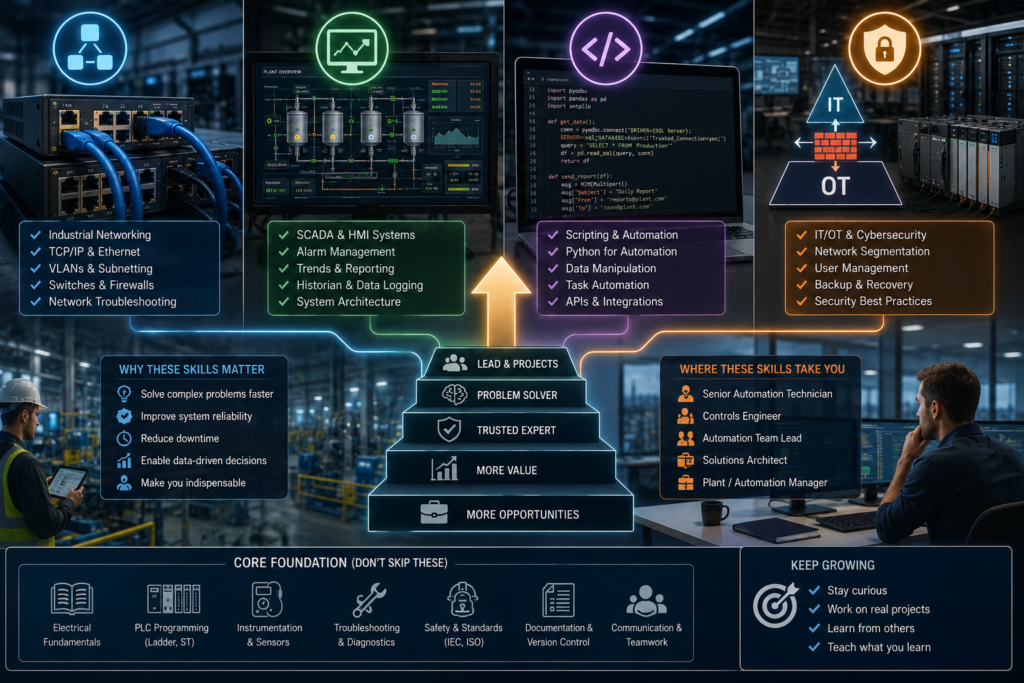
Many automation technicians reach the same career plateau.
They can replace a sensor, clear a VFD fault, trace PLC logic and restore a machine after a breakdown. They are useful—sometimes indispensable—but they remain in the same technician position while someone else receives the automation engineer or controls engineer title.
The difference is rarely one more PLC certificate.
Promotion usually comes when you stop being responsible for individual devices and begin taking ownership of complete systems.
The progression looks roughly like this:
Replace the failed device
→ Diagnose why the system failed
→ Improve the system
→ Connect it to other systems
→ Standardise the solution
→ Lead the project
Four skill areas make that transition easier:
- Industrial networking
- SCADA and data systems
- Scripting
- IT/OT integration and cybersecurity
These skills do not replace PLC knowledge. They multiply its value.
The Skills With the Highest Promotion Value
| Skill | What it allows you to own | Career value |
|---|---|---|
| Industrial networking | PLCs, remote I/O, drives and communication infrastructure | Very high |
| SCADA | Plant-wide monitoring, alarms, trends and operator systems | Very high |
| Scripting | Repetitive engineering, reporting and data-processing tasks | High |
| IT/OT integration | Connections between factory and business systems | Very high |
| Cybersecurity | Secure remote access, segmentation and system hardening | Increasing rapidly |
| Advanced PLC programming | Complete machine sequences and reusable libraries | Essential foundation |
| Vendor certificates | Evidence of training | Useful, but secondary to delivered work |
The important word is ownership.
A technician who can replace an Ethernet cable is useful. A technician who can diagnose why ten remote-I/O stations intermittently disconnect is much harder to replace.
1. Industrial Networking
Networking is probably the highest-return skill for an automation technician.
Modern machines contain:
- PLCs
- HMIs
- VFDs
- Servo drives
- Robots
- Vision systems
- Remote I/O
- Managed switches
- SCADA servers
- Engineering workstations
When communication fails, production may stop even though every individual device is healthy.
Many maintenance teams can handle wiring faults. Far fewer people can confidently diagnose:
- Duplicate IP addresses
- Incorrect subnet masks
- PROFINET device-name problems
- EtherNet/IP connection limits
- Multicast flooding
- Ring failures
- Damaged switch ports
- Incorrect VLANs
- Intermittent fibre links
- Network loops
- Excessive broadcast traffic
That gap creates career opportunity.
What to learn
Start with ordinary Ethernet fundamentals:
IP address
Subnet mask
Default gateway
MAC address
Switch port
TCP and UDP
Client and server
Then learn the industrial protocols used at your workplace:
- PROFINET
- EtherNet/IP
- EtherCAT
- Modbus TCP
- PROFIBUS
- Modbus RTU
- OPC UA
Do not begin by memorising every protocol packet.
Begin by understanding the communication path:
PLC
→ Industrial switch
→ Remote I/O
→ Drive
→ HMI
→ SCADA server
You should be able to identify where communication stops and whether the problem is physical, addressing-related, protocol-related or inside the application.
What gets you noticed
Do not merely attend a networking course.
Create something useful:
- Produce a network drawing.
- Record every PLC, HMI and drive address.
- Label switch ports.
- Back up managed-switch configurations.
- Identify unmanaged switches hidden inside panels.
- Document ring topology and redundancy.
- Create a standard network diagnostic checklist.
That moves you from “technician who knows Ethernet” to “person who understands the factory network.”
2. SCADA and Plant-Wide Diagnostics
PLC troubleshooting normally focuses on one machine.
SCADA forces you to think about the entire process.
A useful SCADA system may handle:
- Plant overview
- Alarm management
- Historical trends
- Production data
- Energy use
- User permissions
- Recipes
- Reports
- Equipment status
- Remote diagnostics
Learning SCADA can move you toward factory controls, process automation and system-integration positions.
Learn more than screen design
Dragging a pump symbol onto a screen is not advanced SCADA work.
You should understand:
- Tag architecture
- Alarm priorities
- Alarm acknowledgement
- Historical logging
- Trend configuration
- User roles
- Redundancy
- Communication drivers
- Server and client architecture
- Backup and restoration
- Database connections
Learn how PLC information reaches the SCADA system and how a communication failure is detected.
OPC UA is especially relevant because it provides a platform-independent framework for moving structured information between sensors, controllers, manufacturing systems and enterprise applications. It covers information modelling, communication and interoperability rather than acting as only another simple tag-transfer protocol.
Build diagnostics maintenance actually needs
A promotion-worthy SCADA improvement might show:
Machine stopped
Reason: Discharge conveyor unavailable
Original cause: Drive 4 communication timeout
First occurrence: 14:32:18
Occurrences this shift: 7
Last healthy communication: 14:32:15
That is more valuable than a screen containing a red motor symbol.
Use your maintenance experience. You already know which missing information wastes time during breakdowns.
Build that information into the system.
3. Scripting and General Programming
PLC programming should remain deterministic and understandable.
Not every automation task belongs inside the PLC.
Scripting is useful for work such as:
- Processing tag lists
- Generating alarm text
- Comparing parameter backups
- Creating reports
- Renaming thousands of variables
- Extracting data from CSV files
- Calling APIs
- Moving information into databases
- Checking configuration consistency
- Automating repetitive engineering tasks
Useful languages include:
- Python
- PowerShell
- JavaScript
- SQL
- C# in some Microsoft-based automation environments
You do not need to become a professional software developer.
You should be able to take a repetitive two-hour task and turn it into a reliable two-minute tool.
Practical examples
A technician might write a script that:
- Reads an I/O spreadsheet.
- Checks for duplicate addresses.
- Generates PLC tag names.
- Creates an alarm-import file.
- Produces terminal labels.
- Flags missing descriptions.
Another script might compare VFD parameter backups from 30 machines and identify which drive has been changed from the approved standard.
That kind of work gets management’s attention because it saves engineering time across the whole plant.
Start with Python and SQL
Python is a useful first scripting language because it handles files, data and automation tasks well.
SQL is valuable because production and SCADA information frequently ends up in databases.
Learn how to:
Read a CSV file
Clean and validate data
Query a database
Create a simple report
Write data safely
Handle errors
Log what the script changed
Never allow a quick script to write directly into production systems without review, backups and access controls.
Automation created to save time can create an impressive mess even faster.
4. IT/OT Integration
IT manages business information systems.
OT manages physical operations.
The boundary between them now includes:
- SCADA
- Historians
- Manufacturing execution systems
- Production databases
- Remote-access platforms
- Industrial edge computers
- Cloud services
- OPC UA
- MQTT
MQTT is a standard publish-and-subscribe messaging protocol commonly used for moving data between distributed applications and devices. Knowing how brokers, topics, publishers, subscribers and quality-of-service settings work can be useful in industrial data projects.
The promoted technician is often the person who can translate between the two teams.
They understand why IT wants:
- Central authentication
- Patching
- Backups
- Antivirus
- Network segmentation
- Asset inventories
They also understand why production says:
- The PLC cannot restart unexpectedly.
- The HMI cannot wait for a domain server during a breakdown.
- A Windows update cannot interrupt a batch.
- A firewall change must be tested before a shutdown ends.
That ability to communicate across departments is extremely valuable.
Learn the architecture
Understand the typical hierarchy:
Sensors and drives
→ PLCs
→ SCADA and historians
→ MES
→ ERP and business systems
Learn where each system belongs and which data should cross between levels.
A PLC should not become a database server.
An ERP system should not directly control a safety output.
Good IT/OT integration preserves clear responsibilities.
5. OT Cybersecurity
Cybersecurity is no longer an optional specialist topic for automation teams.
The ISA/IEC 62443 series defines processes and requirements for securing industrial automation and control systems and explicitly aims to bridge operations, information technology, safety and cybersecurity.
In the EU, NIS2 establishes a common cybersecurity framework across 18 critical sectors. That increases pressure on covered organisations to improve areas such as risk management, incident handling, supply-chain security and vulnerability management.
An automation technician does not need to become a penetration tester.
You should understand:
- Zones and conduits
- Network segmentation
- Firewalls
- Secure remote access
- User permissions
- Backup testing
- Asset inventories
- Patch planning
- Disabling unused services
- Incident response
- Why PLCs should not be exposed directly to the internet
Promotion-level cybersecurity work
Useful projects include:
- Documenting all control-system assets
- Removing shared administrator accounts
- Replacing uncontrolled remote-access software
- Testing PLC and HMI restoration procedures
- Separating machine networks from office networks
- Creating a controlled vendor-access process
- Recording firmware and software versions
- Backing up switch and firewall configurations
The goal is not to make production systems impossible to maintain.
The goal is to make access deliberate, traceable and recoverable.
Technical Skill Alone Is Not Enough
The best network or SCADA specialist may still be overlooked when they cannot manage work professionally.
Promotion also depends on whether you can:
- Explain a problem clearly
- Estimate downtime and risk
- Document changes
- Coordinate contractors
- Train other technicians
- Finish projects
- Admit uncertainty
- Escalate safety-critical problems
- Avoid making undocumented production changes
Management promotes people who can be trusted with a larger area of responsibility.
That trust is built through repeatable results.
A Practical Learning Order
Do not try to learn SCADA, Python, SQL, MQTT, firewalls and cloud computing simultaneously.
Use this order:
Stage 1: Networking
Learn IP addressing, switches and the main industrial protocol at your plant.
Stage 2: SCADA
Build alarms, trends and diagnostics around the equipment you already understand.
Stage 3: SQL and scripting
Automate reports, comparisons and engineering-data tasks.
Stage 4: IT/OT architecture
Learn how PLC, SCADA, historian, MES and business systems exchange information.
Stage 5: Cybersecurity
Apply segmentation, access control, backups and secure remote support.
This sequence builds outward from the machine instead of beginning with abstract enterprise technology.
Projects That Can Lead to Promotion
A useful promotion portfolio could contain three projects.
Network reliability project
- Documented the control network
- Found duplicate addresses or weak topology
- Standardised switch configurations
- Reduced recurring communication faults
SCADA diagnostic project
- Added useful alarm context
- Created downtime trends
- Improved fault history
- Reduced troubleshooting time
Engineering automation project
- Built a Python or SQL tool
- Automated tag or report generation
- Added validation and logging
- Saved measurable engineering hours
Record:
Original problem
Technical solution
Risk controls
Time or downtime saved
Documentation produced
People trained
That is stronger evidence than a folder containing course certificates.
Final Thoughts
Automation technicians are promoted when they become capable of solving larger problems.
PLC troubleshooting remains the foundation, but the strongest career progression usually comes from adding:
Industrial networking
+
SCADA
+
Scripting and SQL
+
IT/OT integration
+
Cybersecurity
Networking lets you own communication.
SCADA lets you own visibility and diagnostics.
Scripting lets you improve engineering productivity.
IT/OT knowledge lets you connect production with the wider organisation.
Cybersecurity lets you do it without creating an uncontrolled path into the factory.
Do not collect these skills only as words for your CV.
Use them to make one system more reliable, one breakdown easier to diagnose or one repetitive process faster.
That is what turns technical knowledge into promotion evidence.