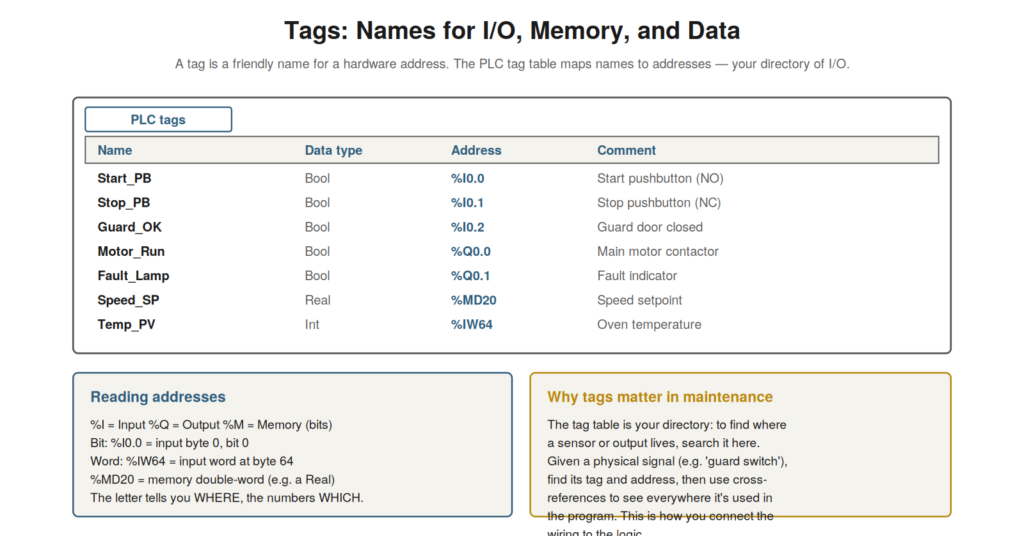
To understand a program, you must understand its tags — the named
signals it works with — and to trace signals through the program, you
use cross-references. Tags connect the program’s logic to the real I/O
and memory, and the tag table is your directory of them;
cross-references show everywhere a tag is used, letting you trace a
signal. Together, tags and cross-references are essential to connecting
the program to the machine and following signals through the logic.
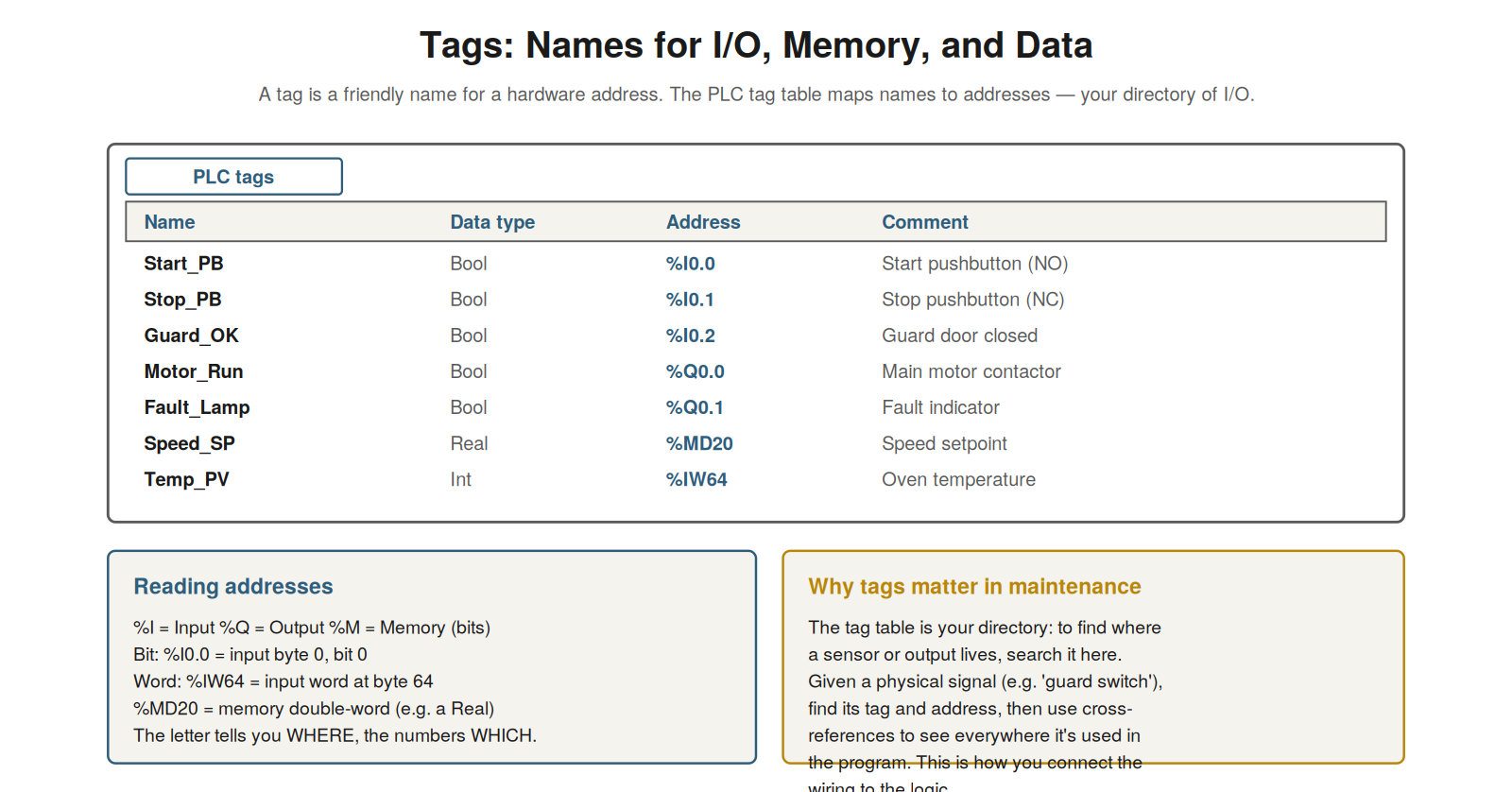
maps names to addresses — your directory of I/O. The address letter
tells you where (%I input, %Q output, %M memory) and the numbers which.
Given a physical signal, find its tag here, then use
cross-references.
Understanding tags and addresses
A tag is a friendly name for a hardware address, and understanding
tags and the addresses they name connects the program’s logic to the
real machine. Rather than referring to raw addresses, the program uses
tags — names like Start_PB or Motor_Run — that are more meaningful than
the underlying addresses. Each tag maps to an address that specifies a
location: the letter indicates the type (%I for input, %Q for output, %M
for memory), and the numbers specify which (the byte and bit, or word).
So %I0.0 is input byte 0, bit 0; %Q0.1 is output byte 0, bit 1; %MD20 is
a memory double-word at byte 20. The tag gives this address a meaningful
name. Understanding tags and addresses — tags as names for addresses,
and how to read the addresses (%I/%Q/%M and the numbers) — connects the
program to the real I/O and memory. It reinforces that tags are
meaningful names for hardware addresses, and that reading an address
(the type letter and the numbers) tells you what kind of signal it is
and which one. Understanding tags and addresses — the named signals and
the addresses they map to — is essential to connecting the program’s
logic to the machine’s real inputs, outputs, and memory, so that when
you see a tag in the logic, you understand what real signal it
represents, and when you have a physical signal, you can find its tag
and address, linking the program you read to the machine you
maintain.
The PLC tag table
The PLC tag table is the directory of all the tags — mapping names to
addresses — and it is an essential maintenance resource for finding
where signals live. The tag table lists every tag with its name, data
type, address, and usually a comment describing it. This makes it your
directory: to find a particular signal, you search the tag table. Given
a physical signal — say the guard door switch — you can find its tag and
address in the tag table (perhaps Guard_OK at %I0.2), which tells you
how the program refers to it and what hardware address it uses.
Conversely, given a tag you see in the logic, the tag table tells you
its address and (from the comment) its meaning. So the tag table
connects names, addresses, and meanings, serving as the directory that
links the program’s tags to the real signals. Understanding the tag
table — the directory mapping tag names to addresses and meanings —
gives you the tool for finding where signals live. It reinforces that
the tag table is your directory of signals, letting you find a tag’s
address and meaning, or find the tag for a physical signal.
Understanding the PLC tag table — the directory of tags, addresses, and
comments — is essential for connecting physical signals to the program,
so that you can find where any signal lives, moving between the physical
machine (a sensor, an output) and the program’s tags, which is
fundamental to relating the logic you read to the machine you are
maintaining and to locating the signals involved in a fault.
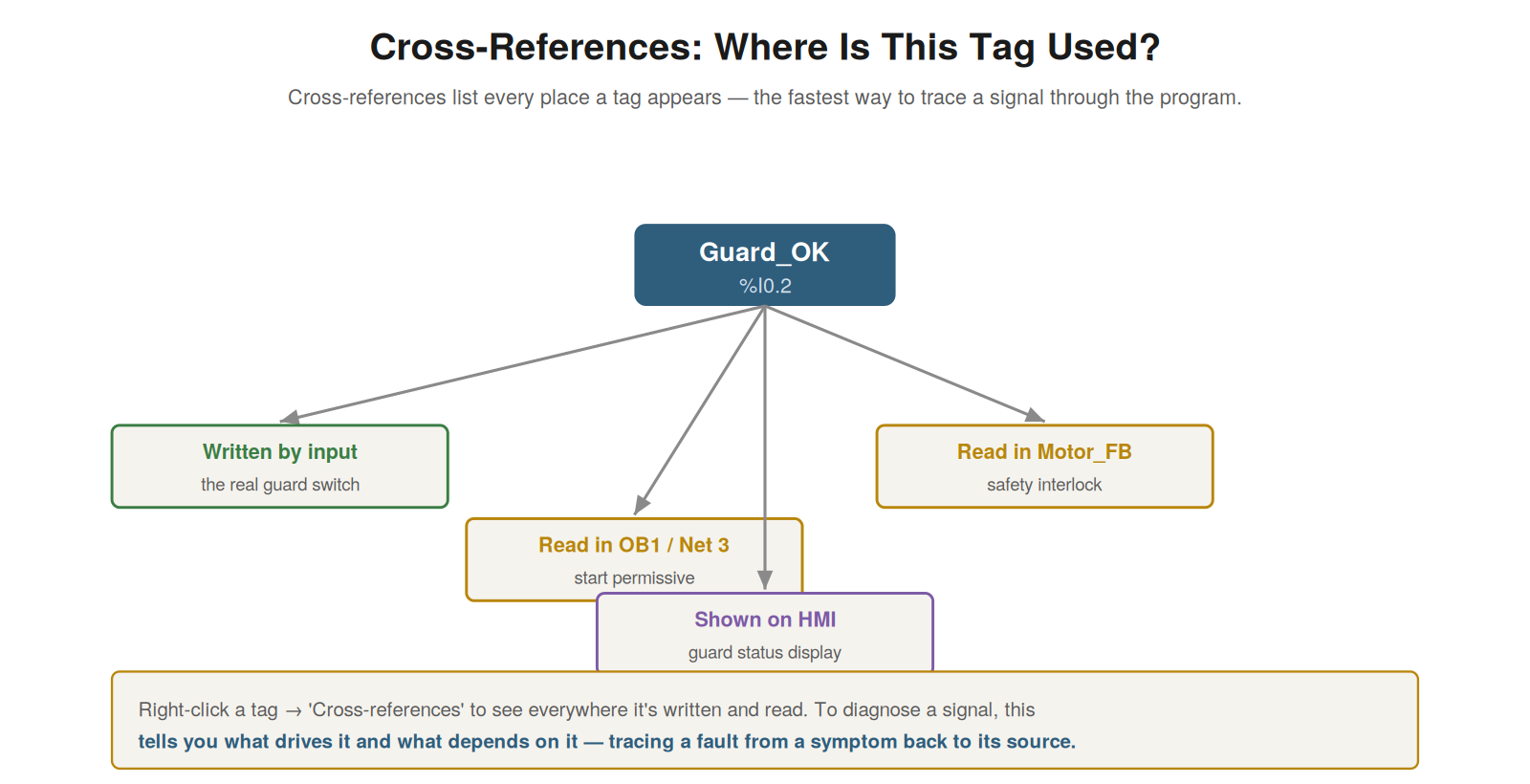
where it’s written (what drives it) and read (what depends on it).
Right-click a tag → ‘Cross-references’ to trace a signal from a symptom
back to its source, or forward to what it affects.
Cross-references: tracing a signal
Cross-references show everywhere a tag is used in the program — every
place it is written and read — and they are the fastest way to trace a
signal through the logic, which is invaluable for diagnosis. When you
want to understand a signal — what sets it, what depends on it — the
cross-references list every occurrence: where the tag is written (what
logic produces it) and where it is read (what logic uses it). This lets
you trace a signal: to find why a tag has its value, you look at where
it is written; to find what a tag affects, you look at where it is read.
For diagnosis, this is powerful: given a symptom involving a signal,
cross-references show you what drives that signal and what it
influences, letting you trace from a symptom back to its cause. You
access cross-references typically by right-clicking a tag. Understanding
cross-references — the list of everywhere a tag is written and read,
used to trace a signal — gives you a powerful tracing tool. It
reinforces that cross-references show every use of a tag, letting you
trace what drives a signal and what depends on it, which is invaluable
for following a fault from symptom to cause. Understanding
cross-references — the way to see everywhere a tag is used and thereby
trace a signal through the program — is an essential diagnostic skill,
letting you follow a signal to find what produces it (tracing toward a
cause) or what it affects (tracing its consequences), which turns the
tag table and the program into a traceable network that you can follow
from a symptom to its source, a core technique of diagnosing
PLC-controlled machines.
Symbolic names and comments
An aspect of tags that greatly aids reading a program is their
symbolic names and comments, and understanding their value — and what
happens when they are missing — is useful. A well-written program gives
tags meaningful symbolic names (like Guard_OK rather than just %I0.2)
and comments describing them, which makes the logic far easier to read:
you see meaningful names in the logic, and the comments explain them.
This is a great help in understanding a program. However, symbolic names
and comments are part of the project, and if you upload a program from a
PLC without the full project, some may be missing (the PLC may store
only limited symbolic information), leaving you with addresses and less
description. So the presence of good names and comments greatly aids
reading, and their absence (as in a bare upload) makes it harder.
Understanding the value of symbolic names and comments — and that they
may be missing in a bare upload — sets expectations for reading a
program. It reinforces that meaningful tag names and comments make a
program much easier to read, and that a program uploaded without the
full project may lack them. Understanding symbolic names and comments —
their great value for reading a program and their possible absence in a
bare upload — helps you appreciate good documentation and understand the
difficulty when it is missing, so that you value the meaningful names
and comments that make logic readable, and understand why a bare upload
from a PLC (lacking the full project’s names and comments) is harder to
read, which is a practical reason to have the full project with its
documentation when possible.
Scenario: tracing a signal to its source
A scenario shows cross-references tracing a signal to its source. A
technician found that a machine’s output was not behaving as expected,
and it depended on an internal status tag whose value seemed wrong. To
find why the tag had its value, they used cross-references on that tag:
the cross-references showed everywhere the tag was written, pointing to
the specific logic that set it. Going to that logic, they saw what
determined the tag — a calculation based on other signals — and found
that one of those input signals was faulty, causing the wrong tag value.
Cross-references had let them trace from the questionable tag back to
the logic that set it and thence to the faulty input — following the
signal to its source. Fixing the faulty input corrected the tag and the
output. This scenario shows cross-references tracing a signal from a
wrong value back to its source. Understanding cross-references let the
technician find where the tag was written, trace to the setting logic,
and reach the faulty input causing the wrong value. It reinforces that
cross-references trace a signal to its source by showing where it is
written, letting you follow from a symptom back to the cause. The
scenario reinforces the power of cross-references: the technician traced
a wrong tag value back through the logic that set it to the faulty input
at its source, illustrating how cross-references turn the question ‘why
does this tag have this value?’ into a traceable path from the tag to
its controlling logic to the root cause, which is a core diagnostic
technique.
Data block tags and structured data
Beyond simple I/O tags, programs use data block tags and structured
data, and understanding these helps you find and monitor values in real
programs. Values in data blocks are accessed as data block tags — like
DB name.variable name — rather than simple addresses, and a DB may
contain structured data (a group of related values under one structure,
like a motor’s data grouped together). So to monitor a value in a DB,
you reference it by its DB and variable name, and understanding the
structure helps you navigate to the specific value within a larger data
structure. When reading a program, you will see these DB tag references
(like Motor_DB.Speed), and understanding that they point into data
blocks — possibly into structured data — lets you find and monitor the
values. Understanding data block tags and structured data — how DB
values are referenced and organized — helps you work with the values in
real programs. Understanding data block tags and structured data — how
values in DBs are referenced by DB and variable name and may be
organized in structures — helps you find and monitor the values that
real programs store in data blocks, so that you can navigate to and
monitor a specific value within a DB (like a setpoint or a status in a
structured group), understanding the DB tag references you see in the
logic, which is necessary for working with the stored data that programs
keep in data blocks alongside the simple I/O and memory tags.
Connecting program to machine
Consolidating the tags-and-cross-references material, these are what
connect the program to the machine — linking the logic you read to the
real signals and letting you trace between them — and appreciating this
emphasizes their diagnostic value. Tags connect the program’s logic to
the machine’s real I/O and data (the tag table mapping names to physical
signals), and cross-references connect the uses of a signal across the
program (letting you trace it). Together they let you move between the
machine and the program: from a physical signal to its tag and uses, or
from a program signal to its real meaning and other uses. This
connection is central to diagnosis, which constantly moves between the
machine (symptoms, signals) and the program (logic, causes). So tags and
cross-references, by connecting program to machine, are essential
diagnostic tools. Understanding tags and cross-references as connecting
program to machine — linking logic to signals and tracing between them —
emphasizes their diagnostic value. Understanding tags and
cross-references as what connect the program to the machine — linking
the logic to the real signals and letting you trace between them —
emphasizes their diagnostic value, so that you appreciate how tags
(mapping names to physical signals) and cross-references (tracing a
signal’s uses) let you move between the machine and the program, which
is central to diagnosis that constantly connects symptoms and signals on
the machine to logic and causes in the program, making tags and
cross-references essential tools for the back-and-forth between machine
and program that diagnosis requires.