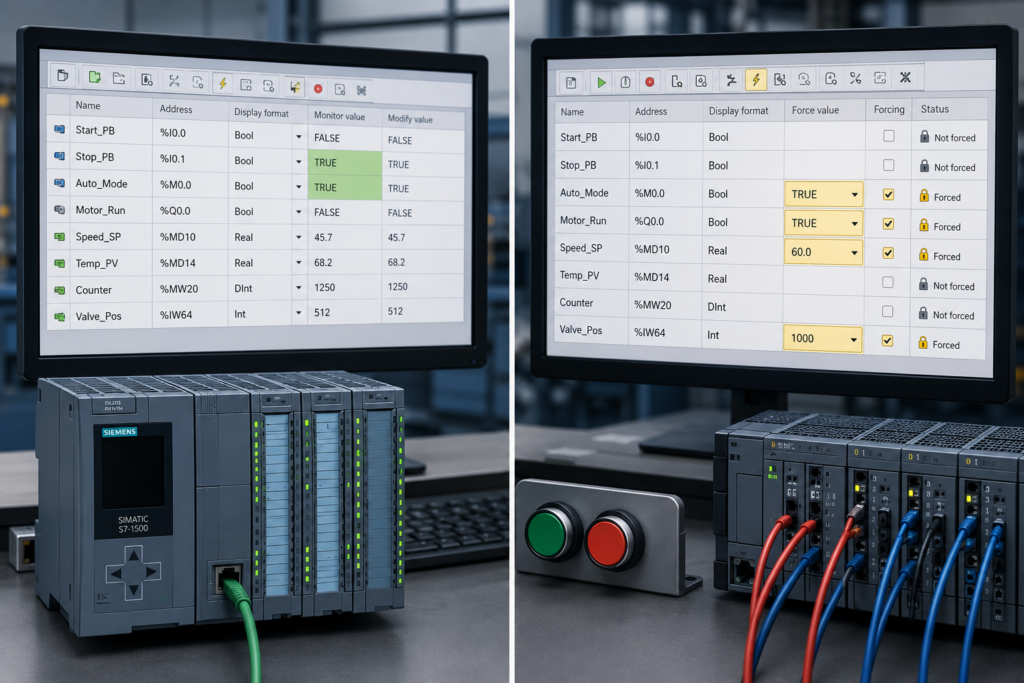
Watch tables and force tables sit inside the same TIA Portal project folder, and both can display live PLC values. That makes them look more similar than they really are.
The practical difference is this:
- A watch table is mainly used to monitor and temporarily modify program values.
- A force table is used to override physical PLC inputs or outputs with fixed values.
That word—override—matters.
Changing a value in a watch table may be overwritten again by the PLC program or process image. A forced I/O value, on the other hand, remains under the force job until forcing is deliberately stopped.
This makes a watch table an everyday diagnostic tool. A force table is a powerful commissioning tool that should be used much more carefully.
Watch Table vs Force Table at a Glance
| Function | Watch Table | Force Table |
|---|---|---|
| Monitor live values | Yes | Yes |
| Modify program values | Yes | No |
| Force physical inputs and outputs | No | Yes |
| Monitor DB and memory values | Yes | Yes |
| Create several tables | Yes | Normally one force table per CPU |
| Value can be overwritten by program | Yes, depending on modification mode | Forced I/O value overrides normal operation |
| Remains after going offline | Normal modification does not behave like a stored force job | Yes, forcing can remain active |
| Typical use | Troubleshooting and commissioning | Simulating or overriding field I/O |
| Risk level | Moderate | High |
Siemens summarises the distinction directly: a watch table supports monitoring and modifying, while a force table supports monitoring and forcing.
What Is a Watch Table?
A watch table collects PLC tags in one place so that you can monitor their current values while the CPU is running.
You might create a watch table containing:
- Start command
- Emergency-stop status
- Motor permissive
- Active sequence step
- Timer elapsed value
- Fault bits
- Analog pressure value
- Physical input and output addresses
This is much faster than opening several program blocks and trying to watch each signal separately.
Siemens allows watch tables to monitor and modify values from areas including inputs, outputs, memory bits and data blocks. You can create several watch tables for different machines, program sections or troubleshooting tasks.
For example, you could create separate tables called:
Conveyor DiagnosticsVFD CommissioningAnalog SignalsSafety StatusSequence Troubleshooting
The tables remain saved in the project, so they can be reused during future service work.
What Does “Modify” Mean?
The watch table includes a Modify value column.
You enter a value and send it to the CPU using commands such as:
- Modify now
- Modify selection now
- Modify with trigger
For example, you might modify:
- A test command bit from false to true
- A timer preset from 5 seconds to 10 seconds
- A simulated pressure value
- A sequence number
- A data-block parameter
A one-time modification writes the requested value once. The PLC program may overwrite it again during the next scan.
Suppose the program contains:
Motor_Command := Start_Button AND Safety_OK;You modify Motor_Command to true in the watch table. During the next scan, the PLC executes the assignment again. If Start_Button is false, Motor_Command returns to false.
Nothing is wrong with the watch table. The program simply wrote a newer value.
Permanent Modification Is Still Not the Same as Forcing
TIA Portal also offers permanent modification modes with defined trigger points.
For example, an input process-image value can be modified at the beginning of each scan, while an output value can be modified at the end. Siemens explains that choosing the wrong trigger point may allow the process image or user program to overwrite the modified value.
This can make permanent modification look similar to forcing, but the mechanisms are different.
A watch-table modification acts on a program operand at a selected point in PLC execution.
A force job acts on the peripheral I/O and overrides the normal value exchanged between the CPU and the physical input or output.
For routine troubleshooting, begin with monitoring. Modify values only when you understand which part of the scan may write them again.
What Is a Force Table?
A force table assigns a fixed value to selected peripheral inputs or outputs.
In Siemens addressing, peripheral access is normally identified by :P, for example:
%I0.0:P%Q0.2:P"Motor_Run":P
Current TIA Portal documentation states that only peripheral inputs and peripheral outputs can be forced. A normal process-image address such as %I0.0 or %Q0.2 is not directly forced; TIA Portal uses the associated peripheral address.
A force table is useful when you need to test how the PLC reacts without having the real field condition available.
Examples include:
- Simulating a sensor that has not yet been installed
- Testing alarm logic for a failed input
- Holding an input off while checking sequence behaviour
- Testing an output channel during commissioning
- Confirming field wiring before normal machine operation
However, forcing an output can energise real equipment. A forced valve output may open the valve even when the ladder logic says it should remain closed.
What Happens When You Force an Input?
Imagine a proximity sensor connected to %I0.0.
The real sensor is off, but you force %I0.0:P to true.
Before the PLC program executes, the CPU applies the forced value to the input process image. The ladder program therefore sees the input as true, regardless of the real electrical signal.
This is useful for testing logic, but it can also hide a genuine sensor or wiring fault.
While forcing is active, the program is no longer responding normally to the physical device.
What Happens When You Force an Output?
Suppose the program sets %Q0.0 to false, but %Q0.0:P is forced to true.
The force job applies the forced value before the output is written to the hardware. The physical channel can therefore remain energised even though the program’s calculated output is false.
This can create confusing online indications:
- Ladder output coil: false
- Output process-image value: false
- Physical output terminal: energised because of forcing
That is why a force-status indicator must never be ignored during troubleshooting.
The Most Important Safety Difference
Watch-table modifications can certainly create dangerous machine behaviour, but forcing carries an additional risk: the force job can remain active after the engineering computer disconnects.
Closing TIA Portal or terminating the online connection does not automatically stop forcing. Siemens states that forcing continues until the force job is explicitly stopped. Force jobs can even remain active through certain CPU memory-reset procedures.
This means you should never assume forcing has ended because:
- The laptop was unplugged
- TIA Portal was closed
- Another technician opened the project
- The PLC was restarted
- The machine was left overnight
Always use the proper Stop forcing command and confirm that no forced operands remain.
When Should You Use a Watch Table?
Use a watch table for normal diagnosis and program testing.
Typical uses include:
- Finding which interlock blocks an output
- Watching sequence steps
- Comparing physical inputs with internal bits
- Monitoring timer and counter values
- Viewing analog raw and scaled values
- Testing a data-block parameter
- Checking commands and feedback signals together
Monitoring itself does not alter the program sequence. It simply displays values from the running CPU.
A watch table should usually be your first choice.
When Should You Use a Force Table?
Use a force table only when you specifically need to override physical I/O.
Typical situations include:
- Factory acceptance testing without all field devices
- Commissioning an incomplete installation
- Simulating a missing sensor
- Testing a PLC input channel
- Confirming output wiring under controlled conditions
- Reproducing a rare I/O condition
Before forcing anything, determine what physical movement or process action may occur.
Check:
- Motors and drives
- Pneumatic cylinders
- Hydraulic actuators
- Solenoid valves
- Heaters
- Pumps
- Safety-related equipment
- Other machines connected to the same process
Do not force an interlock merely because it prevents the machine from starting. The interlock may be correctly responding to an unsafe condition.
Common Mistakes
Modifying an Input and Expecting It to Stay Changed
The physical input process image may overwrite the modified value during the next scan. Use the correct trigger mode or a force table when genuine peripheral-input simulation is required.
Forcing a Normal Symbol Without Peripheral Access
Forcing applies to peripheral I/O. TIA Portal normally appends :P to the relevant input or output address.
Forgetting an Active Force Job
The machine may continue behaving incorrectly long after the original test. Always check the force table when physical I/O disagrees with the program.
Forcing an Output Before Isolating the Machine
The output may operate immediately. Establish a safe machine state before starting the force job.
Using Force Instead of Understanding the Program
Forcing may make a machine run, but it does not explain why the normal command is missing. Use cross-references and watch tables to find the real blocking condition.
A Simple Rule to Remember
Use this basic decision:
Need to observe values? Use a watch table.
Need to test or temporarily change a program value? Use Modify in a watch table.
Need to override a real physical PLC input or output? Use a force table—with strict safety controls.
Final Thoughts
Watch tables and force tables are both valuable, but they solve different problems.
A watch table helps you understand what the PLC program is doing. It lets you collect signals, monitor them together and temporarily modify selected values.
A force table deliberately overrides peripheral I/O. It is useful during controlled commissioning, but it can make the real machine behave differently from the ladder program.
Start with a watch table. Move to forcing only when an I/O override is genuinely necessary.
And when the test is finished, stop the force job, verify the force indicators are gone and confirm that the machine has returned to normal control.