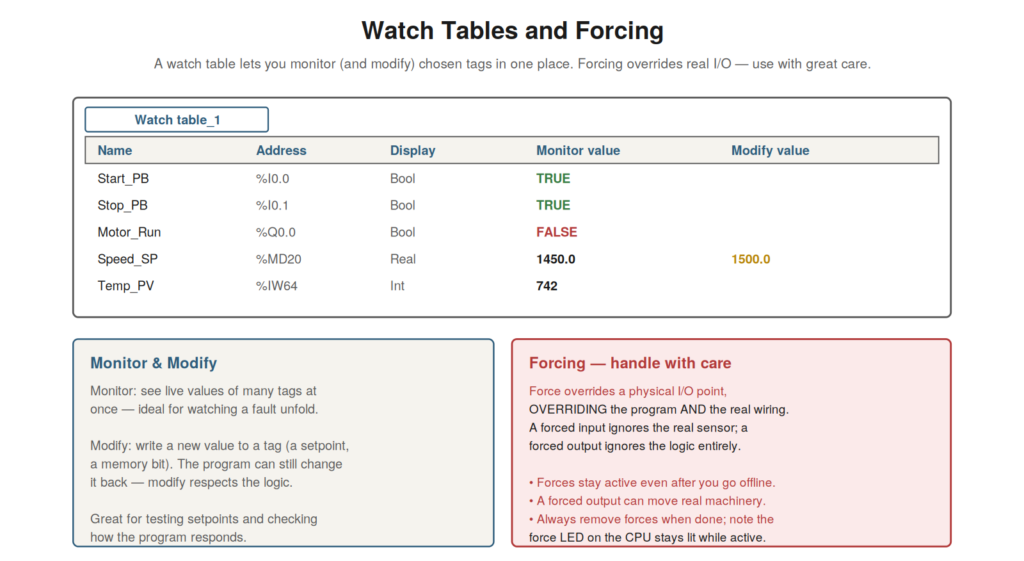
Beyond monitoring the program in the editor, TIA Portal provides
watch tables for monitoring chosen values in one place, and forcing for
overriding real I/O — two powerful tools with very different risk
levels. Watch tables are a safe, flexible way to monitor and modify
values; forcing is a powerful but hazardous way to override the real
inputs and outputs. Understanding both — and especially the care that
forcing demands — rounds out the monitoring skills.
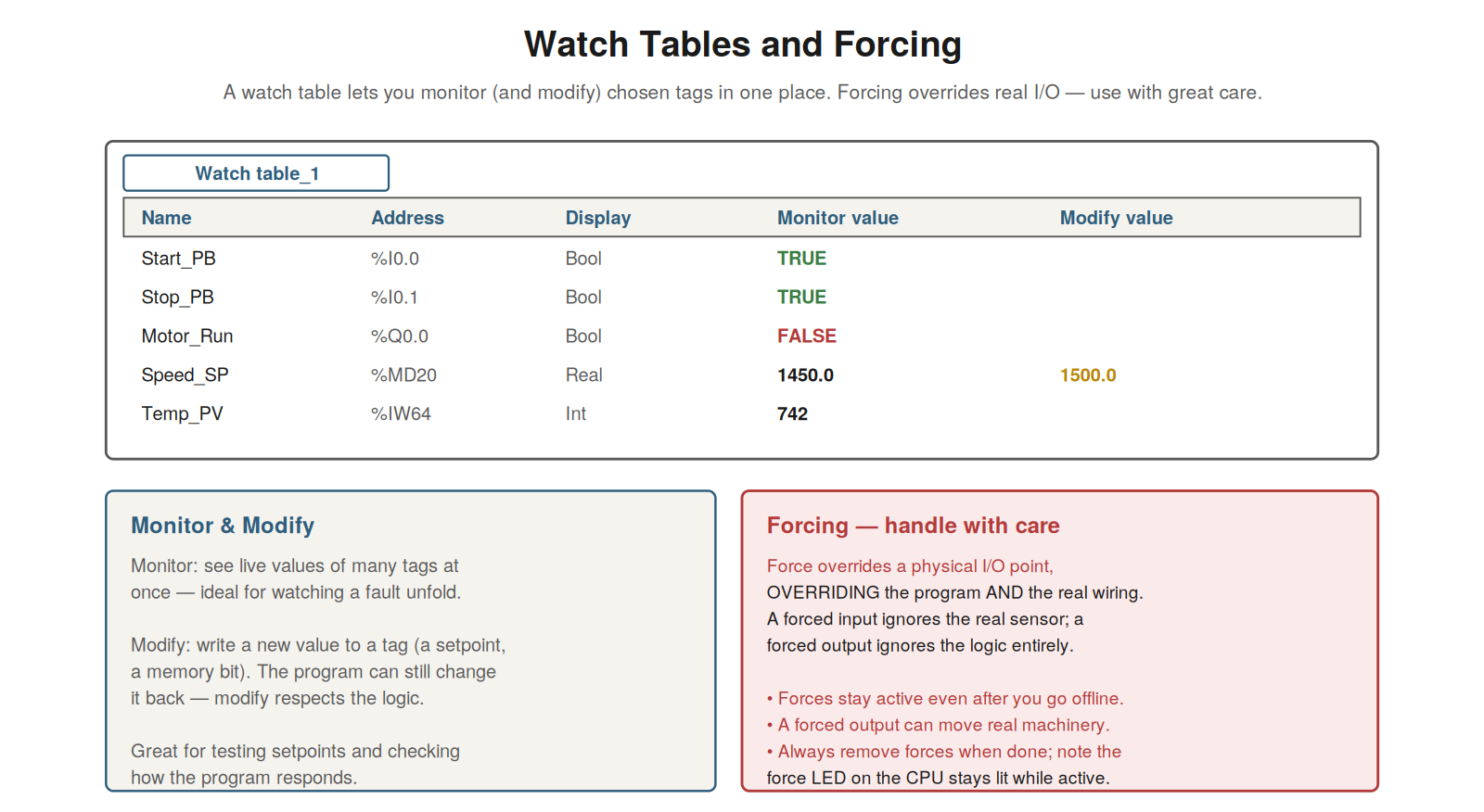
place — ideal for watching a fault unfold. Forcing overrides real I/O,
overriding both the program and the wiring — forces persist even offline
and can move real machinery, so use with great care and always remove
them.
Watch tables
A watch table lets you monitor a chosen set of tags together in one
place, which is invaluable for watching a situation unfold across
several signals. Rather than hunting through the program for each value,
you list the tags you care about — an input, an output, a setpoint, a
status word — in a watch table, and it shows their live values together.
This is ideal for diagnosis: you can watch all the relevant signals at
once as a fault occurs or a sequence runs, seeing how they relate and
change. Watch tables also let you modify values — writing a new value to
a tag, such as changing a setpoint — though the program can still change
the value back, so modify respects the running logic. So watch tables
provide flexible monitoring of chosen values, plus controlled
modification. Understanding watch tables — monitoring chosen tags
together, and modifying values within the logic — gives you a powerful,
safe diagnostic tool. It reinforces that watch tables let you monitor a
chosen set of signals together (ideal for watching a fault unfold) and
modify values (respecting the program), making them a flexible tool for
diagnosis and testing. Understanding watch tables — gathering the
signals you care about to monitor together, and modifying values in a
controlled way — adds a valuable, safe capability to your monitoring,
letting you watch related signals together and test the program’s
response, which is especially useful for diagnosing situations that
involve several signals or for checking how the program reacts to a
changed value, all within the safety of respecting the running
logic.
Forcing: power and danger
Forcing is a powerful capability that overrides the real inputs and
outputs — and it is correspondingly dangerous, demanding great care.
When you force an input, you override the real input signal: the program
sees your forced value regardless of what the actual sensor says. When
you force an output, you override the program: the physical output takes
your forced value regardless of what the logic wants. So forcing
overrides both the program and the real wiring, imposing your value on
the actual I/O. This is powerful for testing — you can simulate an input
or drive an output directly — but dangerous, because a forced output can
move real machinery regardless of the logic, and a forced input makes
the program act on false information. Critically, forces persist: they
stay active even after you go offline, and the CPU indicates active
forces (a force LED), so a forgotten force can cause mysterious,
dangerous behavior. Understanding forcing — its power to override real
I/O and its serious dangers — is essential to using it safely, if at
all. It reinforces that forcing overrides the real inputs and outputs,
overriding both program and wiring, which is powerful but dangerous:
forced outputs can move machinery, forced inputs feed the program false
data, and forces persist even offline. Understanding forcing’s power and
danger — that it overrides real I/O with persisting effect — impresses
the great care it demands, so that forcing is used only with full
understanding, appropriate safety measures, and awareness that it
overrides reality and persists, making it a capability to approach with
the utmost caution given its ability to override the safeguards of both
the program and the physical wiring.
Using forcing responsibly
Given forcing’s dangers, using it responsibly — when you use it at
all — requires specific disciplines, and understanding them protects
against the harm forcing can cause. Only force when necessary and when
you fully understand the consequences — what the forced value will do to
the machine. Ensure the machine is safe for the force: a forced output
may move machinery, so the area must be safe. Be aware that forces
persist, so you must actively track and remove them — never leave a
force active when you finish, and check for existing forces (the CPU’s
force indication) that others may have left. Remove all forces when
done, restoring normal operation. And follow your site’s procedures,
which may restrict or govern forcing. Understanding these disciplines —
force only when necessary and understood, ensure safety, track and
remove forces, follow procedures — lets you use forcing responsibly if
you must. It reinforces that forcing, being dangerous, demands
disciplines: necessity and understanding, safety, tracking and removal,
and procedure. Understanding how to use forcing responsibly — the
disciplines that manage its dangers — protects against the serious harm
a careless force can cause, so that if forcing is needed, it is done
safely: only when necessary and understood, with the machine safe, with
active tracking and removal of forces, and within site procedures, which
together manage the real dangers of a capability that overrides both the
program and the physical I/O and persists until deliberately
removed.
Building a useful watch table
Getting the most from watch tables involves building them
thoughtfully for the task, and understanding how makes them a powerful
diagnostic. A watch table is most useful when it gathers exactly the
signals relevant to what you are investigating: for a motor that will
not start, you might include the start command, the permissives and
interlocks, the motor output, and any relevant status — all the signals
that bear on the problem, together. With them gathered, you watch how
they relate and change as you try to start the motor, seeing which
permissive is missing or which interlock is open. You can build a watch
table by adding tags (typing their names or dragging them from the tag
table or logic), and you can save it for reuse. So a well-built watch
table — gathering the relevant signals for a task — turns scattered
values into a focused diagnostic view. Understanding how to build a
useful watch table — gathering the signals relevant to the problem —
makes it a powerful tool. It reinforces that watch tables are most
valuable when thoughtfully built to gather the signals relevant to a
specific investigation, letting you watch them together. Understanding
how to build a useful watch table — assembling the relevant signals for
the task at hand — lets you create a focused diagnostic view of exactly
the signals that matter for your problem, so that instead of hunting
through the program for each value, you watch them together and see how
they relate, which is the practical skill that makes watch tables such
an effective tool for diagnosing situations involving several related
signals.
Scenario: the forgotten force
A scenario shows the danger of a forgotten force. A machine was
behaving strangely — an output was on when the logic clearly said it
should be off, defying explanation from the program. The technician
monitored the logic and confirmed the rung was false, yet the output was
on, which made no sense until they realized: the output was forced.
Someone had forced that output on during earlier work and left the force
active. The force overrode the logic, holding the output on regardless
of the (false) rung. Checking the CPU’s force indication confirmed
active forces. Removing the force restored normal operation — the output
now followed the logic. The forgotten force had caused mysterious
behavior until recognized. This scenario shows a forgotten force causing
puzzling behavior, resolved by recognizing and removing it.
Understanding that forces override the logic and persist — and checking
for them — explained the output that defied the logic. It reinforces
that forces override the program and persist, so a forgotten force
causes behavior that contradicts the logic, and checking for active
forces (the CPU indication) is important when behavior defies the
program. The scenario reinforces the danger of forces: a forgotten force
made an output defy its logic, causing mysterious behavior until the
technician recognized and removed it, illustrating exactly why forces
must be tracked and removed, and why unexplained behavior that
contradicts the logic should prompt a check for active forces overriding
it.
Modify versus force: choosing safely
An important distinction for safe testing is between modifying a
value (safer) and forcing (more dangerous), and understanding when each
is appropriate guides you to the safer choice. Modifying a value in a
watch table writes a value that the program can still override — so if
you modify a setpoint, the program uses it but can change it, and the
modify respects the running logic. Forcing overrides the real I/O
regardless of the logic — more powerful but more dangerous, bypassing
the program and wiring. For many testing purposes, modifying is
sufficient and safer: to test how the program responds to a setpoint,
modify the setpoint (the program still runs normally around it). Forcing
is needed only when you must override actual I/O (simulating a physical
input or driving an output directly), which is more invasive. So
preferring modify over force when it suffices is the safer choice.
Understanding modify versus force — modify (safer, respects logic)
versus force (more dangerous, overrides I/O) — guides you to the safer
option when it suffices. Understanding modify versus force — and
choosing modify when it suffices because it respects the running logic
while force overrides the real I/O — guides you to the safer testing
choice, so that you use the less invasive modify (which the program can
still override) for tests it can accomplish, reserving the more
dangerous force (which overrides the actual I/O and wiring) for the
cases that genuinely require overriding real inputs or outputs, which is
a safer approach to testing that prefers the gentler tool when it will
do the job.
The two faces of intervention
Consolidating watch tables and forcing, they represent two faces of
intervention — the safe (monitoring and modifying within the logic) and
the dangerous (forcing, which overrides reality) — and understanding
this contrast keeps you on the safe side when possible. Watch tables,
for monitoring and controlled modification, are a safe face of
intervention: you observe and gently adjust, within the running logic.
Forcing is the dangerous face: you override the real I/O, bypassing the
logic and wiring, with the power to move machinery and the hazard of
persisting overrides. The contrast reminds you to prefer the safe face —
monitoring and modifying — when it suffices, reserving the dangerous
face — forcing — for when it is truly necessary and used with full care.
So understanding the two faces guides you toward safe intervention.
Understanding the two faces of intervention — the safe
monitoring/modifying and the dangerous forcing — keeps you on the safe
side when possible and careful when not. Understanding watch tables and
forcing as the two faces of intervention — the safe face of monitoring
and controlled modification, and the dangerous face of forcing that
overrides reality — keeps you on the safe side when possible, so that
you prefer the safe monitoring and modifying (within the logic) for what
they can accomplish, reserving the dangerous forcing (overriding the
real I/O, with power to move machinery and hazard of persistence) for
when it is truly necessary and using it with full care, which is the
balanced approach to intervention that these two very different
capabilities call for.