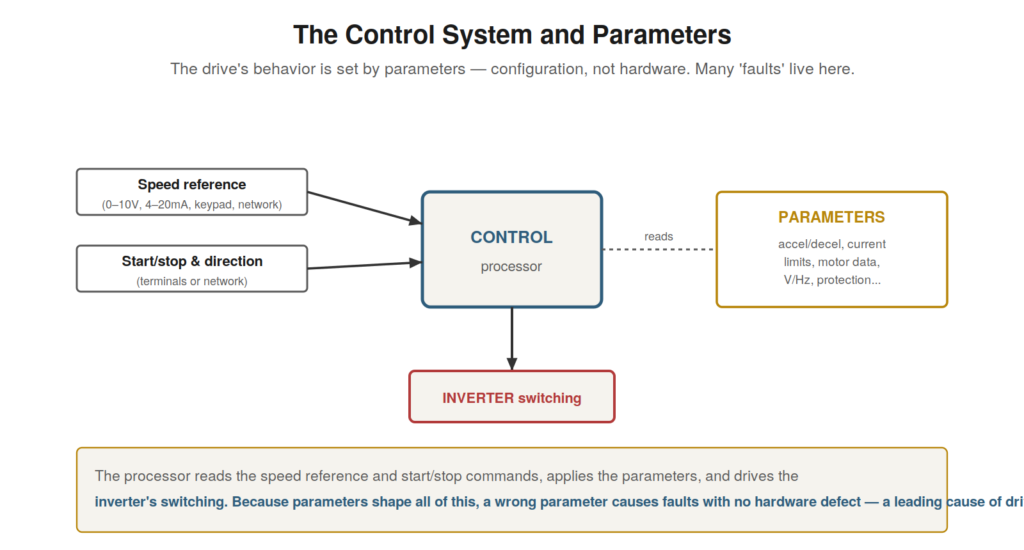
The drive’s power structure converts and switches the power, but it
is the control system that governs how — and the parameters are where
that governance is configured. Because so many drive problems are not
hardware faults at all but configuration issues, understanding the
control system and parameters is essential to troubleshooting. The
parameters shape the drive’s every behavior, and a wrong parameter can
cause a fault with no physical defect, so this understanding is one of
the most practically important in the book.
reads the speed reference and start/stop commands, applies the
parameters, and drives the inverter’s switching. A wrong parameter
causes faults with no hardware defect — a leading cause of drive
problems.
The control system
At the drive’s core is a control system — a microprocessor and
associated electronics — that governs the drive’s operation. It reads
the inputs (the speed reference telling it how fast to run, the
start/stop and direction commands), applies the configured parameters,
and controls the inverter’s switching accordingly to produce the
appropriate output. It also monitors the drive continuously (currents,
voltages, temperatures) and detects fault conditions, tripping the drive
to protect it and reporting the fault. So the control system is the
drive’s brain: it takes in commands and settings, controls the power
output, monitors for problems, and manages faults. Understanding the
control system — reading inputs and parameters, controlling the
inverter, monitoring and protecting — is the basis for understanding how
the drive is governed. Much of what the drive does, and much of its
self-diagnosis, resides in this control system, so understanding its
role — the intelligent governance of the drive’s operation and
protection — frames both how the drive works and how it helps in
troubleshooting by monitoring itself and reporting faults. The control
system is what makes the drive more than raw power electronics: it is
the intelligence that operates, monitors, and protects the drive, and
understanding it is key to understanding the drive’s behavior and its
diagnostics.
Parameters: configuring the drive
The drive’s behavior is configured by its parameters — a large set of
settings that determine how the drive operates. Parameters set the motor
data (so the drive knows the motor it is controlling), the speed
reference source and limits, the acceleration and deceleration rates,
the control mode, the protection settings, and a great many other
aspects of operation. The drive applies these parameters in everything
it does, so they shape its every behavior. Crucially, parameters are
configuration, not hardware: they can be set correctly or incorrectly,
and a wrong parameter causes the drive to behave wrongly — to trip, to
run poorly, to protect inadequately — with no physical defect in the
drive at all. This makes parameters one of the most important
considerations in troubleshooting, because a great many drive problems
are parameter errors rather than hardware faults. Understanding
parameters — that they configure the drive’s behavior, and that wrong
parameters cause faults without hardware defects — is essential to VFD
troubleshooting. It reinforces a key theme: when a drive misbehaves, the
parameters are a prime suspect, especially on a newly set up or recently
changed drive, because the problem may well be in the configuration
rather than the hardware, and checking the parameters against what they
should be is often the path to resolving a fault that has no physical
cause but a configuration error in the parameters that govern the
drive’s behavior.
Why parameters cause so many problems
It is worth understanding why parameters are such a common source of
problems, because it directs troubleshooting attention appropriately.
Parameters are numerous — a drive may have hundreds — and many interact,
so a wrong value in one can have effects that are not obvious. They are
set by people, during commissioning or later adjustment, and people make
errors: entering wrong motor data, setting ramps too fast, configuring
the wrong reference source, mis-setting protection. They may be changed
over time, sometimes without records, so a drive’s configuration may
drift from correct. And because parameters are invisible (unlike a
physical fault you can see), a parameter problem gives no visible sign —
the drive simply behaves wrongly, which can be puzzling until the
parameters are examined. All this makes parameter errors common and
sometimes hard to spot. Understanding why — numerous, interacting,
human-set, changeable, and invisible — explains their prominence in
drive problems and directs the troubleshooter to consider them. It
reinforces checking parameters as a key troubleshooting step: because
parameter errors are common, easily made, and not visible, examining the
configuration — comparing it to what it should be, looking for wrong or
changed values — is essential when diagnosing a drive, particularly one
recently commissioned or adjusted, where a parameter error is a likely
cause of a fault that has no hardware explanation but originates in the
drive’s extensive, human-set, and sometimes mis-set configuration.
THE DRIVE IN ONE PICTUREA VFD rectifies the fixed-frequency supply to DC, stores and smooths |
Parameters interact
An important and sometimes tricky aspect of parameters is that they
interact — the effect of one parameter can depend on others — which
makes parameter problems occasionally subtle. A drive’s parameters are
not all independent: the control mode affects which other parameters are
relevant, the motor data affects how the drive interprets currents and
applies volts-per-hertz, the ramp times interact with the load and the
protection settings. So a parameter problem may not be a single
obviously-wrong value but an interaction — a combination of settings
that together cause a problem, or a value that is wrong only in the
context of another setting. This interaction can make parameter problems
subtle to diagnose, as the issue may not be apparent from any single
parameter but from how they combine. Understanding that parameters
interact — that their effects depend on each other — is important for
parameter troubleshooting, because it means checking parameters is not
just verifying each value in isolation but considering how they work
together. It reinforces careful, holistic parameter checking when a
configuration problem is suspected: not just looking for one wrong
value, but considering the parameter set as a whole and how the settings
interact, because a subtle parameter problem may lie in the interaction
of settings rather than in any single obviously wrong value, making
parameter diagnosis a matter of understanding the configuration as an
interacting whole.
Scenario: the drive that ignored the start
button
A scenario shows a parameter problem with no hardware fault. A drive
would not start when the start button was pressed, yet everything seemed
connected and powered, and the drive itself tested fine. The puzzle
resolved when the parameters were checked: the reference and command
source parameter was set to expect the start command from a
communication network, not from the control terminal where the start
button was wired. So the drive was looking for its start command in the
wrong place — waiting for a network command that never came — and
ignoring the button, which was wired to a terminal the drive was not
configured to use. There was no hardware fault; the drive worked
perfectly, but a parameter directed it to the wrong command source.
Setting the command source parameter to the control terminal made the
drive respond to the start button. This scenario shows a parameter
problem causing a puzzling symptom (the drive ignoring the start button)
with no hardware fault — the configuration directed the drive to the
wrong command source. Understanding that parameters govern the drive’s
behavior, including where it takes commands from, explains this: the
drive ignored the button because a parameter told it to look elsewhere.
It reinforces checking parameters when a drive behaves wrongly without a
hardware cause, because a parameter — here the command source — can
cause behavior (ignoring the start button) that seems like a fault but
is a configuration issue, resolved by correcting the parameter rather
than any hardware repair.
Backing up and documenting parameters
A crucial practice around parameters is backing them up and
documenting them, and understanding its importance protects against a
whole class of problems and eases troubleshooting. A drive’s parameter
set is its configuration, developed during commissioning and adjustment,
and it represents significant work and knowledge. If it is lost —
through a drive failure and replacement, a parameter reset, or an
undocumented change — recreating it can be difficult and error-prone,
and the drive may not work correctly until the configuration is
restored. Backing up the parameter set (saving it, whether to the
drive’s memory, a keypad, or a computer) and documenting it (a record of
the settings) protects against this loss: the configuration can be
restored to a replacement drive or after a reset. Documentation also
aids troubleshooting, providing a reference for what the parameters
should be, against which the current settings can be compared.
Understanding the importance of backing up and documenting parameters —
protecting the configuration against loss and providing a
troubleshooting reference — makes it a key practice. It reinforces
backing up the parameter set after commissioning and any changes, and
keeping documentation, because the configuration is valuable and easily
lost, and its backup enables restoration while its documentation aids
troubleshooting. Understanding that the parameter set is important
configuration worth protecting — through backup and documentation —
reinforces this practice, which safeguards against configuration loss
and provides the reference for verifying parameters in troubleshooting,
making it an essential part of managing a drive’s crucial
configuration.
Parameters: the recurring theme
Parameters are a recurring theme throughout drive troubleshooting,
and recognizing this consolidates their central importance. Again and
again, across the fault types, parameters appear as a cause: ramps
causing overcurrent and overvoltage, motor data causing torque and
current problems, protection settings causing nuisance trips, reference
and mode settings causing operational problems. So parameters are not
just one topic but a theme running through drive faults, because so many
faults are configuration issues rather than hardware defects. This
recurring role makes checking parameters a habitual step in drive
troubleshooting, applicable to many faults. Recognizing parameters as
this recurring theme consolidates their importance: they are a leading
cause across fault types, so considering them is part of diagnosing many
drive problems. It reinforces the habit of checking parameters when
diagnosing drive faults, because they recur as a cause throughout — a
wrong parameter behind many faults that might otherwise be mistaken for
hardware problems. Understanding parameters as the recurring theme of
drive troubleshooting — a cause appearing across fault types —
consolidates the lesson that configuration is central to drive faults,
and that checking the parameters is a habitually valuable step,
applicable to the many faults that are configuration issues, which is
why parameters, introduced early, recur throughout the fault chapters as
a cause to consider, making them one of the most important recurring
themes in the whole subject of drive troubleshooting.