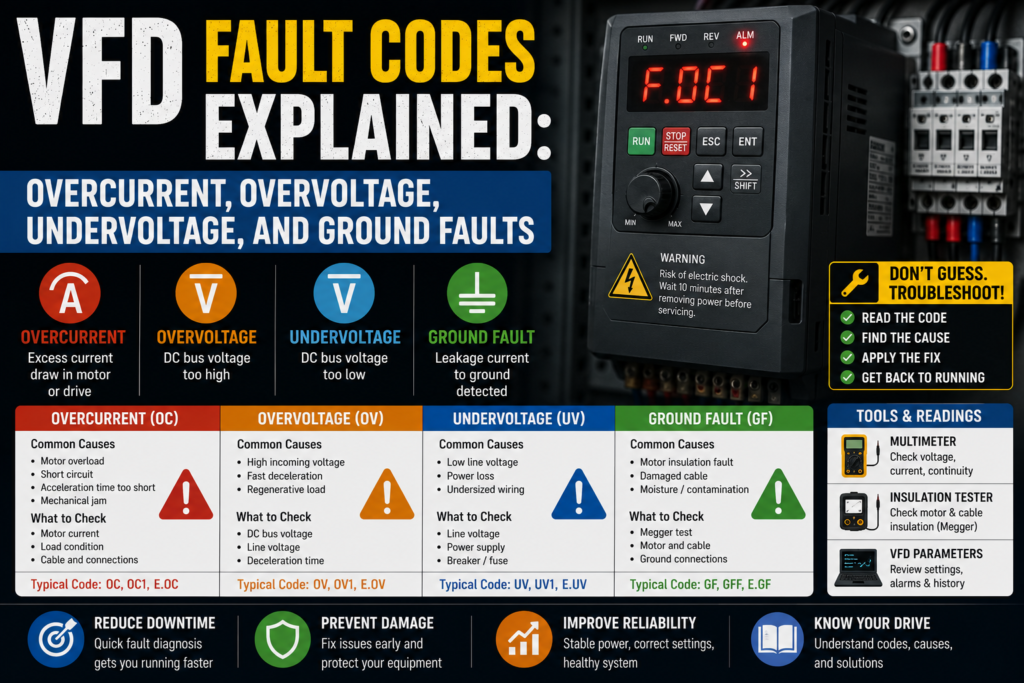
A VFD fault code is usually not the real problem.
It is the drive’s way of saying, “Something happened, and I’m not going to keep running until you look at it.”
Sometimes the VFD is protecting itself. Sometimes it is protecting the motor. Sometimes it is reacting to a bad parameter, a mechanical jam, a weak power supply, a shorted motor cable, or a braking resistor that has quietly left this world.
And, of course, the display only gives you a few cryptic letters.
OC. OV. UV. GF. EF. OH. OL.
Very poetic.
But once you understand what the common VFD fault codes mean, troubleshooting becomes much less random. You stop resetting the drive like a casino machine and start following the cause.
This post explains four common VFD faults:
- Overcurrent
- Overvoltage
- Undervoltage
- Ground fault
Not as textbook theory only. More like, “the machine stopped, the drive is flashing red, what do I check first?”
First: Do Not Just Keep Pressing Reset
I know the reset button is right there.
And sometimes a reset works.
But if the same VFD fault comes back immediately, or comes back every time the motor starts, accelerates, stops, or carries load, then the drive is not being dramatic. It is reporting a real condition.
Before resetting repeatedly, check:
- What exact fault code is shown?
- When does the fault happen?
- At startup?
- During acceleration?
- During normal running?
- During deceleration?
- When load increases?
- After a few minutes?
- Only sometimes?
- After maintenance or parameter changes?
That timing is gold.
A VFD overcurrent fault during acceleration is not the same as overcurrent after 20 minutes of running. Overvoltage during deceleration points in a different direction than overvoltage while the motor is idle. Ground fault immediately at start is a different animal than random ground fault in a wet environment.
Fault code first. Timing second. Then measurements.
That’s the clean way.
Safety Before VFD Troubleshooting
A VFD is not just a simple motor starter.
Inside the drive, there is a DC bus with stored energy. Even after power is switched off, capacitors can remain charged for a while. The drive may also have dangerous input voltage, output voltage, braking resistor terminals, and motor cable terminals.
Before working:
- Follow lockout/tagout rules
- Wait for the DC bus to discharge
- Check the drive display and manual for discharge time
- Measure with a proper meter before touching terminals
- Use insulated tools
- Do not disconnect motor cables while the drive is running
- Do not megger the motor while it is connected to the VFD
- Do not bypass protections just to “try it”
That megger point is important.
If you test motor insulation with an insulation resistance tester, disconnect the motor cable from the VFD first. Sending high test voltage into the drive output terminals can damage the drive.
Expensive mistake. Painfully expensive.
What a VFD Actually Monitors
A VFD can monitor many things, depending on model and brand.
Common monitored conditions include:
- Output current
- DC bus voltage
- Input voltage
- Output short circuit
- Ground leakage
- Motor overload
- Drive temperature
- Motor temperature, if sensor connected
- Phase loss
- Communication loss
- Braking resistor overload
- Safe torque off status
- Encoder feedback
- External fault input
So when you see a fault, remember this: the VFD is reacting to an electrical condition, a parameter condition, or a feedback condition.
The drive is not always the broken part.
Actually, it often isn’t.
1. VFD Overcurrent Fault
An overcurrent fault means the VFD detected too much current on the motor/output side.
This is one of the most common VFD faults.
On the display it may appear as:
- OC
- OCF
- Overcurrent
- Output overcurrent
- Motor overcurrent
- Short circuit
- Current limit fault
- IGBT fault, in some cases
The exact name depends on the drive brand.
What Usually Causes Overcurrent?
Common causes include:
- Motor overloaded
- Mechanical jam
- Acceleration time too short
- Deceleration time too short
- Wrong motor parameters
- Motor cable short circuit
- Motor winding fault
- Ground fault beginning to develop
- Motor too small for load
- VFD too small for motor/load
- Starting into a spinning motor
- Bad bearings
- Pump or fan blocked
- Conveyor jammed
- High inertia load
- Incorrect V/f or vector settings
- Encoder feedback problem, on closed-loop systems
That is a long list, yes.
But don’t panic. The timing of the fault narrows it down.
Overcurrent During Acceleration
If the VFD trips on overcurrent while accelerating, check these first:
- Acceleration ramp time
- Load too heavy at startup
- Mechanical jam
- Motor nameplate parameters
- Drive current limit
- Torque boost setting
- Motor wiring
- Motor cable
- Motor size vs drive size
A very short acceleration time can cause high current. The drive is trying to bring the motor to speed too quickly, and the motor demands more current than the VFD allows.
Good sign:
- Motor accelerates smoothly
- Output current stays below the drive/motor limit
- No mechanical binding
- Ramp time is reasonable
Bad sign:
- Current spikes immediately
- Motor barely turns, then faults
- Conveyor or pump is stuck
- Acceleration time is unrealistically short
- Motor hums but does not rotate properly
A good first test is to increase acceleration time, if the process allows it. For example, if the ramp is 1 second on a heavy conveyor, try a longer ramp. Don’t just change things blindly, but yes, a too-aggressive ramp is a classic cause.
Sometimes the VFD is not “weak.”
You are asking it to launch a fully loaded conveyor like a drag car.
Overcurrent During Normal Running
If the drive faults after running for a while, think load and motor condition.
Check:
- Motor current during operation
- Mechanical load
- Bearings
- Gearbox
- Pump blockage
- Fan dirt buildup
- Conveyor friction
- Belt tension
- Product jam
- Motor temperature
- Motor overload setting
- Motor cooling
Use a clamp meter or drive display to compare running current with the motor nameplate current.
Good sign:
- Running current is below motor rated current
- Current is stable
- Load moves freely
- Motor does not overheat
Bad sign:
- Current is above motor rated current
- Current rises as machine runs
- Motor gets hot
- Gearbox noisy
- Pump or fan blocked
- Conveyor hard to move
- Bearings grinding
A motor pulling high current is often telling you something mechanical is wrong.
Electrical people sometimes stay too long in the cabinet. Go look at the machine. Touch nothing unsafe, obviously, but inspect the actual load.
The answer may be a stuck roller, not a parameter.
Overcurrent Immediately at Start
If the VFD trips instantly when you press start, check for harder electrical faults.
Possible causes:
- Shorted motor cable
- Shorted motor winding
- Ground fault
- Wrong motor wiring
- Failed output transistor/IGBT
- Motor connected incorrectly
- Contactor switching on VFD output
- Output cable damaged
Checks:
- Disconnect motor cable from VFD output, then test motor and cable insulation
- Inspect motor terminal box
- Check cable for damage
- Verify motor star/delta wiring matches voltage
- Check if any contactor is switching between VFD and motor
- Try running VFD with motor disconnected only if the manufacturer allows it and process is safe
Be careful here.
Some drives do not like running with no motor connected, or they may require specific settings. Always check the manual.
A direct short on the output side can trip the drive very quickly. If you keep resetting it, you may turn a cable fault into a drive failure.
Not ideal.
2. VFD Overvoltage Fault
An overvoltage fault means the VFD’s DC bus voltage became too high.
On the display, it may appear as:
- OV
- Overvoltage
- DC bus overvoltage
- Overvoltage during decel
- Main circuit overvoltage
A VFD converts AC input into DC internally, then uses that DC bus to create variable-frequency output to the motor. If the DC bus voltage rises too high, the drive trips to protect itself.
What Usually Causes Overvoltage?
Common causes include:
- Deceleration time too short
- High-inertia load
- Regenerative energy from motor
- Braking resistor missing
- Braking resistor faulty
- Braking transistor fault
- Input voltage too high
- Supply voltage spikes
- Wrong drive voltage class
- Load driving the motor
- Fan/pump backspin
- Hoist or lowering application regenerating energy
- Power factor correction switching nearby
- Unstable mains supply
The most common one?
Overvoltage during deceleration.
The motor becomes a generator when the load is still spinning and the VFD tries to slow it too quickly. That energy goes back into the DC bus. If the drive cannot absorb or dissipate it, the bus voltage rises and the VFD trips.
Simple idea, annoying fault.
Overvoltage During Deceleration
If overvoltage happens when stopping or slowing down, check:
- Deceleration time
- Load inertia
- Braking resistor
- Braking resistor wiring
- Braking resistor parameter
- DC braking settings
- Braking chopper/transistor
- Mechanical coast-down time
Good signs:
- Motor decelerates smoothly
- DC bus voltage stays below trip level
- Braking resistor warms normally during braking
- No overvoltage fault
Bad signs:
- Fault happens only while stopping
- DC bus voltage rises quickly
- Braking resistor open circuit
- Braking resistor overheated
- Braking resistor not connected
- Braking transistor fault
- Deceleration ramp too short
The first practical test is usually to increase deceleration time, if the machine process allows it.
If a fan naturally takes 40 seconds to coast down, but the VFD is told to stop it in 3 seconds, the drive may say “no thanks” with an overvoltage fault.
For high-inertia loads, you may need a braking resistor or regenerative drive solution. Depends on the machine.
Overvoltage While Running or Idle
If overvoltage appears while the motor is running steady or even idle, look at the input supply.
Check:
- Input voltage phase-to-phase
- Supply voltage stability
- Correct drive voltage rating
- Incoming transformer taps
- Voltage spikes
- Nearby capacitor banks
- Regenerative loads on same supply
- Loose input connections
Good signs:
- Input voltage within drive allowed range
- Voltage stable
- No loose terminals
- Drive voltage class matches supply
Bad signs:
- Supply voltage too high
- Voltage spikes
- Wrong drive voltage class
- Loose input phase
- Input voltage fluctuating
- Overvoltage happens when other equipment switches
If the VFD is rated for the wrong supply voltage, that is not a parameter problem. That is a hardware selection problem.
A 230V-class drive and 400V supply are not going to become friends.
3. VFD Undervoltage Fault
An undervoltage fault means the VFD’s DC bus voltage dropped too low.
It may appear as:
- UV
- Undervoltage
- DC bus undervoltage
- Low voltage
- Main circuit undervoltage
- Input phase loss, sometimes separately
Undervoltage can happen when the incoming AC supply drops, when a phase is missing, when the DC bus cannot charge properly, or when the power dips during motor operation.
What Usually Causes Undervoltage?
Common causes include:
- Main supply voltage too low
- Missing input phase
- Blown fuse
- Loose input terminal
- Weak transformer
- Voltage sag when motor/load starts
- Bad contactor or breaker contact
- Long cable voltage drop
- Poor power supply quality
- Drive precharge circuit fault
- Power interruption
- Wrong voltage class
- Undersized generator supply
- Loose neutral, in some systems
Undervoltage often shows up during startup or when another large load starts nearby.
The drive is basically saying, “I don’t have enough voltage to operate safely.”
Undervoltage at Power-Up
If the VFD shows undervoltage immediately when powered, check:
- Main incoming voltage
- All input phases present
- Fuses
- Breakers
- Input contactor
- Drive input terminals
- Correct supply voltage
- Control power, if separate
- DC bus voltage reading, if available
Good signs:
- Correct voltage at VFD input terminals
- All phases present
- Fuses healthy
- Drive powers normally
Bad signs:
- One phase missing
- Low voltage at input
- Blown fuse
- Bad breaker pole
- Input contactor not closing fully
- Loose terminal
- Voltage present before contactor but not after
Measure at the correct place.
Voltage at the panel incoming terminals does not prove voltage reaches the VFD input. You may have a bad fuse, contactor, breaker, or terminal between them.
Follow the power path.
Undervoltage During Running
If the drive starts but trips undervoltage during operation, check for voltage sag.
Possible causes:
- Supply transformer overloaded
- Long cable run
- Loose input connection
- Other large motors starting
- Weak generator
- Bad input contactor
- Undersized supply
- Faulty breaker contact
- Momentary mains dip
Good signs:
- Input voltage remains stable under load
- No major dips when equipment starts
- Terminals stay cool
- DC bus stable
Bad signs:
- Voltage drops when motor accelerates
- Voltage drops when another machine starts
- Undervoltage fault happens randomly
- Input terminals hot
- Contactor buzzes
- One phase intermittent
This is where a normal quick multimeter check may miss the fault. The voltage may be fine when you measure it, but dip for half a second during operation.
If the fault is intermittent, check fault history, input voltage logs if the drive has them, and look at what else was running at the same time.
Machines love hiding faults inside timing.
4. VFD Ground Fault
A ground fault means the VFD detected current leaking from the motor/output circuit to ground.
It may appear as:
- GF
- Ground fault
- Earth fault
- Output ground fault
- Leakage fault
- Ground short
- Insulation fault
This is a serious fault and should not be ignored.
Ground faults can come from the motor, motor cable, terminal box, moisture, damaged insulation, or the drive output stage.
What Usually Causes Ground Fault?
Common causes include:
- Damaged motor cable
- Motor winding insulation failure
- Moisture in motor terminal box
- Water inside motor
- Oil contamination
- Crushed cable
- Cable rubbed through on machine frame
- Wrong cable gland
- Loose strands touching ground
- Long motor cable leakage
- EMC filter/leakage issues
- Failed VFD output transistor
- Motor overheated and insulation damaged
Ground faults can be immediate or intermittent.
Immediate ground fault at start often points to motor cable, motor winding, or drive output fault.
Random ground fault in wet or dirty environments may point to moisture, damaged insulation, or cable movement.
How to Check a Ground Fault Safely
Do not just reset and restart.
Do this carefully:
- Power down and lock out the machine.
- Wait for the VFD DC bus to discharge.
- Verify safe voltage.
- Disconnect motor cable from the VFD output terminals.
- Disconnect motor leads if needed.
- Test insulation resistance of the motor and cable separately.
- Inspect the motor terminal box and cable route.
- Only reconnect after the fault is found and corrected.
Important again: do not use an insulation resistance tester on a motor cable while it is still connected to the VFD.
Test motor and cable separately from the drive.
Checks:
- Motor phase to ground insulation
- Cable conductor to ground insulation
- Cable conductor to conductor insulation
- Motor terminal box moisture
- Cable damage
- Grounding condition
- Motor winding smell or discoloration
Good signs:
- High insulation resistance
- Terminal box dry
- Cable jacket undamaged
- No conductor touching ground
- Fault disappears after damaged part is repaired
Bad signs:
- Low insulation resistance to ground
- Moisture in terminal box
- Burn marks
- Cable crushed or cut
- Loose strand touching PE
- Oil/water inside connector
- Fault returns immediately
What value is “good”?
That depends on motor voltage, company rules, and manufacturer requirements. In practical maintenance, very low insulation resistance is suspicious, and a healthy motor/cable should show high resistance to ground. Always follow your site standards and equipment manual.
Don’t guess with insulation faults. Prove it.
Ground Fault Only When Motor Runs
Sometimes insulation looks acceptable when the motor is cold, but the ground fault appears after running.
Possible causes:
- Heat-related motor winding fault
- Moisture moving inside motor
- Cable flexing during machine movement
- Vibration opening damaged insulation
- Motor cable shield issue
- Output cable touching frame under movement
- Bearing or mechanical issue overheating motor
If the fault happens only after 10–20 minutes, check temperature and movement.
A cold motor can test better than a hot motor. A cable can look fine until the machine moves and bends it. A terminal box can be dry today and wet tomorrow. Industrial equipment has moods, apparently.
Well, not moods. Conditions.
But it feels like moods.
Quick VFD Fault Code Checklist
Use this as a first-pass troubleshooting path.
Overcurrent Fault
Check:
- When does it happen?
- Acceleration time too short?
- Load jammed?
- Motor current too high?
- Motor parameters correct?
- Motor cable shorted?
- Motor winding OK?
- Drive sized correctly?
- Output contactor switching incorrectly?
Most likely areas:
- Mechanical load
- Motor cable
- Motor wiring
- Parameters
- Acceleration settings
Overvoltage Fault
Check:
- Does it happen during deceleration?
- Decel time too short?
- Load inertia high?
- Braking resistor connected?
- Braking resistor healthy?
- Braking parameter enabled?
- Input voltage too high?
- Supply spikes?
Most likely areas:
- Deceleration ramp
- Regenerative energy
- Braking resistor
- Input voltage
Undervoltage Fault
Check:
- Incoming voltage correct?
- All phases present?
- Fuse blown?
- Input contactor OK?
- Loose terminals?
- Voltage sag during start?
- Supply transformer overloaded?
- Generator too weak?
Most likely areas:
- Main supply
- Input fuses
- Breakers/contactors
- Loose terminals
- Voltage dips
Ground Fault
Check:
- Motor cable damaged?
- Motor insulation OK?
- Moisture in motor terminal box?
- Cable crushed?
- Loose wire strand touching ground?
- Fault immediate or intermittent?
- Motor and cable tested separately?
Most likely areas:
- Motor cable
- Motor insulation
- Moisture
- Ground leakage
- Damaged terminals
Good vs Bad Signs During VFD Troubleshooting
| Fault | Good Sign | Bad Sign |
|---|---|---|
| Overcurrent | Current below motor rated value, load moves freely | Current spikes, motor stalls, mechanical jam |
| Overvoltage | DC bus stable, smooth deceleration | Fault during stopping, bus voltage rises fast |
| Undervoltage | Input voltage stable, all phases present | Voltage sag, missing phase, blown fuse |
| Ground fault | High insulation resistance, dry motor box | Low insulation resistance, moisture, damaged cable |
| Motor cable | No damage, correct terminals, good insulation | Crushed cable, rubbed insulation, loose strands |
| Parameters | Motor data matches nameplate | Wrong motor current, wrong voltage, wrong control mode |
| Braking resistor | Correct resistance, connected, not overheated | Open resistor, wrong wiring, overheated resistor |
| Mechanical load | Spins/moves freely | Jammed conveyor, blocked pump, seized bearing |
| Input supply | Balanced phases, correct voltage | Phase loss, loose terminal, unstable mains |
| Drive behavior | Fault timing matches real cause | Random resets without checking history |
Example 1: Overcurrent When Conveyor Starts
A conveyor VFD trips with overcurrent every time the operator presses start.
You check the fault timing. It trips during acceleration.
The acceleration time is set to 0.5 seconds. The conveyor is fully loaded.
That is probably too aggressive.
You inspect the conveyor and find it moves, but it is heavy. No obvious jam. Motor parameters match the nameplate.
You increase acceleration time to a more reasonable value, test carefully, and the motor starts without tripping.
Cause: acceleration ramp too short for the load.
Not a bad drive.
Not a bad motor.
Just an impatient parameter.
Example 2: Overvoltage When Fan Stops
A large fan runs fine but trips overvoltage every time it stops.
That timing is a giant clue.
The fan has high inertia. When the VFD tries to stop it quickly, the spinning fan drives energy back into the DC bus. The bus voltage rises, and the VFD trips.
Checks:
- Deceleration time
- Braking resistor
- Braking settings
- DC bus voltage during stop
You increase deceleration time. The fault disappears.
Cause: regenerative energy during fast deceleration.
The fan did not want to stop that quickly. Fair enough.
Example 3: Undervoltage Randomly During Production
A pump drive faults with undervoltage a few times per shift.
When you measure input voltage, it looks normal.
Annoying.
Then you check the timing. The fault often happens when another large motor starts on the same supply.
Now the problem makes more sense. There may be a momentary voltage dip that your quick meter reading does not catch.
Checks:
- Supply capacity
- Transformer loading
- Input terminals
- Other machine startup timing
- Drive fault history
- Voltage monitoring
Cause may be voltage sag, not the pump motor itself.
This is why “I measured voltage and it was fine” does not always end the investigation.
Example 4: Ground Fault After Cleaning
A machine is washed down during cleaning. Next morning, the VFD trips ground fault immediately.
You power down safely, disconnect the motor cable from the drive, and test motor/cable insulation separately.
The motor terminal box has moisture inside.
Cause: water entered the motor terminal box and created leakage to ground.
Drying, repairing the sealing/gland issue, and retesting insulation is the right path.
Repeated resets are not.
Water plus VFD output is not a friendly combination.
Common Mistakes When Reading VFD Fault Codes
The first mistake is treating the fault code as the final answer.
“Overcurrent” does not mean “replace the drive.” It means current exceeded the limit. Find out why.
The second mistake is resetting repeatedly without checking timing.
When the fault happens tells you where to look.
The third mistake is ignoring mechanical load.
A jammed conveyor, blocked pump, dirty fan, or seized bearing can create electrical faults.
The fourth mistake is changing parameters randomly.
A longer ramp may help. A higher current limit may also hide a real mechanical problem. Be careful.
The fifth mistake is using a regular multimeter on the VFD output and trusting strange readings too much.
VFD output is not a clean sine wave. Use the right meter and the drive’s own current/voltage display when appropriate.
The sixth mistake is insulation testing the motor while still connected to the VFD.
Don’t do it.
The seventh mistake is replacing the VFD before testing motor cable and motor insulation.
A bad motor cable can kill the new drive too. Then you have two problems and a very unhappy manager.
Tools for VFD Fault Troubleshooting
Useful tools include:
- Multimeter with correct safety rating
- Clamp meter
- Insulation resistance tester
- Screwdrivers and insulated tools
- Electrical drawings
- Motor nameplate data
- VFD manual
- Parameter backup
- Known-good control signal reference
- Thermal camera, if available
- Motor test equipment, if available
For many faults, the best “tool” is still the fault history screen.
Some drives store:
- Last fault
- Output current at fault
- DC bus voltage at fault
- Frequency at fault
- Motor speed
- Input status
- Output status
- Drive temperature
- Runtime
Use that data.
The drive often remembers what happened better than people do.
Final Thoughts
VFD fault codes are not random little insults from the drive.
They are clues.
An overcurrent fault usually points toward too much load, too fast acceleration, wrong motor data, cable problems, or motor faults.
An overvoltage fault often appears when the motor regenerates energy back into the drive, especially during fast deceleration or high-inertia stopping.
An undervoltage fault usually points toward supply problems, missing phases, blown fuses, weak power, or voltage dips.
A ground fault is a warning sign for insulation leakage, damaged motor cable, moisture, or motor winding problems.
The best troubleshooting method is simple:
Read the fault.
Note when it happens.
Check the load.
Check the power.
Check the motor and cable.
Check parameters last, but don’t ignore them.
And please, don’t just keep pressing reset.
A VFD fault code is the drive trying to tell you something.
Listen before it gets expensive.